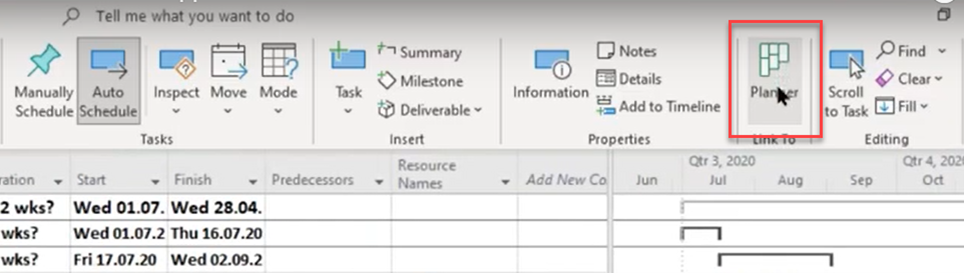
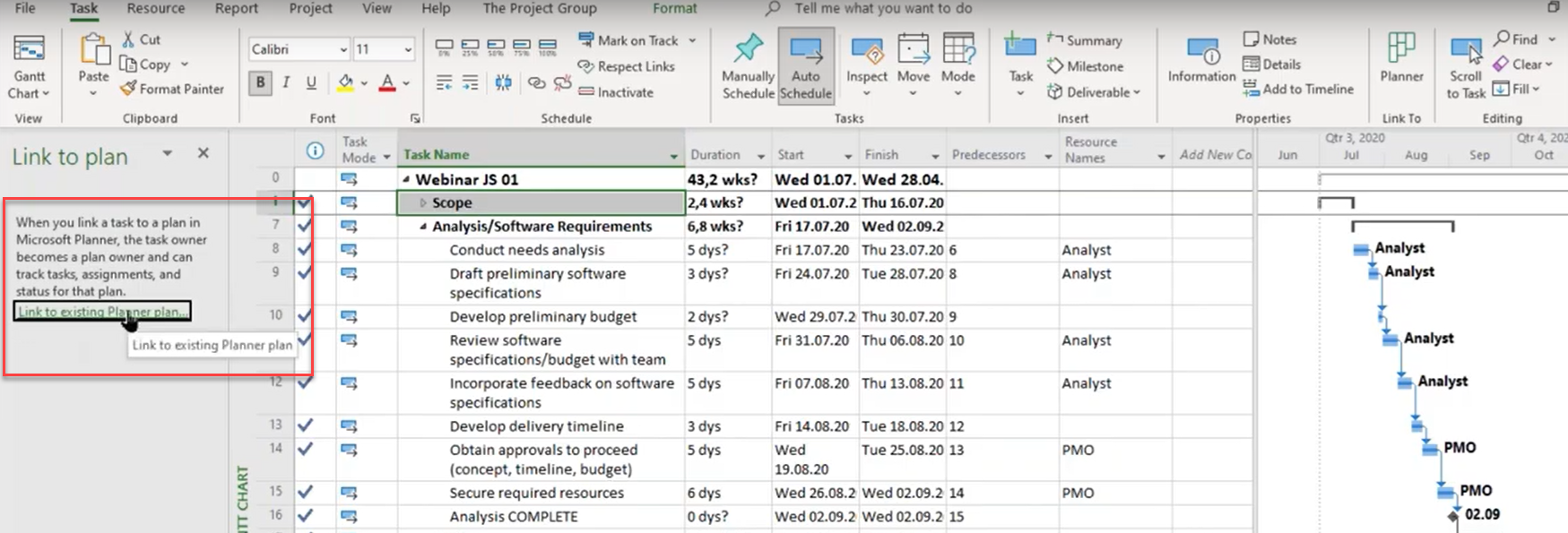
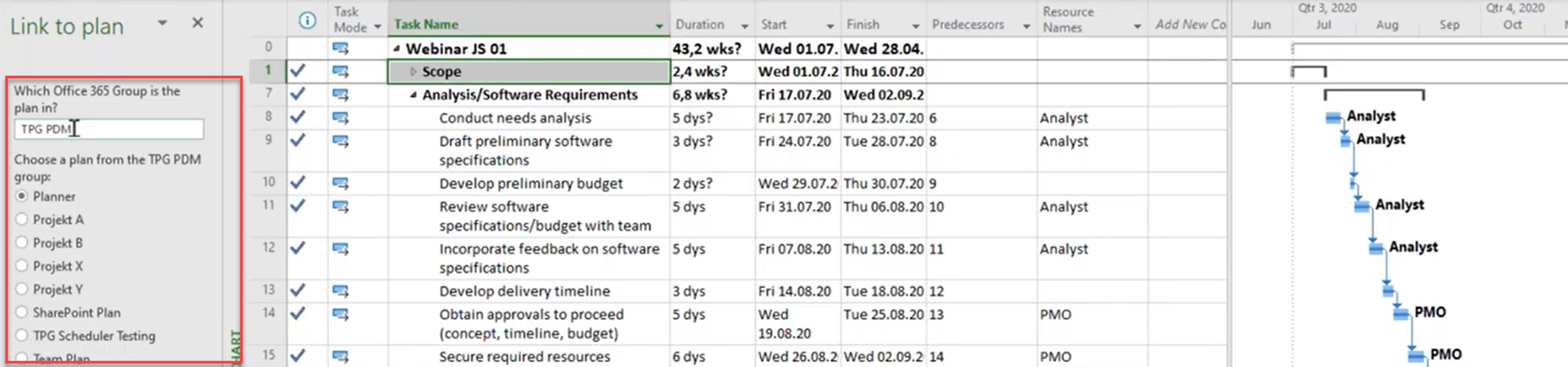

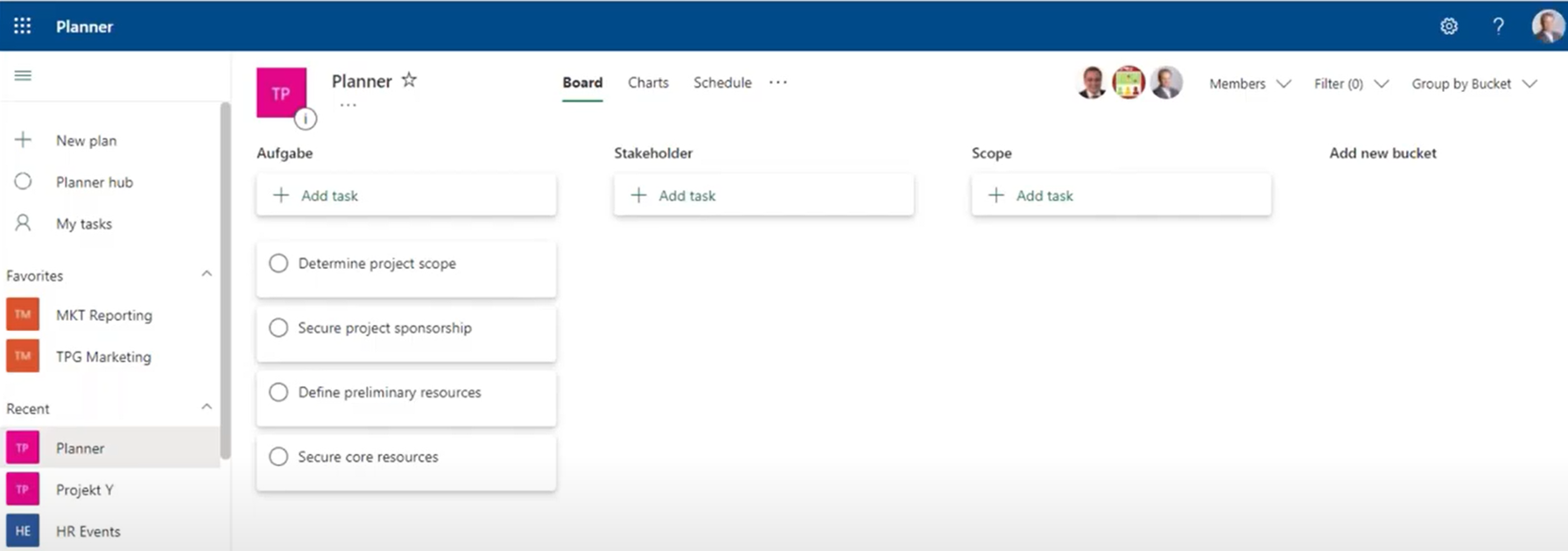
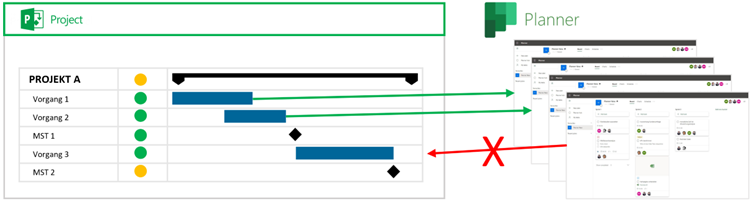
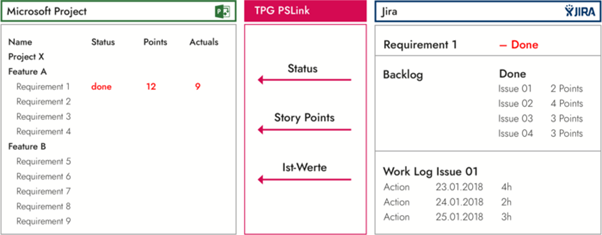

<img loading='lazy' style='display: none;' data-attachment-id-target='0' src=''><img loading='lazy' style='display: none;' data-attachment-id-target='0' src=''><img loading='lazy' style='display: none;' data-attachment-id-target='0' src=''><img loading='lazy' style='display: none;' data-attachment-id-target='9924' src='https://www.theprojectgroup.com/blog/wp-content/uploads/2022/08/Picture1.png'><img loading='lazy' style='display: none;' data-attachment-id-target='9925' src='https://www.theprojectgroup.com/blog/wp-content/uploads/2022/08/Picture2.png'><img loading='lazy' style='display: none;' data-attachment-id-target='9926' src='https://www.theprojectgroup.com/blog/wp-content/uploads/2022/08/Picture3.png'><img loading='lazy' style='display: none;' data-attachment-id-target='9927' src='https://www.theprojectgroup.com/blog/wp-content/uploads/2022/08/Picture4.png'><img loading='lazy' style='display: none;' data-attachment-id-target='9928' src='https://www.theprojectgroup.com/blog/wp-content/uploads/2022/08/Picture5.png'><img loading='lazy' style='display: none;' data-attachment-id-target='9929' src='https://www.theprojectgroup.com/blog/wp-content/uploads/2022/08/Picture6.png'><img loading='lazy' style='display: none;' data-attachment-id-target='9860' src='https://www.theprojectgroup.com/blog/wp-content/uploads/2022/08/Bild15.png'><img loading='lazy' style='display: none;' data-attachment-id-target='9861' src='https://www.theprojectgroup.com/blog/wp-content/uploads/2022/08/Bild16.png'><img loading='lazy' style='display: none;' data-attachment-id-target='10750' src='https://www.theprojectgroup.com/blog/wp-content/uploads/2023/04/JohannS-200x200-1.jpg'><img loading='lazy' style='display: none;' data-attachment-id-target='10753' src='https://www.theprojectgroup.com/blog/wp-content/uploads/2023/04/AchimS-200x200-2.jpg'><img loading='lazy' style='display: none;' data-attachment-id-target='0' src=''>{"id":9842,"date":"2025-06-11T11:09:21","date_gmt":"2025-06-11T09:09:21","guid":{"rendered":"https:\/\/www.theprojectgroup.com\/blog\/?p=9842"},"modified":"2025-09-19T11:00:34","modified_gmt":"2025-09-19T09:00:34","slug":"ms-project-planner-verknuepfen","status":"publish","type":"post","link":"https:\/\/www.theprojectgroup.com\/blog\/ms-project-planner-verknuepfen\/","title":{"rendered":"MS Project mit Planner verkn\u00fcpfen \u2013 was ist m\u00f6glich und was geht aber nicht?"},"content":{"rendered":"<p>Oft kommt die Frage auf, ob und wie sich <strong>MS Project mit Planner verkn\u00fcpfen<\/strong> l\u00e4sst. Was bei der Integration der beiden Tools f\u00fcr Aufgabenplanung und Projektmanagement auf <strong>Basis der Standardfunktionen<\/strong> m\u00f6glich ist, das erfahren Sie in diesem Artikel.<\/p>\n<ul>\n<li><a href=\"#Kapitel1\">Unterschied Microsoft Planner und Project Online<\/a><\/li>\n<li><a href=\"#Kapitel2\">MS Planner verkn\u00fcpfen mit MS Project Server<\/a><\/li>\n<li><a href=\"#Kapitel3\">Wann macht die Integration MS Planner mit Project Online Sinn?<\/a><\/li>\n<li><a href=\"#Kapitel4\">Die Einschr\u00e4nkungen der Integration \u201eout of the box\u201c<\/a><\/li>\n<li><a href=\"#Kapitel5\">Verbinden von Project Online Vorg\u00e4ngen mit einem MS Planner Plan<\/a><\/li>\n<li><a href=\"#Kapitel6\">Bearbeiten der Aufgaben im MS Planner Plan<\/a><\/li>\n<li><a href=\"#Kapitel7\">Keine Daten\u00fcbertragung von MS Planner nach Project Online<\/a><\/li>\n<li><a href=\"#Kapitel8\">Zusammenfassung MS Project mit Planner verkn\u00fcpfen<\/a><\/li>\n<\/ul>\n<h2 id=\"Kapitel1\">Unterschied Microsoft Planner und Project Online<\/h2>\n<p><a href=\"https:\/\/www.theprojectgroup.com\/de\/office-365-microsoft-planner\" target=\"_blank\" rel=\"noopener\">Microsoft Planner<\/a> ist ein cloudbasiertes und einfaches Tool f\u00fcr Aufgabenmanagement in Microsoft 365. Hiermit k\u00f6nnen Sie effizient Zeiten und Aufgaben zuteilen und organisieren. Zudem lassen sich Deadlines festsetzen und Dateien teilen.<\/p>\n<p>Microsoft Planner eignet sich hervorragend f\u00fcr Teams, die einfache Aufgaben koordinieren, To-dos visuell in Boards organisieren und ohne viel Aufwand zusammenarbeiten m\u00f6chten. Er ist ideal f\u00fcr kleinere Projekte oder operative Teams.<\/p>\n<p>F\u00fcr die <strong>agile Projektplanung ist MS Planner nur bedingt geeignet<\/strong>. Hierf\u00fcr fehlen wichtige Funktionen, die etwa f\u00fcr die Aufwandsplanung n\u00f6tig w\u00e4ren. Wenn Sie diese ben\u00f6tigen, dann sollten Sie etwa \u00fcber eine <a href=\"https:\/\/www.theprojectgroup.com\/de\/middleware\/jira-integration\" target=\"_blank\" rel=\"noopener\">Integration von Project Online mit Jira<\/a> nachdenken.<\/p>\n<p>Die Version Planner Premium (ehemals Project for the Web) umfasst auch M\u00f6glichkeiten der Gantt-Planung.<\/p>\n<p>Im Vergleich zu Microsoft Planner ist <a href=\"https:\/\/www.theprojectgroup.com\/de\/projektmanagement-tools\/project-online\" target=\"_blank\" rel=\"noopener\">Project Online<\/a> seit vielen Jahren ein leistungsf\u00e4higes Werkzeug f\u00fcr Projekt- und Portfoliomanagement (PPM) in der Cloud. Es stellt weitgehend dieselben Funktionen wie der <a href=\"https:\/\/www.theprojectgroup.com\/de\/projektmanagement-tools\/microsoft-project-server\" target=\"_blank\" rel=\"noopener\">Microsoft Project Server<\/a> (on premises) zur Verf\u00fcgung. Projektleitende k\u00f6nnen damit komplexe Projekte planen und managen.<\/p>\n<blockquote><p><strong>Wichtiger Hinweis:<\/strong> Alles zum <strong><a href=\"https:\/\/www.theprojectgroup.com\/blog\/project-online-ende-2026\/\" target=\"_blank\" rel=\"noopener\">Project Online Ende<\/a> 2026 und Migrationsoptionen<\/strong><\/p><\/blockquote>\n<blockquote><p><strong>Unser Lese-Tipp: <\/strong><a href=\"https:\/\/www.theprojectgroup.com\/blog\/microsoft-projektmanagement-tools\/\" target=\"_blank\" rel=\"noopener\">Microsoft Projektmanagement-Tool-\u00dcbersicht<\/a>: Projekt-, Portfolio- &amp; Ressourcenmanagement (To Do, Planner, Planner Premium, Project, Project Online etc.)<\/p><\/blockquote>\n<h2 id=\"Kapitel2\">MS Planner Integration mit MS Project Server<\/h2>\n<p>\u201eOut of the box\u201c k\u00f6nnen Sie die <strong>MS Planner Integration<\/strong> nur mit Project Online durchf\u00fchren. Wenn Sie MS Planner nicht an Project Online, sondern an einen lokal laufenden Microsoft Project Server anbinden m\u00f6chten, dann ist dies nicht so einfach m\u00f6glich. Hierf\u00fcr brauche Sie eine zus\u00e4tzliche <a href=\"https:\/\/www.theprojectgroup.com\/de\/integration-middleware\" target=\"_blank\" rel=\"noopener\">Integration Middleware<\/a>\u00a0 wie z.B. TPG PSLink.<\/p>\n\n    <p class=\"datamintsbanner\">\n        <a href=\"\" target=\"_blank\" class=\"datamintsbanner__link\" title=\"Motorworld Event (TPG Webinar)\" style=\"display: block;\">\n            <img data-attachment-id=\"0\"decoding=\"async\" src=\"\" class=\"datamintsbanner__image\" style=\"display: block; max-width: 100%\">\n        <\/a>\n    <\/p>\n    \n<h2 id=\"Kapitel3\">Wann macht die Integration MS Planner mit Project Online Sinn?<\/h2>\n<p>Microsoft Project l\u00e4sst das Editieren von Projekten gleichzeitig immer nur durch einen User zu. Normalerweise ist dies die Projektleiterin, der Projektleiter oder eine Assistenz. Oft sind die Projektpl\u00e4ne recht umfangreich, weil darin viele Details untergebracht sind.<\/p>\n<p>Ist es Ihr Ziel, Ihre Projektpl\u00e4ne eher schlank zu halten, so k\u00f6nnen Sie die <strong>Teammitglieder einfach ihre Aufgaben via MS Planner im Detail selbst planen<\/strong> lassen. Hierf\u00fcr mach die Integration von MS Planner mit Project Online Sinn. Die Zusammenarbeit zwischen den Projektleitenden und den Projektteams wird dadurch sehr <strong>viel einfacher und effizienter<\/strong>.<\/p>\n<blockquote><p><strong>Hinweis:<\/strong> Sollten Sie die Struktur, Vorg\u00e4nge und Aufgaben in einem Projektplan gemeinsam mit Ihrem Team editieren wollen, so pr\u00fcfen Sie den Einsatz von <a href=\"https:\/\/www.theprojectgroup.com\/de\/projektmanagement-tools\/ms-project-for-the-web\" target=\"_blank\" rel=\"noopener\">Planner Premium (ehem. Project for the Web)<\/a>. Als viel leistungsf\u00e4higere PPM-L\u00f6sung empfehlen wir aber den Blick auf das <a href=\"https:\/\/www.theprojectgroup.com\/de\/microsoft-cloud-projektmanagement\/project-power-pack\" target=\"_blank\" rel=\"noopener\">TPG ProjectPowerPack<\/a> auf Basis von Microsoft 365 und Power Platform.<\/p><\/blockquote>\n<p>Bei der Aufteilung in beide Tools k\u00f6nnen Sie Ihr Projekt in MS Project grob strukturieren und die Details dazu in MS Planner auslagern. Erstellen Sie dazu jeweils <strong>einen Vorgang in Project Online f\u00fcr ein Aufgabenpaket<\/strong> und h\u00e4ngen Sie an diesen Vorgang dann einen <strong>Link zum passenden Plan in MS Planner<\/strong>. In diesem Plan k\u00f6nnen Sie dann die Details als Aufgaben individuell von Ihrem Team planen lassen und Sie selbst bleiben alleiniger Besitzer Ihres Projektes in MS Project.<\/p>\n<blockquote><p>Lesen Sie den Artikel zur <strong>Abschaltung der <a href=\"https:\/\/www.theprojectgroup.com\/blog\/project-online-workflows\/\" target=\"_blank\" rel=\"noopener\">Project Online Workflows<\/a> im April 2026<\/strong>.<\/p><\/blockquote>\n\n    <p class=\"datamintsbanner\">\n        <a href=\"https:\/\/bit.ly\/3vY038o\" target=\"_blank\" class=\"datamintsbanner__link\" title=\"Seminar MS Project Schulung Grundlagen MicrosoftProject Einsteiger Projekt Projektmanagement PM\" style=\"display: block;\">\n            <img data-attachment-id=\"0\"decoding=\"async\" src=\"https:\/\/www.theprojectgroup.com\/blog\/wp-content\/uploads\/2022\/07\/TPG_Header_1400_Project-lernen_de.jpg\" class=\"datamintsbanner__image\" style=\"display: block; max-width: 100%\">\n        <\/a>\n    <\/p>\n    \n<h2 id=\"Kapitel4\">Die Einschr\u00e4nkungen der Verkn\u00fcpfung \u201eout of the box\u201c<\/h2>\n<p>Bitte beachten Sie bei dieser L\u00f6sung:<\/p>\n<ul>\n<li>Zu den Vorg\u00e4ngen in Ihrem Projekt k\u00f6nnen Sie <strong>immer nur einen Link zu einem MS Planner Plan auf oberster Ebene <\/strong>erstellen.<\/li>\n<li><strong>Die Details <\/strong>innerhalb eines Planner Planes lassen sich<strong> nicht direkt verlinken.<\/strong><\/li>\n<li>Einen MS Planner Plan k\u00f6nnen Sie immer nur zu <strong>einem einzigen Vorgang in einem einzigen Project Online Projekt verbinden<\/strong>.<\/li>\n<li><strong>Es also nicht m\u00f6glich, denselben Plan mit verschiedenen Vorg\u00e4ngen im selben Projekt zu verbinden.<\/strong><\/li>\n<\/ul>\n<blockquote><p><strong>Zusammengefasst:<\/strong> Im Standard gibt es keine M\u00f6glichkeit, einen Vorgang im Project Online Projekt mit einem Teil eines Planes in MS Planner z.B. zu einem Bucket zu verbinden. Sie m\u00fcssen also zu jedem detailliert zu planenden Arbeitspaket einen eigenen Plan in MS Planner anlegen.<\/p><\/blockquote>\n<p>Wie Sie dabei vorgehen, das erfahren Sie folgend.<\/p>\n\n    <p class=\"datamintsbanner\">\n        <a href=\"https:\/\/bit.ly\/3IWzlQw\" target=\"_blank\" class=\"datamintsbanner__link\" title=\"TPG ProjectPowerPack Microsoft 365 Projektmanagement\" style=\"display: block;\">\n            <img data-attachment-id=\"0\"decoding=\"async\" src=\"https:\/\/www.theprojectgroup.com\/blog\/wp-content\/uploads\/2025\/04\/PPP_Blog_Banner_3_1300px-AS_tiny.jpg\" class=\"datamintsbanner__image\" style=\"display: block; max-width: 100%\">\n        <\/a>\n    <\/p>\n    \n<h2 id=\"Kapitel5\">Project Online Vorg\u00e4nge mit einem MS Planner Plan verbinden<\/h2>\n<ol>\n<li>\u00d6ffnen Sie ein Projekt in Project Online und\u00a0 w\u00e4hlen Sie den Vorgang aus, den Sie mit einem Plan in MS Planner verbinden wollen.<\/li>\n<li>Klicken Sie dann im Men\u00fcband Task auf die Schaltfl\u00e4che Planner.\n<figure id=\"attachment_9924\" aria-describedby=\"caption-attachment-9924\" style=\"width: 964px\" class=\"wp-caption alignnone\"><a href=\"https:\/\/www.theprojectgroup.com\/blog\/wp-content\/uploads\/2022\/08\/Picture1.png\"><img data-attachment-id=\"9924\"loading=\"lazy\" decoding=\"async\" class=\"size-full wp-image-9924\" src=\"https:\/\/www.theprojectgroup.com\/blog\/wp-content\/uploads\/2022\/08\/Picture1.png\" alt=\"Schaltfl\u00e4che: Microsoft Planner Integration mit Project Online\" width=\"964\" height=\"273\" srcset=\"https:\/\/www.theprojectgroup.com\/blog\/wp-content\/uploads\/2022\/08\/Picture1.png 964w, https:\/\/www.theprojectgroup.com\/blog\/wp-content\/uploads\/2022\/08\/Picture1-300x85.png 300w, https:\/\/www.theprojectgroup.com\/blog\/wp-content\/uploads\/2022\/08\/Picture1-768x217.png 768w\" sizes=\"(max-width: 964px) 100vw, 964px\" \/><\/a><figcaption id=\"caption-attachment-9924\" class=\"wp-caption-text\">Die Schaltfl\u00e4che Planner ist nur im Men\u00fcband Task in Project Online sichtbar.<\/figcaption><\/figure><\/li>\n<li>Als n\u00e4chstes \u00f6ffnet sich links ein neuer Bereich \u201eLink to plan\u201c.\n<figure id=\"attachment_9925\" aria-describedby=\"caption-attachment-9925\" style=\"width: 1749px\" class=\"wp-caption alignnone\"><a href=\"https:\/\/www.theprojectgroup.com\/blog\/wp-content\/uploads\/2022\/08\/Picture2.png\"><img data-attachment-id=\"9925\"loading=\"lazy\" decoding=\"async\" class=\"size-full wp-image-9925\" src=\"https:\/\/www.theprojectgroup.com\/blog\/wp-content\/uploads\/2022\/08\/Picture2.png\" alt=\"Planner Pl\u00e4ne: Microsoft Planner Integration mit Project Online \" width=\"1749\" height=\"595\" srcset=\"https:\/\/www.theprojectgroup.com\/blog\/wp-content\/uploads\/2022\/08\/Picture2.png 1749w, https:\/\/www.theprojectgroup.com\/blog\/wp-content\/uploads\/2022\/08\/Picture2-300x102.png 300w, https:\/\/www.theprojectgroup.com\/blog\/wp-content\/uploads\/2022\/08\/Picture2-1024x348.png 1024w, https:\/\/www.theprojectgroup.com\/blog\/wp-content\/uploads\/2022\/08\/Picture2-768x261.png 768w, https:\/\/www.theprojectgroup.com\/blog\/wp-content\/uploads\/2022\/08\/Picture2-1536x523.png 1536w\" sizes=\"(max-width: 1749px) 100vw, 1749px\" \/><\/a><figcaption id=\"caption-attachment-9925\" class=\"wp-caption-text\">\u00d6ffnen des Bereichs zu den bestehenden MS Planner Pl\u00e4nen.<\/figcaption><\/figure><\/li>\n<li>Mit Klick auf den Link \u00f6ffnet sich eine Textbox, in die Sie den Anfang des Namens des Teams eingeben k\u00f6nnen, das den jeweiligen Plan beinhaltet. Aus der damit angebotenen Liste k\u00f6nnen Sie das gew\u00fcnschte Team selektieren.<\/li>\n<li>W\u00e4hlen Sie den passenden Plan aus den zuvor angelegten MS Planner Pl\u00e4nen. (Hinweis: Benennen Sie Ihre MS Planner Pl\u00e4ne zuvor so eindeutig und sprechend, dass Ihnen das Ausw\u00e4hlen des richtigen einfach m\u00f6glich ist.)<br \/>\n<blockquote><p><strong>Unser Tipp:<\/strong> Die uneingeschr\u00e4nkte Freigabe von Microsoft Teams und Planner f\u00fchrt in der Regel dazu, dass es sehr viele Gruppen mit sehr vielen Pl\u00e4nen gibt. Hier geht die \u00dcbersicht schnell verloren. Beugen Sie dem vor, indem Sie Ihren Administrator die Rechte so vergeben lassen, dass nur wenige Berechtigte neue Teams und Pl\u00e4ne anlegen d\u00fcrfen. Den sonst entstehenden Wildwuchs wieder einzufangen ist schwer.<\/p><\/blockquote>\n<figure id=\"attachment_9926\" aria-describedby=\"caption-attachment-9926\" style=\"width: 1792px\" class=\"wp-caption alignnone\"><a href=\"https:\/\/www.theprojectgroup.com\/blog\/wp-content\/uploads\/2022\/08\/Picture3.png\"><img data-attachment-id=\"9926\"loading=\"lazy\" decoding=\"async\" class=\"wp-image-9926 size-full\" src=\"https:\/\/www.theprojectgroup.com\/blog\/wp-content\/uploads\/2022\/08\/Picture3.png\" alt=\"Auswahl Plan: MS Planner Project Online Integration\" width=\"1792\" height=\"419\" srcset=\"https:\/\/www.theprojectgroup.com\/blog\/wp-content\/uploads\/2022\/08\/Picture3.png 1792w, https:\/\/www.theprojectgroup.com\/blog\/wp-content\/uploads\/2022\/08\/Picture3-300x70.png 300w, https:\/\/www.theprojectgroup.com\/blog\/wp-content\/uploads\/2022\/08\/Picture3-1024x239.png 1024w, https:\/\/www.theprojectgroup.com\/blog\/wp-content\/uploads\/2022\/08\/Picture3-768x180.png 768w, https:\/\/www.theprojectgroup.com\/blog\/wp-content\/uploads\/2022\/08\/Picture3-1536x359.png 1536w\" sizes=\"(max-width: 1792px) 100vw, 1792px\" \/><\/a><figcaption id=\"caption-attachment-9926\" class=\"wp-caption-text\">Auswahl des passenden Planner Plans aus dem Team-Bereich.<\/figcaption><\/figure><\/li>\n<li>Klicken Sie dann am Fu\u00dfe der grauen Fl\u00e4che links auf den Button \u201eCreate link\u201c.<\/li>\n<li>Darauf erscheint neben dem zuvor ausgew\u00e4hlten Vorgang ein MS Planner Symbol.\n<figure id=\"attachment_9927\" aria-describedby=\"caption-attachment-9927\" style=\"width: 1791px\" class=\"wp-caption alignnone\"><a href=\"https:\/\/www.theprojectgroup.com\/blog\/wp-content\/uploads\/2022\/08\/Picture4.png\"><img data-attachment-id=\"9927\"loading=\"lazy\" decoding=\"async\" class=\"wp-image-9927 size-full\" src=\"https:\/\/www.theprojectgroup.com\/blog\/wp-content\/uploads\/2022\/08\/Picture4.png\" alt=\"Planner Symbol: MS Planner Project Online Integration\" width=\"1791\" height=\"222\" srcset=\"https:\/\/www.theprojectgroup.com\/blog\/wp-content\/uploads\/2022\/08\/Picture4.png 1791w, https:\/\/www.theprojectgroup.com\/blog\/wp-content\/uploads\/2022\/08\/Picture4-300x37.png 300w, https:\/\/www.theprojectgroup.com\/blog\/wp-content\/uploads\/2022\/08\/Picture4-1024x127.png 1024w, https:\/\/www.theprojectgroup.com\/blog\/wp-content\/uploads\/2022\/08\/Picture4-768x95.png 768w, https:\/\/www.theprojectgroup.com\/blog\/wp-content\/uploads\/2022\/08\/Picture4-1536x190.png 1536w\" sizes=\"(max-width: 1791px) 100vw, 1791px\" \/><\/a><figcaption id=\"caption-attachment-9927\" class=\"wp-caption-text\">Anzeigen des verlinkten Planner Symbols neben dem Vorgang in Project Online.<\/figcaption><\/figure><\/li>\n<li>Bei Klick auf dieses Planner Symbol \u00f6ffnet sich der verlinkte MS Planner Plan in Ihrem Browser. (Ggf. m\u00fcssen Sie sich beim sp\u00e4teren \u00d6ffnen des Links zuerst noch in Ihrer Microsoft 365 Umgebung anmelden.)\n<figure id=\"attachment_9928\" aria-describedby=\"caption-attachment-9928\" style=\"width: 1791px\" class=\"wp-caption alignnone\"><a href=\"https:\/\/www.theprojectgroup.com\/blog\/wp-content\/uploads\/2022\/08\/Picture5.png\"><img data-attachment-id=\"9928\"loading=\"lazy\" decoding=\"async\" class=\"wp-image-9928 size-full\" src=\"https:\/\/www.theprojectgroup.com\/blog\/wp-content\/uploads\/2022\/08\/Picture5.png\" alt=\"\u00d6ffnen Planner Plan: Microsoft Planner Integration mit Project Online \" width=\"1791\" height=\"629\" srcset=\"https:\/\/www.theprojectgroup.com\/blog\/wp-content\/uploads\/2022\/08\/Picture5.png 1791w, https:\/\/www.theprojectgroup.com\/blog\/wp-content\/uploads\/2022\/08\/Picture5-300x105.png 300w, https:\/\/www.theprojectgroup.com\/blog\/wp-content\/uploads\/2022\/08\/Picture5-1024x360.png 1024w, https:\/\/www.theprojectgroup.com\/blog\/wp-content\/uploads\/2022\/08\/Picture5-768x270.png 768w, https:\/\/www.theprojectgroup.com\/blog\/wp-content\/uploads\/2022\/08\/Picture5-1536x539.png 1536w\" sizes=\"(max-width: 1791px) 100vw, 1791px\" \/><\/a><figcaption id=\"caption-attachment-9928\" class=\"wp-caption-text\">\u00d6ffnen des verlinkten Planner Plans zur Bearbeitung.<\/figcaption><\/figure><\/li>\n<\/ol>\n<h2 id=\"Kapitel6\">Bearbeiten der Aufgaben im MS Planner Plan<\/h2>\n<p>Im ge\u00f6ffneten MS Planner Plan k\u00f6nnen Sie nun die zugeh\u00f6rigen Aufgaben planen und managen.<\/p>\n<p>Zu beachten ist, dass Sie beim MS Planner <strong>keine individuelle Einschr\u00e4nkung der Rechte<\/strong> vornehmen k\u00f6nnen: Entweder haben die User Rechte auf alles oder nichts.<\/p>\n<p>Bei den Aufgaben lassen sich verschiedene Eingaben vornehmen:<\/p>\n<ul>\n<li>Zuweisen der Aufgabe an eine oder mehrere Personen<\/li>\n<li>Zuweisen von Labels<\/li>\n<li>Zuweisen zu einem Bucket<\/li>\n<li>Festlegen des Fortschritts (not started, in progress, completed)<\/li>\n<li>Setzen der Priorit\u00e4t (urgent, important, medium, low)<\/li>\n<li>Start-\/Enddatum<\/li>\n<li>Details als Checklisten<\/li>\n<li>Attachments<\/li>\n<li>Kommentar<\/li>\n<\/ul>\n<figure id=\"attachment_9929\" aria-describedby=\"caption-attachment-9929\" style=\"width: 1791px\" class=\"wp-caption alignnone\"><a href=\"https:\/\/www.theprojectgroup.com\/blog\/wp-content\/uploads\/2022\/08\/Picture6.png\"><img data-attachment-id=\"9929\"loading=\"lazy\" decoding=\"async\" class=\"wp-image-9929 size-full\" src=\"https:\/\/www.theprojectgroup.com\/blog\/wp-content\/uploads\/2022\/08\/Picture6.png\" alt=\"Eingabem\u00f6glichkeiten: MS Project mit Planner verkn\u00fcpfen\" width=\"1791\" height=\"892\" srcset=\"https:\/\/www.theprojectgroup.com\/blog\/wp-content\/uploads\/2022\/08\/Picture6.png 1791w, https:\/\/www.theprojectgroup.com\/blog\/wp-content\/uploads\/2022\/08\/Picture6-300x150.png 300w, https:\/\/www.theprojectgroup.com\/blog\/wp-content\/uploads\/2022\/08\/Picture6-1024x510.png 1024w, https:\/\/www.theprojectgroup.com\/blog\/wp-content\/uploads\/2022\/08\/Picture6-768x382.png 768w, https:\/\/www.theprojectgroup.com\/blog\/wp-content\/uploads\/2022\/08\/Picture6-1536x765.png 1536w, https:\/\/www.theprojectgroup.com\/blog\/wp-content\/uploads\/2022\/08\/Picture6-350x175.png 350w, https:\/\/www.theprojectgroup.com\/blog\/wp-content\/uploads\/2022\/08\/Picture6-700x350.png 700w, https:\/\/www.theprojectgroup.com\/blog\/wp-content\/uploads\/2022\/08\/Picture6-164x82.png 164w\" sizes=\"(max-width: 1791px) 100vw, 1791px\" \/><\/a><figcaption id=\"caption-attachment-9929\" class=\"wp-caption-text\">Eingabem\u00f6glichkeiten zu einer Aufgabe in MS Planner.<\/figcaption><\/figure>\n<p>Was im MS Planner bislang noch schmerzlich ist, ist das <strong>Fehlen von benutzerdefinierten Feldern<\/strong>. Diese w\u00e4ren im agilen Umfeld n\u00f6tig, um z.B. mit Story Points zu arbeiten, Prozent Fertigstellung anzugeben oder Soll- und Ist-Stunden auf diese Aufgabe einzugeben.<\/p>\n<p>Microsoft arbeitet derzeit nur sehr schleppend an der Fortentwicklung von Planner. Die benutzerdefinierten Felder werden von den Anwendenden in User Voice zwar stark eingefordert, bis jetzt ist aber noch nicht bekannt, ob und wann diese kommen sollen.<\/p>\n<div id=\"id6957397bd34bd\" class=\"iframecontainer iframecontainer--hidden\">\n            <div class=\"iframecontainer__head\" style=\"background: #D60B52!important;\">\n                <div class=\"iframecontainer__head__inner\" style=\"color:#ffffff;\" data-for=\"#id6957397bd34bd\">\n                    <p><strong>Download (PDF):<\/strong> 11 Schritte zum optimalen MS Project Projektplan (Tutorial)<\/p>\n                <\/div>\n                <div class=\"iframecontainer__head__icon\" data-for=\"#id6957397bd34bd\">\n                    <svg width=\"10px\" height=\"16px\" viewBox=\"1092 550 10 16\" version=\"1.1\" xmlns=\"http:\/\/www.w3.org\/2000\/svg\" xmlns:xlink=\"http:\/\/www.w3.org\/1999\/xlink\">\n                        <polygon class=\"iframecontainer__head__icon__pfeil\"  data-for=\"#id6957397bd34bd\" stroke=\"none\" fill=\"#ffffff\" fill-rule=\"evenodd\" points=\"1093.875 550 1101.875 558 1093.875 566 1092 564.125 1098.125 558 1092 551.875\"><\/polygon>\n                    <\/svg>\n                <\/div>\n            <\/div>\n            <div class=\"iframecontainer__iframe\">\n                <div class=\"iframecontainer__iframe__inner\">\n                    <p>Vermeiden Sie mit diesem Tutorial von Beginn an typische Stolperfallen, \u00fcber die Neulinge in MS Project sich gerne den Kopf zerbrechen, unsicher werden und Zeit verschwendet. Das wird Ihnen nicht passieren!<\/p>\n<p><span style=\"font-size: xx-small;\">* Pflichtfeld\u00a0 |\u00a0 <a href=\"https:\/\/www.theprojectgroup.com\/de\/datenschutz\/\" target=\"_blank\" rel=\"noopener\">Datenschutzhinweise<\/a><\/span><\/p>\n<div class=\"cookieconsent-optout-marketing\">Dieses Formular wird durch Ihre Cookie-Einstellung zu unserer Website blockiert. Bitte <a>klicken Sie hier<\/a> und w\u00e4hlen Sie mindestens die Marketing-Cookies aus. Dann wird dieses Formular angezeigt. Vielen Dank.<\/div>\n\n                \t<!-- DEUTSCH: Wichtig: nur den Code in data-download-asset \u00e4ndern - definiert Download -->\r\n<script type='text\/x-ccm-loader' data-ccm-loader-src=\"https:\/\/js-eu1.hsforms.net\/forms\/embed\/developer\/146642994.js\" defer><\/script>\r\n\r\n<div class=\"hs-form-html\"\r\n     data-download-asset=\"CU9D\"\r\n     data-region=\"eu1\"\r\n     data-form-id=\"32ae4d32-4e61-47ed-90d3-c7a25b28719d\"\r\n     data-portal-id=\"146642994\"><\/div>\r\n\r\n<script>\r\n(() => {\r\n  const FORM_ID = '32ae4d32-4e61-47ed-90d3-c7a25b28719d';\r\n  const FIELD   = '0-1\/download_asset';\r\n  const roots   = new Set();\r\n  const formsByRoot = new WeakMap();\r\n\r\n  const setViaApi = (root) => {\r\n    const code = root.dataset.downloadAsset || '';\r\n    const form = formsByRoot.get(root);\r\n    if (!code || !form) return;\r\n    form.setFieldValue(FIELD, code);\r\n  };\r\n\r\n  \/\/ 1) Wenn das Formular ready ist: Form-Instanz holen + Wert via API setzen\r\n  window.addEventListener('hs-form-event:on-ready', (event) => {\r\n    if (!window.HubSpotFormsV4) return;\r\n    const form = HubSpotFormsV4.getFormFromEvent(event);\r\n    if (!form || form.getFormId() !== FORM_ID) return;\r\n\r\n    const root = [...roots].find(r => r.contains(event.target));\r\n    if (!root) return;\r\n\r\n    formsByRoot.set(root, form);\r\n    setViaApi(root);\r\n  });\r\n\r\n  \/\/ 2) Kurz vor dem Absenden nochmal setzen (globaler Callback)\r\n  window.addEventListener('message', (event) => {\r\n    const d = event.data;\r\n    if (!d || d.type !== 'hsFormCallback' || d.eventName !== 'onFormSubmit') return;\r\n    if (d.id !== FORM_ID) return;\r\n\r\n    roots.forEach(setViaApi);\r\n  });\r\n\r\n  \/\/ Boot\r\n  document.addEventListener('DOMContentLoaded', () => {\r\n    document.querySelectorAll('.hs-form-html[data-download-asset][data-form-id=\"' + FORM_ID + '\"]')\r\n      .forEach(r => roots.add(r));\r\n  });\r\n})();\r\n<\/script>\n                    <style>\/* Kompaktere Darstellung f\u00fcr HubSpot Formulare *\/\n[data-hsfc-id=\"Renderer\"] .hsfc-Step .hsfc-Step__Content { padding: 0 20px 20px !important; }\n[data-hsfc-id=Renderer] .hsfc-TextField>*:not(:last-child) { margin-bottom:4px !important; }\n[data-hsfc-id=\"Renderer\"] .hsfc-Row { gap: 20px !important; margin-bottom: 12px !important; }\n[data-hsfc-id=\"Renderer\"] .hsfc-NavigationRow { margin-top: 6px !important; }\n[data-hsfc-id=\"Renderer\"] .hsfc-TextInput { padding: 8px !important; }<\/style>\n                <\/div>\n            <\/div>\n        <\/div><h2 id=\"Kapitel7\">Keine Daten\u00fcbertragung von MS Planner nach Project Online<\/h2>\n<p>Mit dem Standard der Microsoft Tools lassen sich <strong>keine Informationen von MS Planner nach Project Online \u00fcbertragen<\/strong>. Sie k\u00f6nnen nur einen Vorgang in Project Online mit einem MS Planner Plan verlinken. Durch Klicken dieses Links \u00f6ffnen Sie sp\u00e4ter \u201eone way\u201c den verlinkten MS Planner Plan zum Nachsehen, was dort steht \u2013 mehr geht out-of-the-box leider nicht.<\/p>\n<figure id=\"attachment_9860\" aria-describedby=\"caption-attachment-9860\" style=\"width: 752px\" class=\"wp-caption aligncenter\"><a href=\"https:\/\/www.theprojectgroup.com\/blog\/wp-content\/uploads\/2022\/08\/Bild15.png\"><img data-attachment-id=\"9860\"loading=\"lazy\" decoding=\"async\" class=\"wp-image-9860 size-full\" src=\"https:\/\/www.theprojectgroup.com\/blog\/wp-content\/uploads\/2022\/08\/Bild15.png\" alt=\"MS Planner Integration \u2013 was ist nicht m\u00f6glich\" width=\"752\" height=\"201\" srcset=\"https:\/\/www.theprojectgroup.com\/blog\/wp-content\/uploads\/2022\/08\/Bild15.png 752w, https:\/\/www.theprojectgroup.com\/blog\/wp-content\/uploads\/2022\/08\/Bild15-300x80.png 300w\" sizes=\"(max-width: 752px) 100vw, 752px\" \/><\/a><figcaption id=\"caption-attachment-9860\" class=\"wp-caption-text\">Das \u00dcbertragen von Daten aus MS Planner nach Project Online geht im Standard nicht.<\/figcaption><\/figure>\n<p>Wenn Sie Daten zwischen Project Online und MS Planner in beide Richtungen austauschen wollen, dann brauchen Sie hierf\u00fcr eine zus\u00e4tzliche <a href=\"https:\/\/www.theprojectgroup.com\/de\/integration-middleware\" target=\"_blank\" rel=\"noopener\">Integration Middleware<\/a> wie z.B. TPG PSLink.<\/p>\n<h2 id=\"Kapitel8\">Zusammenfassung MS Project mit Planner verkn\u00fcpfen<\/h2>\n<p>Um eine To-Do-Liste zu pflegen ist MS Planner ein passendes Tool. Wenn Sie die Daten im Sinne einer Meldung zur Fertigstellung aber genau haben wollen, aus der die Punkte oder Ist-Stunden hervorgehen, dann geht das mit MS Planner aufgrund der fehlenden benutzerdefinierten Felder nicht.<\/p>\n<p>Auch gibt es Einschr\u00e4nkungen dadurch, dass sich immer nur ein MS Planner Plan mit einem Vorgang eines Project Online Projekts verbinden l\u00e4sst. Zudem ist die Verbindung von MS Planner zur\u00fcck zu Project Online nicht m\u00f6glich ohne eine zus\u00e4tzliche Integration Middleware.<\/p>\n<figure id=\"attachment_9861\" aria-describedby=\"caption-attachment-9861\" style=\"width: 602px\" class=\"wp-caption aligncenter\"><a href=\"https:\/\/www.theprojectgroup.com\/blog\/wp-content\/uploads\/2022\/08\/Bild16.png\"><img data-attachment-id=\"9861\"loading=\"lazy\" decoding=\"async\" class=\"wp-image-9861 size-full\" src=\"https:\/\/www.theprojectgroup.com\/blog\/wp-content\/uploads\/2022\/08\/Bild16.png\" alt=\"Microsoft Project Integration mit MS Planner \u2013 was ist m\u00f6glich\" width=\"602\" height=\"235\" srcset=\"https:\/\/www.theprojectgroup.com\/blog\/wp-content\/uploads\/2022\/08\/Bild16.png 602w, https:\/\/www.theprojectgroup.com\/blog\/wp-content\/uploads\/2022\/08\/Bild16-300x117.png 300w\" sizes=\"(max-width: 602px) 100vw, 602px\" \/><\/a><figcaption id=\"caption-attachment-9861\" class=\"wp-caption-text\">Bidirektionaler Datenaustausch von Project Online mit Planner \/ Jira \/ TFS \/ DevOps via Middleware TPG PSLink.<\/figcaption><\/figure>\n<p>Unsere Empfehlung lautet daher: Wenn Sie Project Online professionell mit einem Tool f\u00fcr Aufgabenmanagement verbinden wollen, dann integrieren Sie leistungsf\u00e4hige Tools wie <a href=\"https:\/\/www.theprojectgroup.com\/de\/middleware\/integration-devops-tfs\" target=\"_blank\" rel=\"noopener\">DevOps<\/a> oder <a href=\"https:\/\/www.theprojectgroup.com\/de\/middleware\/jira-integration\" target=\"_blank\" rel=\"noopener\">Jira<\/a>.<\/p>\n<blockquote><p><strong>Unsere Tipps zum Schluss: <\/strong>Lernen Sie das individuell anpassbare \u201cThe PPM Paradise\u201d kennen \u2013 <span dir=\"ltr\" role=\"presentation\">die optimale Umgebung f\u00fcr ein unternehmensweites Projekt-, Programm-, Portfolio- und Ressourcenmanagement (PPM). Laden Sie sich jetzt <\/span><a href=\"https:\/\/www.theprojectgroup.com\/data\/Downloads_eBooks\/TPG_PPM_Paradise_eBook_-_TPG_TheProjectGroup.pdf\" target=\"_blank\" rel=\"noopener\"><span dir=\"ltr\" role=\"presentation\">hier das eBook dazu herunter<\/span><\/a><span dir=\"ltr\" role=\"presentation\"> (nur klicken, ohne Formular).<\/span><\/p>\n<p><span dir=\"ltr\" role=\"presentation\">Und abonnieren Sie unseren <\/span><a href=\"https:\/\/www.theprojectgroup.com\/de\/projektmanagement-newsletter\" target=\"_blank\" rel=\"noopener\"><span dir=\"ltr\" role=\"presentation\">Projektmanagement Newsletter<\/span><\/a> mit mehr MS Project Tipps, praxisstarken Artikeln, Webinaren, Podcasts, eBooks etc. f\u00fcr ein h\u00f6heres Reifengrad-Level Ihres Projektmanagements!<\/p><\/blockquote>\n<p>Sie wollen Ihr Projektmanagement-Umfeld optimieren und integrieren? Dann finden Sie hier Videos und PDFs zur <a href=\"https:\/\/www.theprojectgroup.com\/de\/download\/middleware-integration-einfuehren\" target=\"_blank\" rel=\"noopener\">Integration von Projekt- und Portfoliomanagement (PPM) Systemen<\/a> mit ERP, Workmanagement, Ressourcenmanagement und vielen anderen IT-Systemen.<\/p>\n<p><strong>Haben Sie noch Fragen? Dann hinterlassen Sie einen Kommentar, auf den wir in K\u00fcrze antworten werden \u2013 garantiert.<\/strong><\/p>\n<span style='display:none;'>FALSE<\/span><hr \/>\n<div class=\"row cf\"><div class=\"column half\">\n<p><a href=\"https:\/\/www.theprojectgroup.com\/blog\/wp-content\/uploads\/2023\/04\/JohannS-200x200-1.jpg\"><img data-attachment-id=\"10750\"loading=\"lazy\" decoding=\"async\" class=\"wp-image-10750 size-thumbnail alignleft\" src=\"https:\/\/www.theprojectgroup.com\/blog\/wp-content\/uploads\/2023\/04\/JohannS-200x200-1-150x150.jpg\" alt=\"\" width=\"150\" height=\"150\" srcset=\"https:\/\/www.theprojectgroup.com\/blog\/wp-content\/uploads\/2023\/04\/JohannS-200x200-1-150x150.jpg 150w, https:\/\/www.theprojectgroup.com\/blog\/wp-content\/uploads\/2023\/04\/JohannS-200x200-1.jpg 200w\" sizes=\"(max-width: 150px) 100vw, 150px\" \/><\/a><strong>\u00dcber den Autor<\/strong><br \/>\n<strong>Johann Strasser<\/strong><\/p>\n<p>Nach mehrj\u00e4hriger Erfahrung als Entwicklungsingenieur im Automotive- und Energiesektor arbeitete Johann Strasser f\u00fcr zehn Jahre als selbst\u00e4ndiger Trainer und Berater im Bereich Projektmanagement. In dieser Zeit war er zudem als Projektleiter f\u00fcr Softwareprojekte in der Bauwirtschaft t\u00e4tig und unterst\u00fctzte Gro\u00dfbauten im Rahmen von Termin- und Kostenmanagement. Seit 2001 flie\u00dft seine Expertise bei TPG in die Produktentwicklung und in die Beratung internationaler Kunden ein. Besonderen Fokus legt er auf die Themen <a href=\"https:\/\/www.theprojectgroup.com\/blog\/pmo-project-management-office\/\" target=\"_top\" rel=\"noopener\">PMO<\/a>, Projektportfolio, <a href=\"https:\/\/www.theprojectgroup.com\/blog\/projektmanagement-methoden\/\" target=\"_blank\" rel=\"noopener\">hybrides Projektmanagement<\/a> und <a href=\"https:\/\/www.theprojectgroup.com\/blog\/ressourcenmanagement\/\">Ressourcenplanung<\/a>. Sein Wissen gibt er seit vielen Jahren in Form von Vortr\u00e4gen, Seminaren, Artikeln und Webinaren weiter.<\/p>\n<p>Mehr \u00fcber Johann Strasser auf <a href=\"https:\/\/www.linkedin.com\/in\/johann-strasser\/?originalSubdomain=de\" target=\"_blank\" rel=\"noopener\">Linkedin<\/a>.<\/p>\n<\/div><div class=\"column half\">\n<p><a href=\"https:\/\/www.theprojectgroup.com\/blog\/wp-content\/uploads\/2023\/04\/AchimS-200x200-2.jpg\"><img data-attachment-id=\"10753\"loading=\"lazy\" decoding=\"async\" class=\"wp-image-10753 size-thumbnail alignleft\" src=\"https:\/\/www.theprojectgroup.com\/blog\/wp-content\/uploads\/2023\/04\/AchimS-200x200-2-150x150.jpg\" alt=\"\" width=\"150\" height=\"150\" srcset=\"https:\/\/www.theprojectgroup.com\/blog\/wp-content\/uploads\/2023\/04\/AchimS-200x200-2-150x150.jpg 150w, https:\/\/www.theprojectgroup.com\/blog\/wp-content\/uploads\/2023\/04\/AchimS-200x200-2.jpg 200w\" sizes=\"(max-width: 150px) 100vw, 150px\" \/><\/a><strong>\u00dcber den Autor<\/strong><br \/>\n<strong>Achim Schmidt-Sibeth<\/strong><em><br \/>\n<\/em><\/p>\n<p>Nach dem Ingenieurstudium in Umwelttechnik sammelte er jahrelang Erfahrung im Projektmanagement bei einem Ingenieurb\u00fcro, einem Anlagenhersteller und in einer Multimediaagentur. Seit vielen Jahren ist Achim Schmidt-Sibeth mit seinem Team f\u00fcr Content, Marketing und Kommunikation bei TPG The Project Group verantwortlich.<\/p>\n<p>Mehr \u00fcber Achim Schmidt-Sibeth auf <a href=\"https:\/\/www.linkedin.com\/in\/achim-schmidt-sibeth-3b89a417\/?originalSubdomain=de\" target=\"_blank\" rel=\"noopener\">LinkedIn.<\/a><\/p>\n<\/div><\/div>\n\n    <p class=\"datamintsbanner\">\n        <a href=\"https:\/\/bit.ly\/3udKM2C\" target=\"_blank\" class=\"datamintsbanner__link\" title=\"Job TPG Bewerbung Wirsuchendich TPG TheProjectGroup Consultant Microsoft PPM Jobs\" style=\"display: block;\">\n            <img data-attachment-id=\"0\"decoding=\"async\" src=\"https:\/\/www.theprojectgroup.com\/blog\/wp-content\/uploads\/2022\/10\/Jobs-3.jpg\" class=\"datamintsbanner__image\" style=\"display: block; max-width: 100%\">\n        <\/a>\n    <\/p>\n    \n","protected":false},"excerpt":{"rendered":"<p>Oft kommt die Frage auf, ob und wie sich MS Project mit Planner verkn\u00fcpfen l\u00e4sst. Was bei der Integration der beiden Tools f\u00fcr Aufgabenplanung und Projektmanagement auf Basis der Standardfunktionen m\u00f6glich ist, das erfahren Sie in diesem Artikel. Unterschied Microsoft Planner und Project Online MS Planner verkn\u00fcpfen mit MS Project Server Wann macht die Integration<\/p>\n<div class=\"read-more\"><a href=\"https:\/\/www.theprojectgroup.com\/blog\/ms-project-planner-verknuepfen\/\" title=\"Weiterlesen\">Weiterlesen<\/a><\/div>\n","protected":false},"author":19,"featured_media":9863,"comment_status":"open","ping_status":"open","sticky":false,"template":"","format":"standard","meta":{"footnotes":""},"categories":[24],"tags":[],"_links":{"self":[{"href":"https:\/\/www.theprojectgroup.com\/blog\/wp-json\/wp\/v2\/posts\/9842"}],"collection":[{"href":"https:\/\/www.theprojectgroup.com\/blog\/wp-json\/wp\/v2\/posts"}],"about":[{"href":"https:\/\/www.theprojectgroup.com\/blog\/wp-json\/wp\/v2\/types\/post"}],"author":[{"embeddable":true,"href":"https:\/\/www.theprojectgroup.com\/blog\/wp-json\/wp\/v2\/users\/19"}],"replies":[{"embeddable":true,"href":"https:\/\/www.theprojectgroup.com\/blog\/wp-json\/wp\/v2\/comments?post=9842"}],"version-history":[{"count":36,"href":"https:\/\/www.theprojectgroup.com\/blog\/wp-json\/wp\/v2\/posts\/9842\/revisions"}],"predecessor-version":[{"id":13722,"href":"https:\/\/www.theprojectgroup.com\/blog\/wp-json\/wp\/v2\/posts\/9842\/revisions\/13722"}],"wp:featuredmedia":[{"embeddable":true,"href":"https:\/\/www.theprojectgroup.com\/blog\/wp-json\/wp\/v2\/media\/9863"}],"wp:attachment":[{"href":"https:\/\/www.theprojectgroup.com\/blog\/wp-json\/wp\/v2\/media?parent=9842"}],"wp:term":[{"taxonomy":"category","embeddable":true,"href":"https:\/\/www.theprojectgroup.com\/blog\/wp-json\/wp\/v2\/categories?post=9842"},{"taxonomy":"post_tag","embeddable":true,"href":"https:\/\/www.theprojectgroup.com\/blog\/wp-json\/wp\/v2\/tags?post=9842"}],"curies":[{"name":"wp","href":"https:\/\/api.w.org\/{rel}","templated":true}]}}