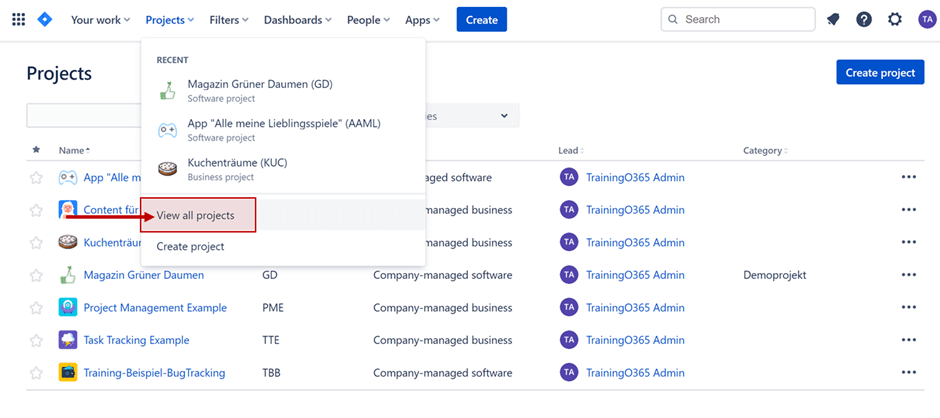

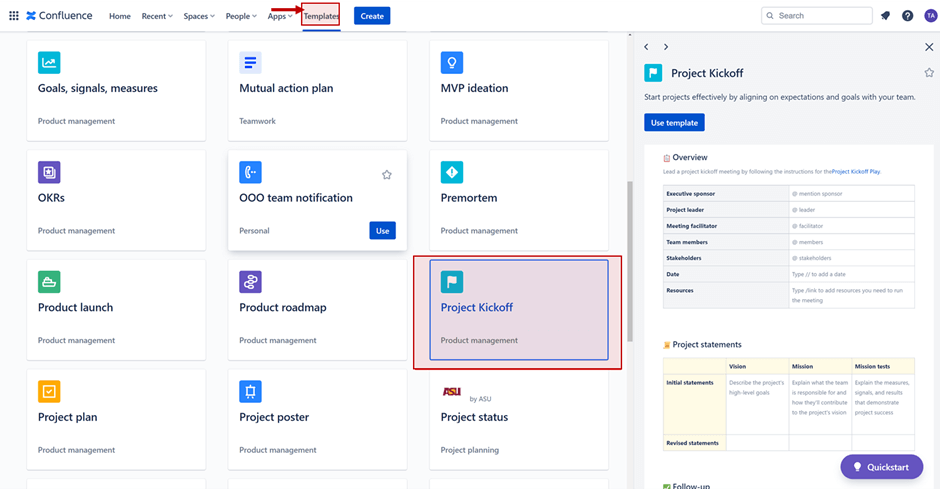
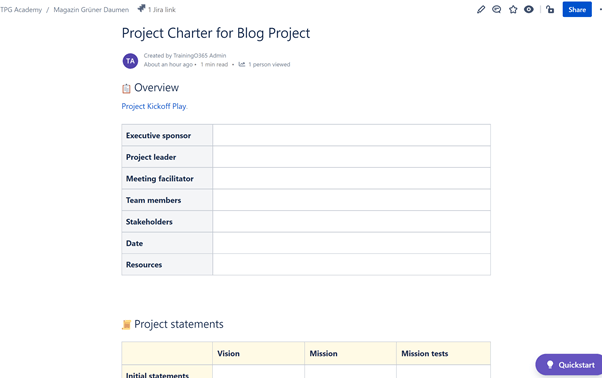
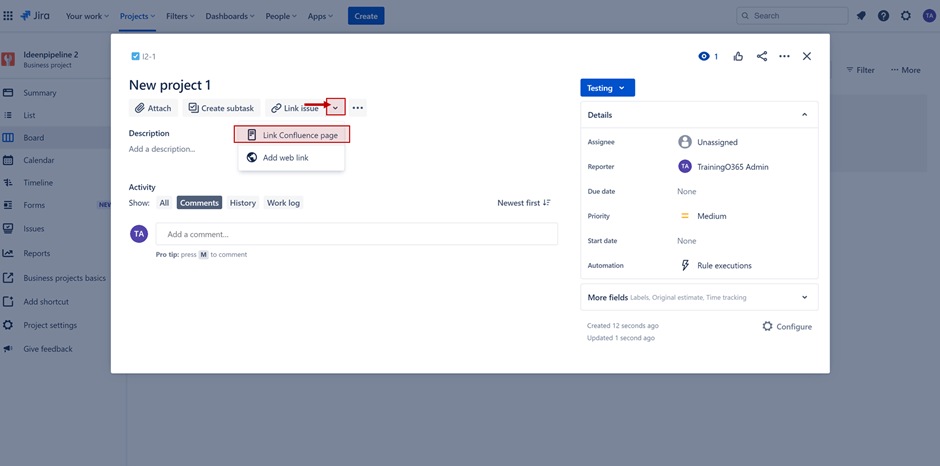
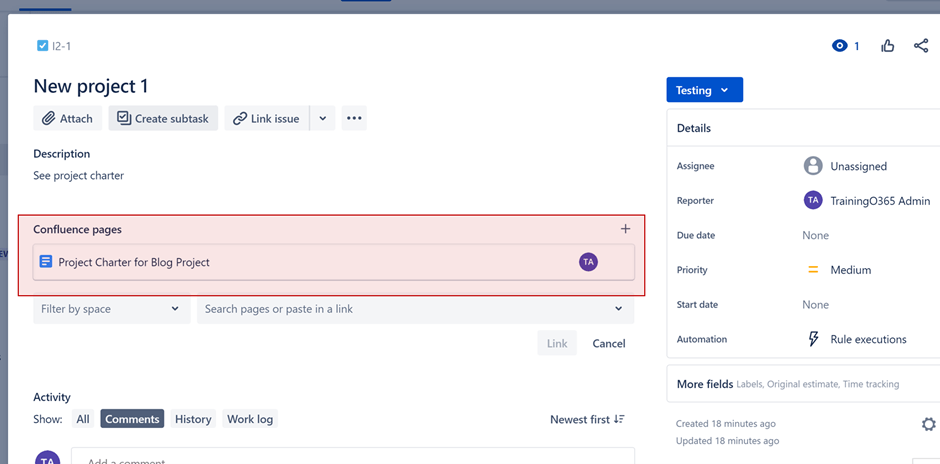
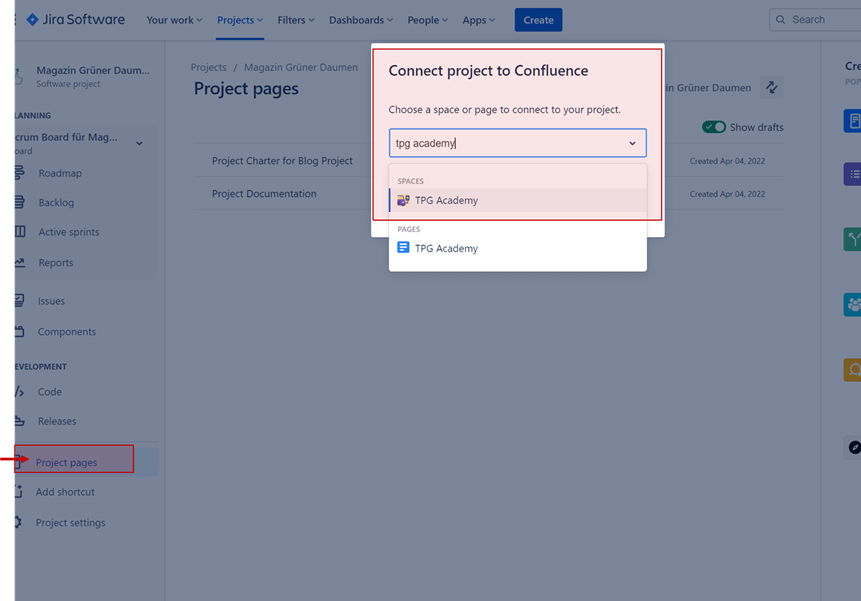
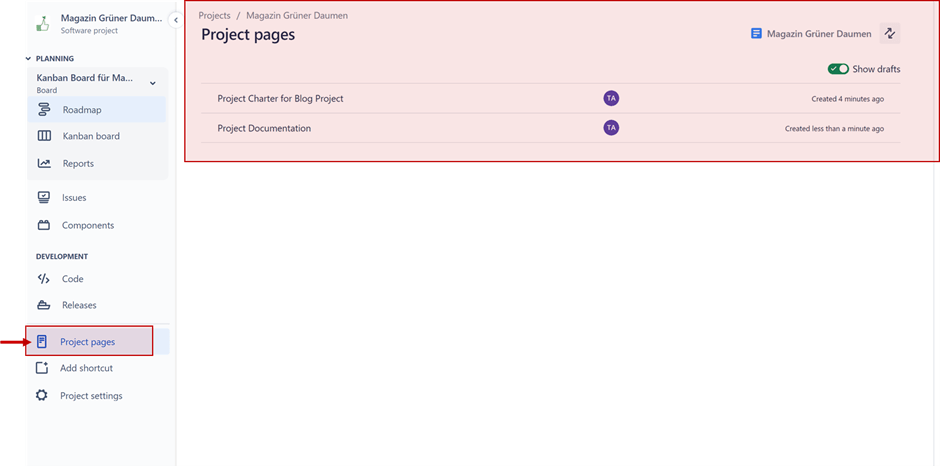
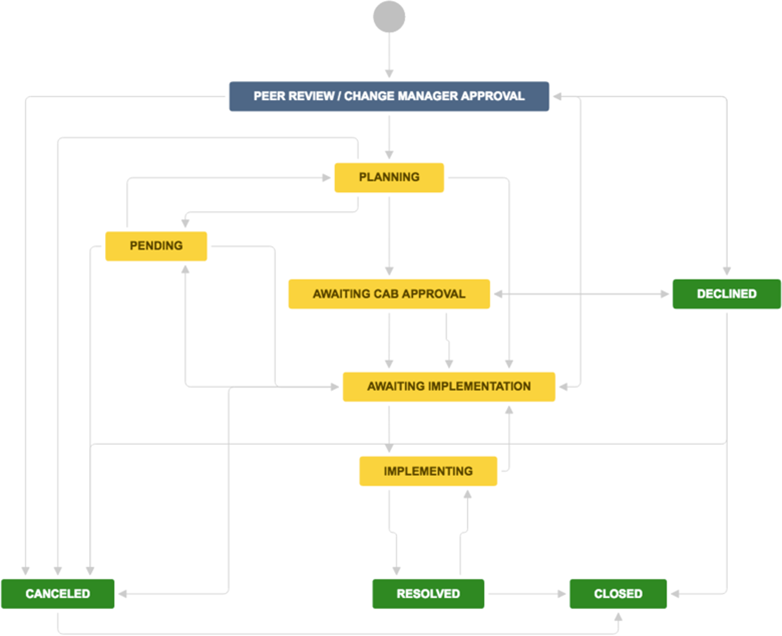
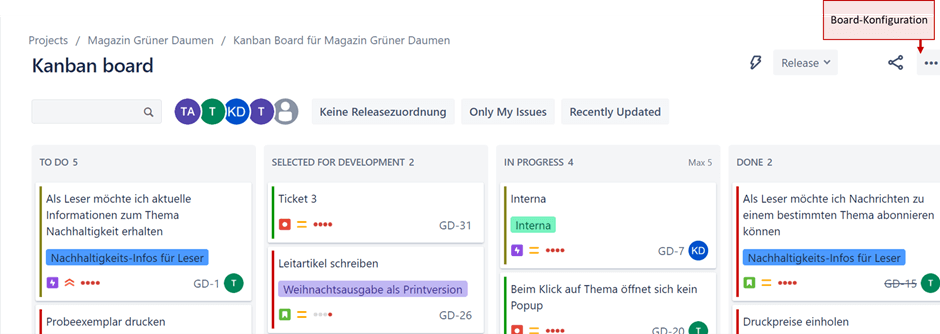

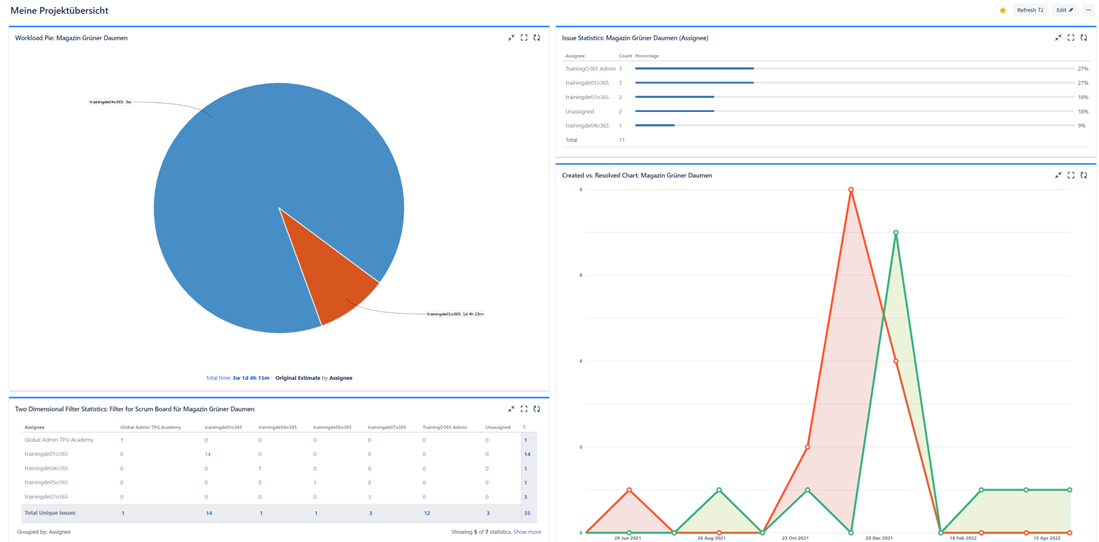
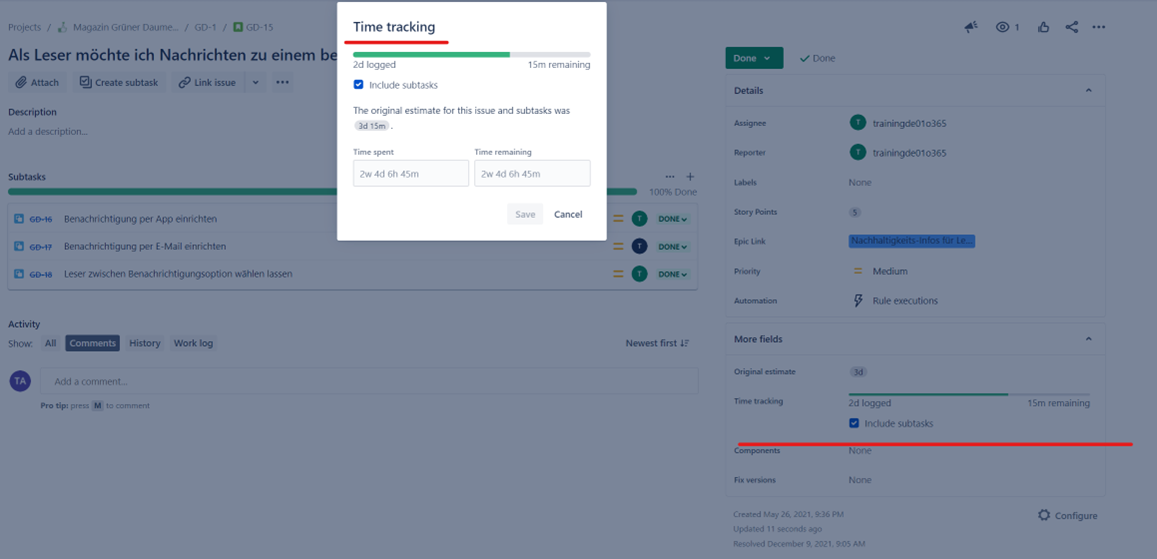
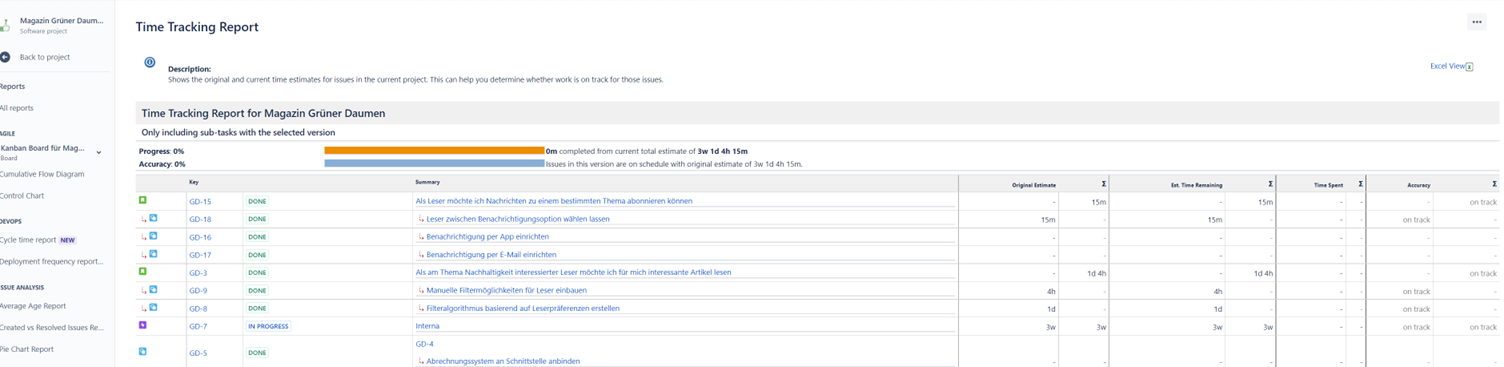
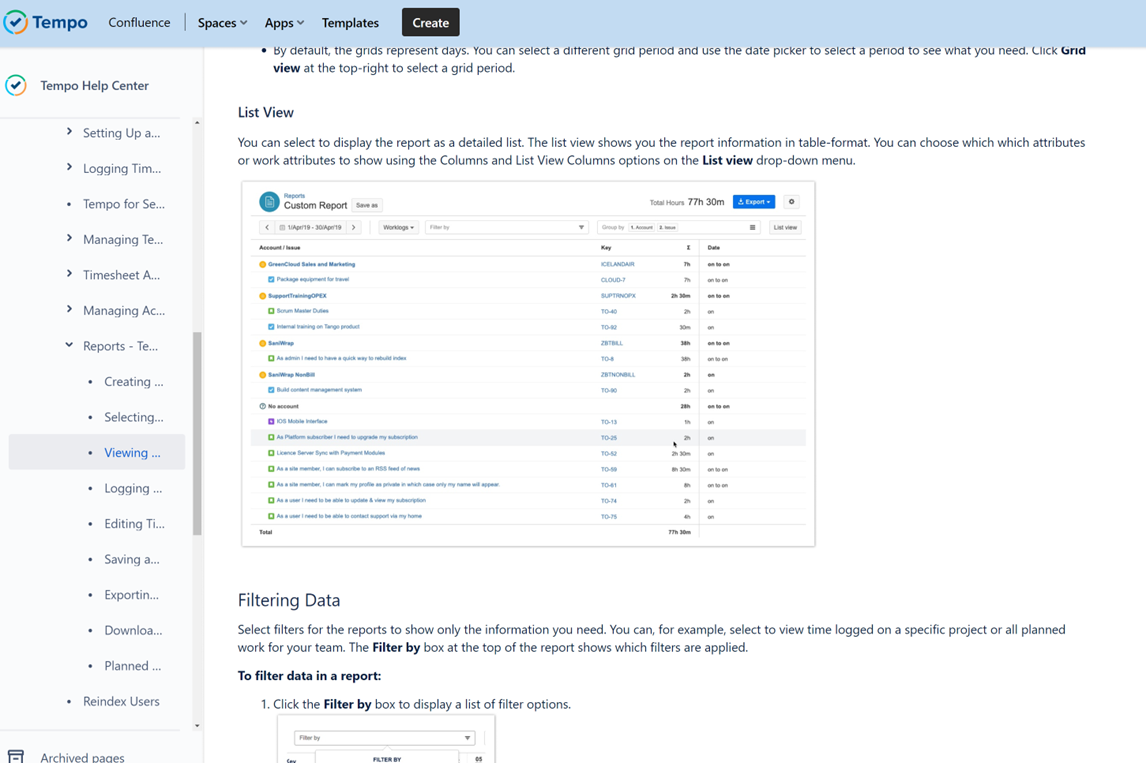
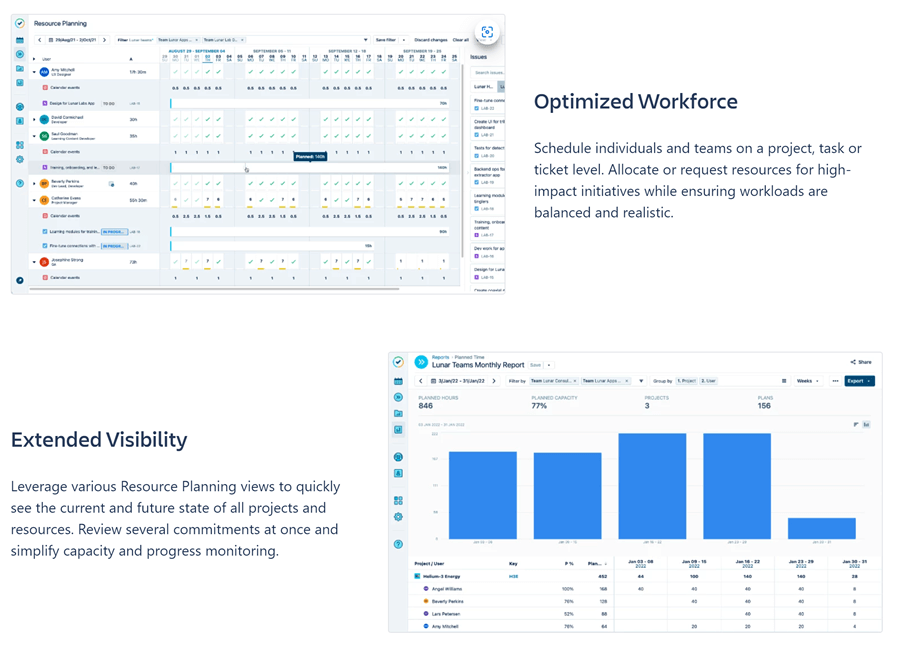
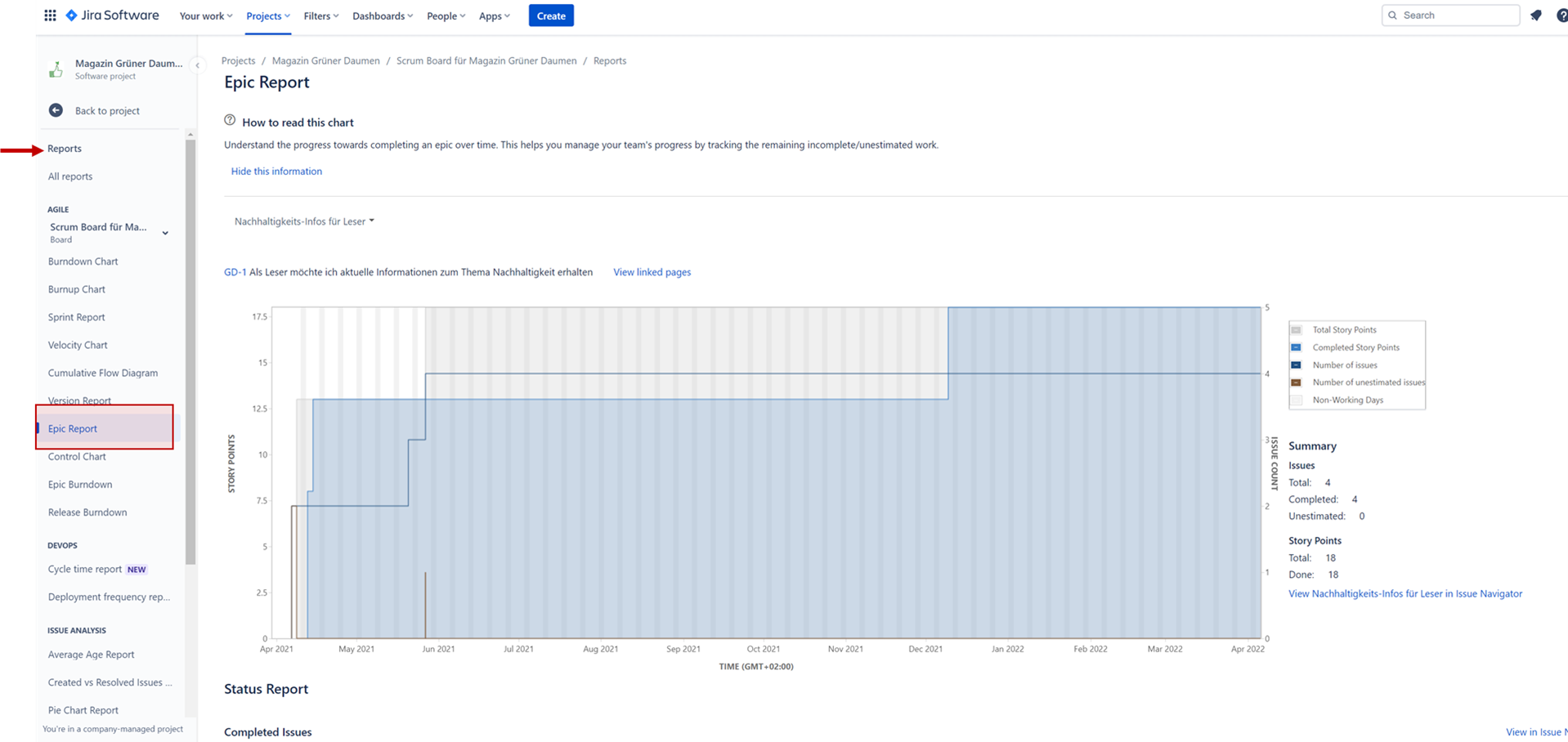
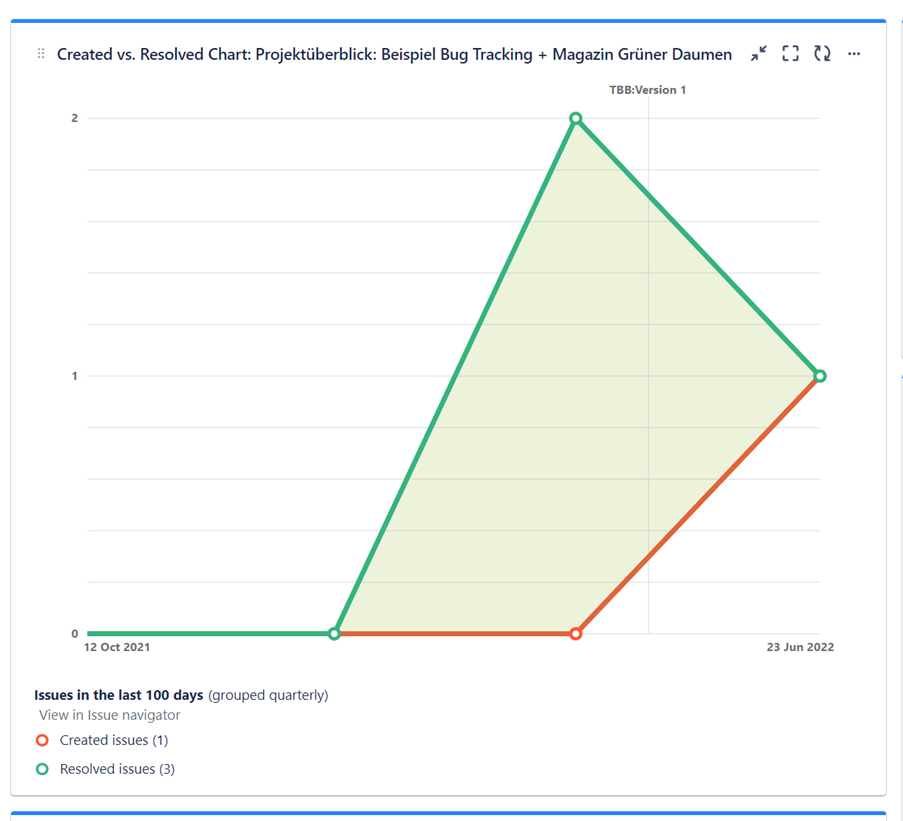
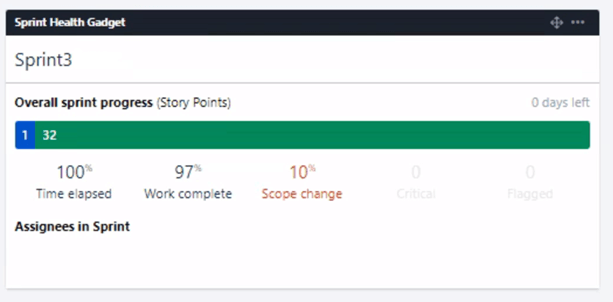
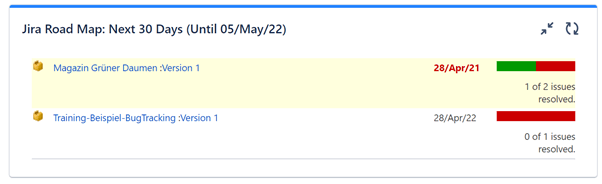
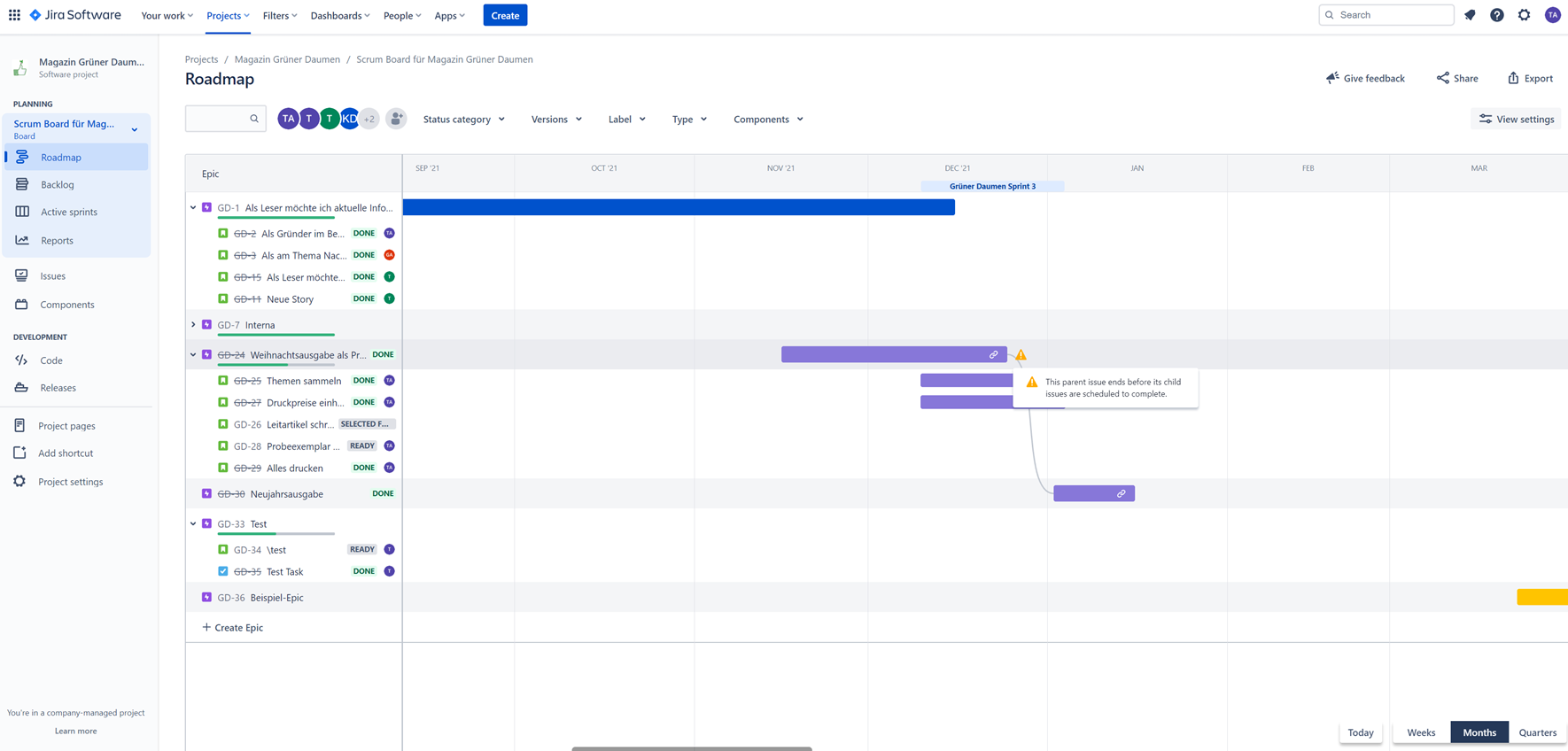
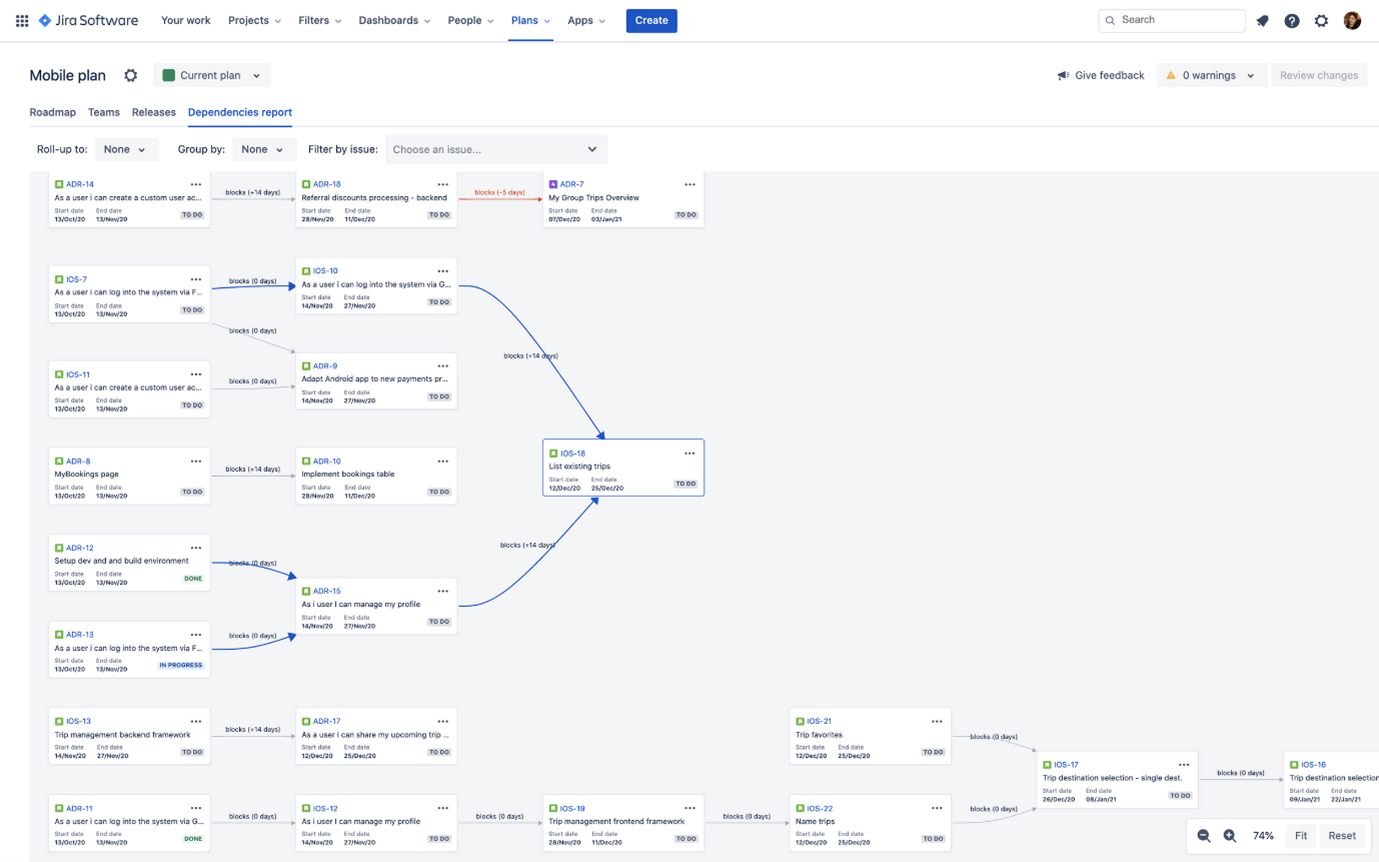
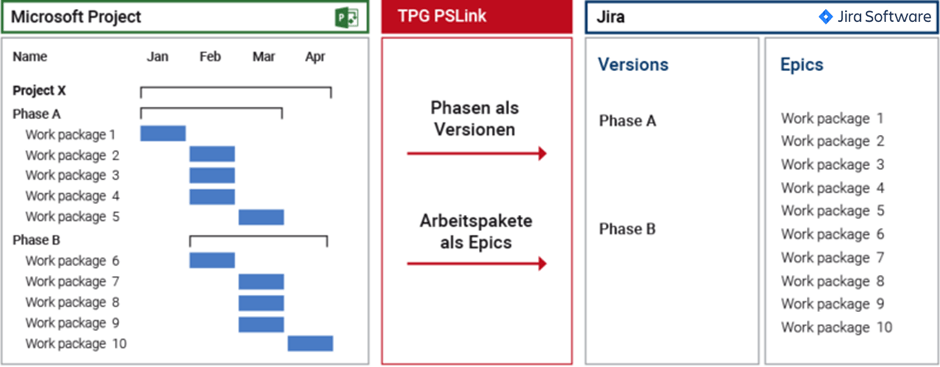
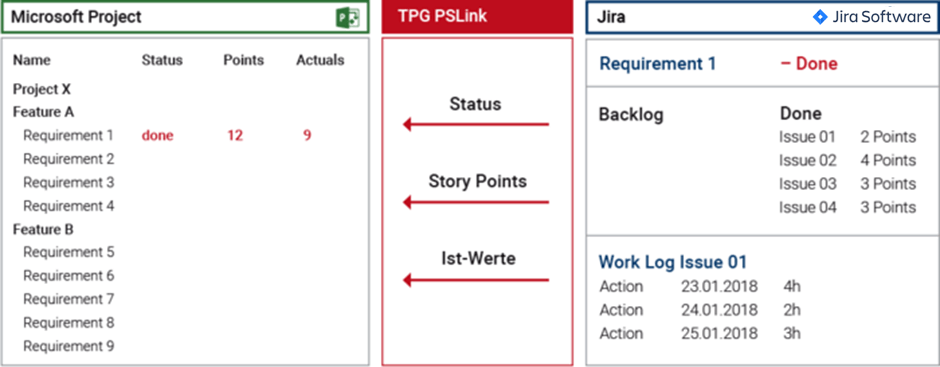
<img loading='lazy' style='display: none;' data-attachment-id-target='0' src=''><img loading='lazy' style='display: none;' data-attachment-id-target='8946' src='https://www.theprojectgroup.com/blog/wp-content/uploads/2022/04/Bild3.png'><img loading='lazy' style='display: none;' data-attachment-id-target='11482' src='https://www.theprojectgroup.com/blog/wp-content/uploads/2023/09/Kanban-Board.png'><img loading='lazy' style='display: none;' data-attachment-id-target='8948' src='https://www.theprojectgroup.com/blog/wp-content/uploads/2022/04/Bild5.png'><img loading='lazy' style='display: none;' data-attachment-id-target='8949' src='https://www.theprojectgroup.com/blog/wp-content/uploads/2022/04/Bild6.png'><img loading='lazy' style='display: none;' data-attachment-id-target='8950' src='https://www.theprojectgroup.com/blog/wp-content/uploads/2022/04/Bild7.png'><img loading='lazy' style='display: none;' data-attachment-id-target='8951' src='https://www.theprojectgroup.com/blog/wp-content/uploads/2022/04/Bild8.png'><img loading='lazy' style='display: none;' data-attachment-id-target='8952' src='https://www.theprojectgroup.com/blog/wp-content/uploads/2022/04/Bild9.png'><img loading='lazy' style='display: none;' data-attachment-id-target='8953' src='https://www.theprojectgroup.com/blog/wp-content/uploads/2022/04/Bild10.png'><img loading='lazy' style='display: none;' data-attachment-id-target='11484' src='https://www.theprojectgroup.com/blog/wp-content/uploads/2023/09/Change-Requests.png'><img loading='lazy' style='display: none;' data-attachment-id-target='8955' src='https://www.theprojectgroup.com/blog/wp-content/uploads/2022/04/Bild12.png'><img loading='lazy' style='display: none;' data-attachment-id-target='8956' src='https://www.theprojectgroup.com/blog/wp-content/uploads/2022/04/Bild13.png'><img loading='lazy' style='display: none;' data-attachment-id-target='11486' src='https://www.theprojectgroup.com/blog/wp-content/uploads/2023/09/Projektuebersicht.png'><img loading='lazy' style='display: none;' data-attachment-id-target='11488' src='https://www.theprojectgroup.com/blog/wp-content/uploads/2023/09/zeiterfassung.png'><img loading='lazy' style='display: none;' data-attachment-id-target='11489' src='https://www.theprojectgroup.com/blog/wp-content/uploads/2023/09/Bericht-Zeiterfassung.png'><img loading='lazy' style='display: none;' data-attachment-id-target='11491' src='https://www.theprojectgroup.com/blog/wp-content/uploads/2023/09/Tempo-Timesheets.png'><img loading='lazy' style='display: none;' data-attachment-id-target='8961' src='https://www.theprojectgroup.com/blog/wp-content/uploads/2022/04/Bild18.png'><img loading='lazy' style='display: none;' data-attachment-id-target='11492' src='https://www.theprojectgroup.com/blog/wp-content/uploads/2023/09/Epic-Report.png'><img loading='lazy' style='display: none;' data-attachment-id-target='8939' src='https://www.theprojectgroup.com/blog/wp-content/uploads/2022/04/Bild21.png'><img loading='lazy' style='display: none;' data-attachment-id-target='8940' src='https://www.theprojectgroup.com/blog/wp-content/uploads/2022/04/Bild22.png'><img loading='lazy' style='display: none;' data-attachment-id-target='8941' src='https://www.theprojectgroup.com/blog/wp-content/uploads/2022/04/Bild23.png'><img loading='lazy' style='display: none;' data-attachment-id-target='11477' src='https://www.theprojectgroup.com/blog/wp-content/uploads/2022/04/Epic-Issue-Planung.png'><img loading='lazy' style='display: none;' data-attachment-id-target='8943' src='https://www.theprojectgroup.com/blog/wp-content/uploads/2022/04/Bild25.png'><img loading='lazy' style='display: none;' data-attachment-id-target='8944' src='https://www.theprojectgroup.com/blog/wp-content/uploads/2022/04/Bild26.png'><img loading='lazy' style='display: none;' data-attachment-id-target='8945' src='https://www.theprojectgroup.com/blog/wp-content/uploads/2022/04/Bild27.png'><img loading='lazy' style='display: none;' data-attachment-id-target='0' src=''><img loading='lazy' style='display: none;' data-attachment-id-target='6274' src='https://www.theprojectgroup.com/blog/wp-content/uploads/2020/04/Antje-058-Bearbeitet_quadrat_Web-e1598523083709.jpg'><img loading='lazy' style='display: none;' data-attachment-id-target='0' src=''>{"id":8936,"date":"2025-08-06T10:30:08","date_gmt":"2025-08-06T08:30:08","guid":{"rendered":"https:\/\/www.theprojectgroup.com\/blog\/?p=8936"},"modified":"2025-09-19T10:40:19","modified_gmt":"2025-09-19T08:40:19","slug":"jira-projektmanagement","status":"publish","type":"post","link":"https:\/\/www.theprojectgroup.com\/blog\/jira-projektmanagement\/","title":{"rendered":"Jira als PMO-Tool \u2013 3 Tipps, wie Jira im Projektmanagement das PMO unterst\u00fctzen kann"},"content":{"rendered":"<p>Das webbasierte Atlassian Jira hat sich zum dominierenden Tool f\u00fcr Aufgabenmanagement, Projektmanagement und Fehlerverwaltung entwickelt. <strong>Jira im Projektmanagement<\/strong> ist besonders f\u00fcr Projekte geeignet, in denen die Methoden Scrum und Kanban zum Einsatz kommen.<\/p>\n<p>Dieser Artikel ist Bestandteil unserer Blog-Reihe <a href=\"#Serie\">\u201eJira f\u00fcr Rollen im Projektmanagement\u201c<\/a>. Auf dieser Seite erfahren Sie drei M\u00f6glichkeiten f\u00fcr Confluence und <strong>Jira als PMO-Tool.<\/strong> Lernen Sie, wie Sie Jira f\u00fcr eine bessere High-Level-\u00dcbersicht des <strong>Projektportfolios<\/strong> sowie f\u00fcr Ihre <strong>Fortschrittsmessung<\/strong> nutzen k\u00f6nnen und worauf Sie dabei achten sollten. Das sind die Themen, die auf Sie warten:<\/p>\n<ul>\n<li><a href=\"#Kapitel1\">Welche PMO-Aufgaben k\u00f6nnen Jira und Confluence unterst\u00fctzen?<\/a><\/li>\n<li><a href=\"#Kapitel2\">Tipp 1: Jira im Projektmanagement: M\u00f6glichkeiten und Grenzen beim Projekt\u00fcberblick<\/a><\/li>\n<li><a href=\"#Kapitel3\">Tipp 2: Jira Dashboards und Roadmaps f\u00fcr bessere \u00dcbersicht<\/a><\/li>\n<li><a href=\"#Kapitel4\">Tipp 3: Einfacher arbeiten durch Integration von Jira mit Microsoft Project<\/a><\/li>\n<li><a href=\"#Kapitel5\">Eine Alternative: PPM auf Microsoft 365 und der Power Platform<\/a><\/li>\n<li><a href=\"#Kapitel6\">Fazit \u2013 Jira im Projektmanagement f\u00fcr PMOs nutzbar, mit Grenzen<\/a><\/li>\n<\/ul>\n<p>Legen wir los mit zwei kurzen Definitionen.<\/p>\n<h2>Was ist Jira?<\/h2>\n<p>Atlassian Jira ist ein webbasiertes Tool f\u00fcr Aufgabenmanagement, Projektmanagement und Fehlerverwaltung. Es kommt haupts\u00e4chlich bei Teams in der Produkt- und Softwareentwicklung zum Einsatz. Agil arbeitende Teams werden unterst\u00fctzt mittels verschiedener Projekt- und Boardtypen (z.B. Kanban, Scrum, Projektmanagement u.v.m.).<\/p>\n<h2>Was ist Confluence?<\/h2>\n<p>Atlassian Confluence ist eine webbasierte Wiki-Software, die die interne Zusammenarbeit in Projektteams und im Unternehmen unterst\u00fctzt. Das Tool l\u00e4sst sich hervorragend mit Jira integrieren und bietet in dieser Kombination beste Voraussetzungen f\u00fcr agil arbeitende Teams.<\/p>\n\n    <p class=\"datamintsbanner\">\n        <a href=\"\" target=\"_blank\" class=\"datamintsbanner__link\" title=\"Motorworld Event (TPG Webinar)\" style=\"display: block;\">\n            <img data-attachment-id=\"0\"decoding=\"async\" src=\"\" class=\"datamintsbanner__image\" style=\"display: block; max-width: 100%\">\n        <\/a>\n    <\/p>\n    \n<h2 id=\"Kapitel1\">Welche PMO-Aufgaben k\u00f6nnen Jira und Confluence unterst\u00fctzen?<\/h2>\n<p>Jira ist vor allem f\u00fcr <strong>Aufgabenmanagement<\/strong> gedacht und bildet dabei die Realit\u00e4ten verschiedener Teams durch <strong>diverse Projekt- und Boardtypen<\/strong> gut ab. Es ist aber kein vollumf\u00e4ngliches Tool f\u00fcr Projektmanagement oder Portfoliomanagement wie <a href=\"https:\/\/www.theprojectgroup.com\/de\/projektmanagement-tools\/microsoft-ppm\" target=\"_blank\" rel=\"noopener\"><u>Microsoft PPM<\/u><\/a>. Dies gilt auch dann, wenn Sie Jira mit Confluence f\u00fcr die Dokumentation kombinieren. Au\u00dferdem bietet Jira ServiceDesk (eine weitere App aus der Atlassian Suite) mehr Funktionalit\u00e4ten f\u00fcr Support-Teams.<\/p>\n<p>Die Umfrage von TPG The Project Group zu <a href=\"https:\/\/www.theprojectgroup.com\/blog\/pmo-tools\/#Kapitel2\" target=\"_blank\" rel=\"noopener\">PMO-Tools<\/a>\u00a0zeigte als Ergebnis: Die meisten Antwortenden aus dem PMO-Umfeld verwenden Jira vor allem f\u00fcr:<\/p>\n<ul>\n<li>Issue-Management und<\/li>\n<li>Change Requests<\/li>\n<\/ul>\n<div id=\"id69573b0824c3e\" class=\"iframecontainer iframecontainer--hidden\">\n            <div class=\"iframecontainer__head\" style=\"background: #D60B52!important;\">\n                <div class=\"iframecontainer__head__inner\" style=\"color:#ffffff;\" data-for=\"#id69573b0824c3e\">\n                    <p><strong>Download (PDF):<\/strong> Ergebnisse zur PMO- \/ PPM-Tools-Umfrage 2024<\/p>\n                <\/div>\n                <div class=\"iframecontainer__head__icon\" data-for=\"#id69573b0824c3e\">\n                    <svg width=\"10px\" height=\"16px\" viewBox=\"1092 550 10 16\" version=\"1.1\" xmlns=\"http:\/\/www.w3.org\/2000\/svg\" xmlns:xlink=\"http:\/\/www.w3.org\/1999\/xlink\">\n                        <polygon class=\"iframecontainer__head__icon__pfeil\"  data-for=\"#id69573b0824c3e\" stroke=\"none\" fill=\"#ffffff\" fill-rule=\"evenodd\" points=\"1093.875 550 1101.875 558 1093.875 566 1092 564.125 1098.125 558 1092 551.875\"><\/polygon>\n                    <\/svg>\n                <\/div>\n            <\/div>\n            <div class=\"iframecontainer__iframe\">\n                <div class=\"iframecontainer__iframe__inner\">\n                    <p>Eine Studie aus Ende 2024 zu eingesetzen PPM-Tools im PMO, der Zufriedenheit damit und Potenzialen zur Verbesserung der Tool-Landschaft.<br \/>\n<span style=\"font-size: xx-small;\">* Pflichtfeld\u00a0 |\u00a0 <a href=\"https:\/\/www.theprojectgroup.com\/de\/datenschutz\/\" target=\"_blank\" rel=\"noopener\">Datenschutzhinweise<\/a><\/span><\/p>\n<div class=\"cookieconsent-optout-marketing\">Dieses Formular wird durch Ihre Cookie-Einstellung zu unserer Website blockiert. Bitte <a>klicken Sie hier<\/a> und w\u00e4hlen Sie mindestens die Marketing-Cookies aus. Dann wird dieses Formular angezeigt. Vielen Dank.<\/div>\n\n                \t<!-- DEUTSCH: Wichtig: nur den Code in data-download-asset \u00e4ndern - definiert Download -->\r\n<script type='text\/x-ccm-loader' data-ccm-loader-src=\"https:\/\/js-eu1.hsforms.net\/forms\/embed\/developer\/146642994.js\" defer><\/script>\r\n\r\n<div class=\"hs-form-html\"\r\n     data-download-asset=\"CU11D\"\r\n     data-region=\"eu1\"\r\n     data-form-id=\"32ae4d32-4e61-47ed-90d3-c7a25b28719d\"\r\n     data-portal-id=\"146642994\"><\/div>\r\n\r\n<script>\r\n(() => {\r\n  const FORM_ID = '32ae4d32-4e61-47ed-90d3-c7a25b28719d';\r\n  const FIELD   = '0-1\/download_asset';\r\n  const roots   = new Set();\r\n  const formsByRoot = new WeakMap();\r\n\r\n  const setViaApi = (root) => {\r\n    const code = root.dataset.downloadAsset || '';\r\n    const form = formsByRoot.get(root);\r\n    if (!code || !form) return;\r\n    form.setFieldValue(FIELD, code);\r\n  };\r\n\r\n  \/\/ 1) Wenn das Formular ready ist: Form-Instanz holen + Wert via API setzen\r\n  window.addEventListener('hs-form-event:on-ready', (event) => {\r\n    if (!window.HubSpotFormsV4) return;\r\n    const form = HubSpotFormsV4.getFormFromEvent(event);\r\n    if (!form || form.getFormId() !== FORM_ID) return;\r\n\r\n    const root = [...roots].find(r => r.contains(event.target));\r\n    if (!root) return;\r\n\r\n    formsByRoot.set(root, form);\r\n    setViaApi(root);\r\n  });\r\n\r\n  \/\/ 2) Kurz vor dem Absenden nochmal setzen (globaler Callback)\r\n  window.addEventListener('message', (event) => {\r\n    const d = event.data;\r\n    if (!d || d.type !== 'hsFormCallback' || d.eventName !== 'onFormSubmit') return;\r\n    if (d.id !== FORM_ID) return;\r\n\r\n    roots.forEach(setViaApi);\r\n  });\r\n\r\n  \/\/ Boot\r\n  document.addEventListener('DOMContentLoaded', () => {\r\n    document.querySelectorAll('.hs-form-html[data-download-asset][data-form-id=\"' + FORM_ID + '\"]')\r\n      .forEach(r => roots.add(r));\r\n  });\r\n})();\r\n<\/script>\n                    <style>\/* Kompaktere Darstellung f\u00fcr HubSpot Formulare *\/\n[data-hsfc-id=\"Renderer\"] .hsfc-Step .hsfc-Step__Content { padding: 0 20px 20px !important; }\n[data-hsfc-id=Renderer] .hsfc-TextField>*:not(:last-child) { margin-bottom:4px !important; }\n[data-hsfc-id=\"Renderer\"] .hsfc-Row { gap: 20px !important; margin-bottom: 12px !important; }\n[data-hsfc-id=\"Renderer\"] .hsfc-NavigationRow { margin-top: 6px !important; }\n[data-hsfc-id=\"Renderer\"] .hsfc-TextInput { padding: 8px !important; }<\/style>\n                <\/div>\n            <\/div>\n        <\/div><p>Weniger zum Einsatz kommt Jira im Projektmanagement f\u00fcr Statusberichte und Kapazit\u00e4tsplanung \u2013 und gar nicht f\u00fcr Kostenplanung oder Stakeholderanalyse. Dabei sind diejenigen, die Jira f\u00fcr die genannten Zwecke verwenden, im Schnitt sehr zufrieden mit dem Tool.<\/p>\n<p>Die Umfrage hat weiterhin ergeben: <strong>Am besten arbeiten PMOs mit einer Kombination geeigneter und miteinander synchronisierter Tools f\u00fcr die jeweiligen PMO-Aufgabenbereiche. <\/strong><\/p>\n<p>Aus der PMO-Umfrage haben wir f\u00fcr diesen Artikel wichtige Arbeitsbereiche des PMO ausgew\u00e4hlt. Nun soll die Frage beantwortet werden, wie diese Bereiche mithilfe der Atlassian Toolsuite gut abgebildet werden k\u00f6nnen:<\/p>\n<ul>\n<li>Projektliste<\/li>\n<li>Multi-Projektberichte<\/li>\n<li>Ideenpipeline<\/li>\n<li>Projektantr\u00e4ge und -auftr\u00e4ge<\/li>\n<li>Change Requests<\/li>\n<li>Issue-Management<\/li>\n<li>Projektstatusberichte<\/li>\n<li>Ist-Stunden-Erfassung und Ressourcenplanung im Projekt und im Team<\/li>\n<\/ul>\n<p>Hinweis: Die folgenden Tipps betrachten der Einheitlichkeit halber <strong>Jira \/ Confluence Cloud<\/strong> mit Spracheinstellung auf Englisch. Falls Sie in Ihrem Unternehmen eine <strong>On-Premise- \/ Data-Center-Version<\/strong> und \/ oder eine deutsche Spracheinstellung nutzen, kann es sein, dass der Funktionsumfang oder die Terminologie abweichen.<\/p>\n<blockquote><p><strong>Bitte beachten Sie auch: Die folgenden Tipps ben\u00f6tigen etwas Vorwissen in Jira. Wenn Sie noch nicht mit Jira gearbeitet haben, ist das Verst\u00e4ndnis dieser Tipps nicht immer ganz einfach.<\/strong><\/p><\/blockquote>\n<p><iframe loading=\"lazy\" referrerpolicy=\"strict-origin-when-cross-origin\" src=\"https:\/\/www.youtube-nocookie.com\/embed\/458Z0PL4Tqc?rel=0\" width=\"560\" height=\"315\" frameborder=\"0\" allowfullscreen=\"allowfullscreen\"><span style=\"display: inline-block; width: 0px; overflow: hidden; line-height: 0;\" data-mce-type=\"bookmark\" class=\"mce_SELRES_start\">\ufeff<\/span><span data-mce-type=\"bookmark\" style=\"display: inline-block; width: 0px; overflow: hidden; line-height: 0;\" class=\"mce_SELRES_start\"><\/span><\/iframe><\/p>\n<div class=\"cookieconsent-optout-marketing\"><b>&#8212; Oops, hier fehlt ein Video &#8212;<\/b><br \/>\nIhre Cookie-Einstellungen blockieren das Anzeigen von Videos of dieser Website. Bitte <b><a> \u21d2 klicken Sie hier <\/a><\/b> und es erscheint die Cookie-Auswahl. W\u00e4hlen Sie dort mindestens die <b>Marketing<\/b>-Cookies aus. Dann wird das Video sofort erscheinen. Vielen Dank.<\/div>\n<div>\n<hr \/>\n<h2 id=\"Kapitel2\">Tipp 1: Jira im Projektmanagement \u2013 M\u00f6glichkeiten und Grenzen beim Projekt\u00fcberblick<strong><br \/>\n<\/strong><\/h2>\n<p>Gehen wir nun die oben genannten PMO-Aufgabenbereiche mit dem Ziel eines m\u00f6glichst guten Projekt\u00fcberblicks durch:<\/p>\n<h3>Projektliste<\/h3>\n<p>In Jira sehen Sie unter \u201eProjects\u201c \/ \u201eView All Projects\u201d eine Liste aller Projekte in Ihrer Jira-Instanz, auf die Sie Zugriff haben. Diese Liste k\u00f6nnen Sie in Ihren Profileinstellungen auch als Standard-Startansicht nach dem Einloggen in Jira festlegen.<\/p>\n<figure id=\"attachment_8946\" aria-describedby=\"caption-attachment-8946\" style=\"width: 700px\" class=\"wp-caption aligncenter\"><a href=\"https:\/\/www.theprojectgroup.com\/blog\/wp-content\/uploads\/2022\/04\/Bild3.png\"><img data-attachment-id=\"8946\"loading=\"lazy\" decoding=\"async\" class=\"wp-image-8946\" src=\"https:\/\/www.theprojectgroup.com\/blog\/wp-content\/uploads\/2022\/04\/Bild3.png\" alt=\"Projektliste\" width=\"700\" height=\"311\" srcset=\"https:\/\/www.theprojectgroup.com\/blog\/wp-content\/uploads\/2022\/04\/Bild3.png 940w, https:\/\/www.theprojectgroup.com\/blog\/wp-content\/uploads\/2022\/04\/Bild3-300x133.png 300w, https:\/\/www.theprojectgroup.com\/blog\/wp-content\/uploads\/2022\/04\/Bild3-768x342.png 768w\" sizes=\"(max-width: 700px) 100vw, 700px\" \/><\/a><figcaption id=\"caption-attachment-8946\" class=\"wp-caption-text\">Darstellung der Projektliste in Jira<\/figcaption><\/figure>\n<h3>Multi-Projektberichte<\/h3>\n<p>Sie k\u00f6nnen die Arbeit verschiedener Teams in Jira-Dashboards tracken \u2013 mehr dazu in Tipp 2.<\/p>\n<h3>Ideenpipeline<\/h3>\n<p>F\u00fcr Ideensammlungen lohnt es sich, ein eigenes, unternehmensverwaltetes Projekt in Jira anzulegen (oder durch Ihre Jira-Administratoren anlegen zu lassen, wenn nur diese \u00fcber Berechtigungen zur Projekterstellung verf\u00fcgen), etwa vom Typ Software Kanban. Kanban deshalb, da Sie dort die Spaltenbenennungen des Boards umkonfigurieren k\u00f6nnen:<\/p>\n<figure id=\"attachment_11482\" aria-describedby=\"caption-attachment-11482\" style=\"width: 700px\" class=\"wp-caption alignnone\"><a href=\"https:\/\/www.theprojectgroup.com\/blog\/wp-content\/uploads\/2023\/09\/Kanban-Board.png\"><img data-attachment-id=\"11482\"loading=\"lazy\" decoding=\"async\" class=\"wp-image-11482\" src=\"https:\/\/www.theprojectgroup.com\/blog\/wp-content\/uploads\/2023\/09\/Kanban-Board.png\" alt=\"Projektmanagement mit Jira - Kanban-Board\" width=\"700\" height=\"98\" srcset=\"https:\/\/www.theprojectgroup.com\/blog\/wp-content\/uploads\/2023\/09\/Kanban-Board.png 954w, https:\/\/www.theprojectgroup.com\/blog\/wp-content\/uploads\/2023\/09\/Kanban-Board-300x42.png 300w, https:\/\/www.theprojectgroup.com\/blog\/wp-content\/uploads\/2023\/09\/Kanban-Board-768x107.png 768w\" sizes=\"(max-width: 700px) 100vw, 700px\" \/><\/a><figcaption id=\"caption-attachment-11482\" class=\"wp-caption-text\">M\u00f6gliches Kanban-Board f\u00fcr eine Ideenpipeline<\/figcaption><\/figure>\n<h3>Projektantr\u00e4ge und -auftr\u00e4ge<\/h3>\n<p>Neue Projektantr\u00e4ge k\u00f6nnen Sie, \u00e4hnlich wie durch eine Ideenpipeline, als Issues in ein daf\u00fcr angelegtes Jira-Sammelprojekt eintragen. Praktischerweise l\u00e4sst sich dies \u00fcber den Issue-Workflow und die Spaltenanordnung auch mit einem Genehmigungsprozess versehen. Alternativ kann f\u00fcr jede Projektidee gleich ein eigenes Jira-Projekt erstellt werden.<\/p>\n<h4><strong>Schritt-f\u00fcr-Schritt-Anleitung: Projektantrags-Pipeline in Jira<\/strong><\/h4>\n<ol>\n<li><strong>Legen Sie ein Sammelprojekt f\u00fcr Projektantr\u00e4ge an<\/strong><\/li>\n<\/ol>\n<ul>\n<li>Erstellen Sie ein neues Kanban-Projekt, zum Beispiel mit dem Namen <strong>\u201eProjektantr\u00e4ge\u201c<\/strong>.<\/li>\n<li>W\u00e4hlen Sie wieder das <strong>Kanban-Template<\/strong> aus, da es eine flexible Spaltenstruktur bietet.<\/li>\n<li>Konfigurieren Sie die Spalten nach Ihrem Bedarf, z.B.:\n<ul>\n<li>Antrag eingereicht<\/li>\n<li>In Pr\u00fcfung<\/li>\n<li>Genehmigt<\/li>\n<li>Abgelehnt<\/li>\n<\/ul>\n<\/li>\n<\/ul>\n<ol start=\"2\">\n<li><strong> Richten Sie einen einfachen Genehmigungsprozess ein (optional)<\/strong><\/li>\n<\/ol>\n<ul>\n<li>Gehen Sie in Ihrem Jira-Projekt auf <strong>\u201eProjekteinstellungen\u201c &gt; \u201eWorkflows\u201c<\/strong>.<\/li>\n<li>Bearbeiten Sie den Workflow:\n<ul>\n<li>F\u00fcgen Sie zus\u00e4tzliche Status wie \u201eIn Pr\u00fcfung\u201c oder \u201eWarten auf Entscheidung\u201c ein.<\/li>\n<li>Legen Sie \u00dcberg\u00e4nge fest, z.B. von \u201eeingereicht\u201c zu \u201egenehmigt\u201c oder \u201eabgelehnt\u201c.<\/li>\n<li>Wenn Sie m\u00f6chten, k\u00f6nnen Sie Bedingungen, Validatoren oder Genehmigungsschritte hinzuf\u00fcgen \u2013 dies erfordert unter Umst\u00e4nden Unterst\u00fctzung durch Ihre Jira-Administratoren.<\/li>\n<\/ul>\n<\/li>\n<\/ul>\n<ol start=\"3\">\n<li><strong> Verkn\u00fcpfen Sie Ideen mit Projektantr\u00e4gen<\/strong><\/li>\n<\/ol>\n<ul>\n<li>\u00d6ffnen Sie ein Jira-Issue in Ihrer <strong>Ideenpipeline<\/strong>, das nun zu einem Projektantrag werden soll.<\/li>\n<li>Klicken Sie im Men\u00fc auf <strong>\u201eVerkn\u00fcpfte Vorg\u00e4nge\u201c<\/strong> (oder \u201eLink hinzuf\u00fcgen\u201c).<\/li>\n<li>W\u00e4hlen Sie die Option <strong>\u201eist Grundlage f\u00fcr\u201c<\/strong> oder eine \u00e4hnliche Beziehung und verlinken Sie den entsprechenden Projektantrag.<\/li>\n<li>So behalten Sie die Verbindung zwischen urspr\u00fcnglicher Idee und offiziellem Antrag transparent und nachvollziehbar.<\/li>\n<\/ul>\n<ol start=\"4\">\n<li><strong> Nutzen Sie Felder und Labels f\u00fcr mehr Struktur<\/strong><\/li>\n<\/ol>\n<ul>\n<li>Sie k\u00f6nnen benutzerdefinierte Felder hinzuf\u00fcgen, z.B.:\n<ul>\n<li>Geplantes Startdatum<\/li>\n<li>Projektbudget<\/li>\n<li>Antragsteller:in<\/li>\n<\/ul>\n<\/li>\n<li>Nutzen Sie <strong>Labels<\/strong> oder <strong>Komponenten<\/strong>, um Antr\u00e4ge thematisch zu gruppieren (z.B. \u201eIT\u201c, \u201eMarketing\u201c oder \u201eInnovation\u201c).<\/li>\n<\/ul>\n<p>Mit diesem Setup k\u00f6nnen Sie einen einfachen, aber wirkungsvollen Genehmigungsprozess in Jira etablieren \u2013 ohne zus\u00e4tzliche Tools. Wenn Sie ausf\u00fchrlichere Texte oder Entscheidungsvorlagen ben\u00f6tigen, empfiehlt es sich, <strong>Confluence-Seiten anzulegen und zu verlinken<\/strong>.<\/p>\n<p><strong>So gehen Sie dabei vor:<\/strong> Erstellen Sie einen eigenen Confluence-Space f\u00fcr Ihr Projekt und darin eine Seite nach einer der verf\u00fcgbaren Vorlagen. Dann k\u00f6nnen Sie in Jira diese Seite oder auch den gesamten Space verlinken.<\/p>\n<p>Nutzen Sie die \u201eProject Kickoff\u201c-Vorlage in Confluence. Alternativen sind die Templates \u201cProject poster\u201c, \u201eMaster project documentation\u201c, \u201eProject plan\u201c und einige weitere, die dieser \u00e4hnlich sind.<\/p>\n<figure id=\"attachment_8948\" aria-describedby=\"caption-attachment-8948\" style=\"width: 700px\" class=\"wp-caption aligncenter\"><a href=\"https:\/\/www.theprojectgroup.com\/blog\/wp-content\/uploads\/2022\/04\/Bild5.png\"><img data-attachment-id=\"8948\"loading=\"lazy\" decoding=\"async\" class=\"wp-image-8948\" src=\"https:\/\/www.theprojectgroup.com\/blog\/wp-content\/uploads\/2022\/04\/Bild5.png\" alt=\"Projektmanagement Confluence \u2013 \u201eProject Kickoff\u201c-Vorlage\" width=\"700\" height=\"364\" srcset=\"https:\/\/www.theprojectgroup.com\/blog\/wp-content\/uploads\/2022\/04\/Bild5.png 940w, https:\/\/www.theprojectgroup.com\/blog\/wp-content\/uploads\/2022\/04\/Bild5-300x156.png 300w, https:\/\/www.theprojectgroup.com\/blog\/wp-content\/uploads\/2022\/04\/Bild5-768x400.png 768w\" sizes=\"(max-width: 700px) 100vw, 700px\" \/><\/a><figcaption id=\"caption-attachment-8948\" class=\"wp-caption-text\">\u201eProject Kickoff\u201c-Vorlage in Confluence<\/figcaption><\/figure>\n<figure id=\"attachment_8949\" aria-describedby=\"caption-attachment-8949\" style=\"width: 700px\" class=\"wp-caption aligncenter\"><a href=\"https:\/\/www.theprojectgroup.com\/blog\/wp-content\/uploads\/2022\/04\/Bild6.png\"><img data-attachment-id=\"8949\"loading=\"lazy\" decoding=\"async\" class=\"wp-image-8949\" src=\"https:\/\/www.theprojectgroup.com\/blog\/wp-content\/uploads\/2022\/04\/Bild6.png\" alt=\"Confluence im Projektmanagement \u2013 \u201eProject Kickoff\u201c-Vorlage\" width=\"700\" height=\"440\" srcset=\"https:\/\/www.theprojectgroup.com\/blog\/wp-content\/uploads\/2022\/04\/Bild6.png 602w, https:\/\/www.theprojectgroup.com\/blog\/wp-content\/uploads\/2022\/04\/Bild6-300x188.png 300w, https:\/\/www.theprojectgroup.com\/blog\/wp-content\/uploads\/2022\/04\/Bild6-343x215.png 343w\" sizes=\"(max-width: 700px) 100vw, 700px\" \/><\/a><figcaption id=\"caption-attachment-8949\" class=\"wp-caption-text\">\u201eProject-Kickoff\u201c-Vorlage zum Ausf\u00fcllen f\u00fcr das Projekt<\/figcaption><\/figure>\n<p>Wenn Confluence an Jira angebunden ist, k\u00f6nnen Sie in einem Issue \u00fcber das Drop-Down-Symbol neben \u201eLink Issue\u201c auf \u201eLink Confluence Page\u201c gelangen (siehe folgenden Screenshot) \u2026<\/p>\n<figure id=\"attachment_8950\" aria-describedby=\"caption-attachment-8950\" style=\"width: 700px\" class=\"wp-caption aligncenter\"><a href=\"https:\/\/www.theprojectgroup.com\/blog\/wp-content\/uploads\/2022\/04\/Bild7.png\"><img data-attachment-id=\"8950\"loading=\"lazy\" decoding=\"async\" class=\"wp-image-8950\" src=\"https:\/\/www.theprojectgroup.com\/blog\/wp-content\/uploads\/2022\/04\/Bild7.png\" alt=\"Confluence im Projektmanagement \u2013 Link einrichten\" width=\"700\" height=\"347\" srcset=\"https:\/\/www.theprojectgroup.com\/blog\/wp-content\/uploads\/2022\/04\/Bild7.png 940w, https:\/\/www.theprojectgroup.com\/blog\/wp-content\/uploads\/2022\/04\/Bild7-300x150.png 300w, https:\/\/www.theprojectgroup.com\/blog\/wp-content\/uploads\/2022\/04\/Bild7-768x381.png 768w, https:\/\/www.theprojectgroup.com\/blog\/wp-content\/uploads\/2022\/04\/Bild7-350x175.png 350w, https:\/\/www.theprojectgroup.com\/blog\/wp-content\/uploads\/2022\/04\/Bild7-164x82.png 164w\" sizes=\"(max-width: 700px) 100vw, 700px\" \/><\/a><figcaption id=\"caption-attachment-8950\" class=\"wp-caption-text\">Einrichten eines Links zu einer Confluence Seite<\/figcaption><\/figure>\n<p>\u2026 und dann wird die Seite im Issue als Verlinkung aufgef\u00fchrt.<\/p>\n<figure id=\"attachment_8951\" aria-describedby=\"caption-attachment-8951\" style=\"width: 700px\" class=\"wp-caption aligncenter\"><a href=\"https:\/\/www.theprojectgroup.com\/blog\/wp-content\/uploads\/2022\/04\/Bild8.png\"><img data-attachment-id=\"8951\"loading=\"lazy\" decoding=\"async\" class=\"wp-image-8951\" src=\"https:\/\/www.theprojectgroup.com\/blog\/wp-content\/uploads\/2022\/04\/Bild8.png\" alt=\"Link zu Confluence\" width=\"700\" height=\"346\" srcset=\"https:\/\/www.theprojectgroup.com\/blog\/wp-content\/uploads\/2022\/04\/Bild8.png 940w, https:\/\/www.theprojectgroup.com\/blog\/wp-content\/uploads\/2022\/04\/Bild8-300x148.png 300w, https:\/\/www.theprojectgroup.com\/blog\/wp-content\/uploads\/2022\/04\/Bild8-768x379.png 768w, https:\/\/www.theprojectgroup.com\/blog\/wp-content\/uploads\/2022\/04\/Bild8-164x82.png 164w\" sizes=\"(max-width: 700px) 100vw, 700px\" \/><\/a><figcaption id=\"caption-attachment-8951\" class=\"wp-caption-text\">Im Jira Issue als Verlinkung aufgef\u00fchrte Confluence Seite<\/figcaption><\/figure>\n<figure id=\"attachment_8952\" aria-describedby=\"caption-attachment-8952\" style=\"width: 700px\" class=\"wp-caption aligncenter\"><a href=\"https:\/\/www.theprojectgroup.com\/blog\/wp-content\/uploads\/2022\/04\/Bild9.png\"><img data-attachment-id=\"8952\"loading=\"lazy\" decoding=\"async\" class=\"wp-image-8952\" src=\"https:\/\/www.theprojectgroup.com\/blog\/wp-content\/uploads\/2022\/04\/Bild9.png\" alt=\"Link zu Confluence-Space\" width=\"700\" height=\"489\" srcset=\"https:\/\/www.theprojectgroup.com\/blog\/wp-content\/uploads\/2022\/04\/Bild9.png 861w, https:\/\/www.theprojectgroup.com\/blog\/wp-content\/uploads\/2022\/04\/Bild9-300x209.png 300w, https:\/\/www.theprojectgroup.com\/blog\/wp-content\/uploads\/2022\/04\/Bild9-768x536.png 768w\" sizes=\"(max-width: 700px) 100vw, 700px\" \/><\/a><figcaption id=\"caption-attachment-8952\" class=\"wp-caption-text\">In Jira-Projekten kann unter \u201eProject pages\u201c ein Confluence-Space verlinkt werden,\u2026<\/figcaption><\/figure>\n<figure id=\"attachment_8953\" aria-describedby=\"caption-attachment-8953\" style=\"width: 700px\" class=\"wp-caption aligncenter\"><a href=\"https:\/\/www.theprojectgroup.com\/blog\/wp-content\/uploads\/2022\/04\/Bild10.png\"><img data-attachment-id=\"8953\"loading=\"lazy\" decoding=\"async\" class=\"wp-image-8953\" src=\"https:\/\/www.theprojectgroup.com\/blog\/wp-content\/uploads\/2022\/04\/Bild10.png\" alt=\"Jira im Projektmanagement - Seitenliste Confluence\" width=\"700\" height=\"347\" srcset=\"https:\/\/www.theprojectgroup.com\/blog\/wp-content\/uploads\/2022\/04\/Bild10.png 940w, https:\/\/www.theprojectgroup.com\/blog\/wp-content\/uploads\/2022\/04\/Bild10-300x150.png 300w, https:\/\/www.theprojectgroup.com\/blog\/wp-content\/uploads\/2022\/04\/Bild10-768x381.png 768w, https:\/\/www.theprojectgroup.com\/blog\/wp-content\/uploads\/2022\/04\/Bild10-350x175.png 350w, https:\/\/www.theprojectgroup.com\/blog\/wp-content\/uploads\/2022\/04\/Bild10-164x82.png 164w\" sizes=\"(max-width: 700px) 100vw, 700px\" \/><\/a><figcaption id=\"caption-attachment-8953\" class=\"wp-caption-text\">\u2026 dessen Inhalte dann als Seitenliste erscheinen.<\/figcaption><\/figure>\n<h3>Change Requests<\/h3>\n<p>Als Issue-Management-System ist Jira gut f\u00fcr die Verwaltung und Abarbeitung einer Change-Request-Liste geeignet. Hierf\u00fcr k\u00f6nnen ein eigener Workflow und eigene Issue-Typen durch Jira-Administratoren (bei unternehmensverwalteten Projekten) oder durch Projektadministratoren (bei teamverwalteten Projekten) erstellt werden.<\/p>\n<p>Wenn Sie Jira Service Desk angebunden haben, finden Sie dort bereits einen eigenen Change-Workflow: <a href=\"https:\/\/confluence.atlassian.com\/servicedeskcloud\/managing-changes-with-your-it-service-desk-817562147.html#:~:text=Jira%20Service%20Desk%27s%20default%20change%20workflow%20Using%20request,needs%20of%20your%20business.%20Customize%20your%20change%20workflow\" target=\"_blank\" rel=\"noopener\">Change management | Jira Service Management Cloud | Atlassian Documentation<\/a>.<\/p>\n<figure id=\"attachment_11484\" aria-describedby=\"caption-attachment-11484\" style=\"width: 700px\" class=\"wp-caption alignnone\"><a href=\"https:\/\/www.theprojectgroup.com\/blog\/wp-content\/uploads\/2023\/09\/Change-Requests.png\"><img data-attachment-id=\"11484\"loading=\"lazy\" decoding=\"async\" class=\"wp-image-11484\" src=\"https:\/\/www.theprojectgroup.com\/blog\/wp-content\/uploads\/2023\/09\/Change-Requests.png\" alt=\"Projektmanagement mit Jira - Change Request\" width=\"700\" height=\"569\" srcset=\"https:\/\/www.theprojectgroup.com\/blog\/wp-content\/uploads\/2023\/09\/Change-Requests.png 782w, https:\/\/www.theprojectgroup.com\/blog\/wp-content\/uploads\/2023\/09\/Change-Requests-300x244.png 300w, https:\/\/www.theprojectgroup.com\/blog\/wp-content\/uploads\/2023\/09\/Change-Requests-768x625.png 768w, https:\/\/www.theprojectgroup.com\/blog\/wp-content\/uploads\/2023\/09\/Change-Requests-168x137.png 168w\" sizes=\"(max-width: 700px) 100vw, 700px\" \/><\/a><figcaption id=\"caption-attachment-11484\" class=\"wp-caption-text\">M\u00f6glicher Change-Request-Workflow in Jira Service Desk<\/figcaption><\/figure>\n<p>In vielen F\u00e4llen k\u00f6nnen Sie \u00c4nderungen aber auch einfach mithilfe von Storys auf einem Kanban-Board betrachten und verfolgen. Dann lassen sie sich nach Genehmigung schnell in die Umsetzung bringen.<\/p>\n<p>Ein Kanban-Board l\u00e4sst sich von Projektadministratoren so konfigurieren, dass es nur gew\u00fcnschte Inhalte anzeigt \u2013 wie zum Beispiel alle Change Requests.<\/p>\n<figure id=\"attachment_8955\" aria-describedby=\"caption-attachment-8955\" style=\"width: 700px\" class=\"wp-caption aligncenter\"><a href=\"https:\/\/www.theprojectgroup.com\/blog\/wp-content\/uploads\/2022\/04\/Bild12.png\"><img data-attachment-id=\"8955\"loading=\"lazy\" decoding=\"async\" class=\"wp-image-8955\" src=\"https:\/\/www.theprojectgroup.com\/blog\/wp-content\/uploads\/2022\/04\/Bild12.png\" alt=\"Jira im Projektmanagement - Kanban-Board\" width=\"700\" height=\"249\" srcset=\"https:\/\/www.theprojectgroup.com\/blog\/wp-content\/uploads\/2022\/04\/Bild12.png 940w, https:\/\/www.theprojectgroup.com\/blog\/wp-content\/uploads\/2022\/04\/Bild12-300x107.png 300w, https:\/\/www.theprojectgroup.com\/blog\/wp-content\/uploads\/2022\/04\/Bild12-768x273.png 768w\" sizes=\"(max-width: 700px) 100vw, 700px\" \/><\/a><figcaption id=\"caption-attachment-8955\" class=\"wp-caption-text\">Konfigurierbares Kanban-Board<\/figcaption><\/figure>\n<p>Grunds\u00e4tzlich bietet Jira die M\u00f6glichkeit, bei einem \u201eResolved\u201c- oder \u201eClosed\u201c-Zustand mit einem \u201eFixed\u201c oder \u201eWon\u2019t Do\u201c im Resolution-Feld die getroffene Entscheidung f\u00fcr oder gegen die Umsetzung eines \u00c4nderungswunsches transparent zu machen. Voraussetzung daf\u00fcr ist, dass das \u201eResolution\u201c-Feld im Projekt von der Jira-Administration als bearbeitbar konfiguriert wurde.<\/p>\n<figure id=\"attachment_8956\" aria-describedby=\"caption-attachment-8956\" style=\"width: 471px\" class=\"wp-caption aligncenter\"><a href=\"https:\/\/www.theprojectgroup.com\/blog\/wp-content\/uploads\/2022\/04\/Bild13.png\"><img data-attachment-id=\"8956\"loading=\"lazy\" decoding=\"async\" class=\"wp-image-8956 size-full\" src=\"https:\/\/www.theprojectgroup.com\/blog\/wp-content\/uploads\/2022\/04\/Bild13.png\" alt=\"Jira im Projektmanagement - Resolution-Feld\" width=\"471\" height=\"93\" srcset=\"https:\/\/www.theprojectgroup.com\/blog\/wp-content\/uploads\/2022\/04\/Bild13.png 471w, https:\/\/www.theprojectgroup.com\/blog\/wp-content\/uploads\/2022\/04\/Bild13-300x59.png 300w\" sizes=\"(max-width: 471px) 100vw, 471px\" \/><\/a><figcaption id=\"caption-attachment-8956\" class=\"wp-caption-text\">Das Resolution-Feld in Jira bietet mehrere M\u00f6glichkeiten<\/figcaption><\/figure>\n<h3>Issue-Management<\/h3>\n<p>Issue-Management ist die Kernaufgabe von Jira als Software-Tool. Es bietet hierf\u00fcr sehr viele M\u00f6glichkeiten zur Konfiguration und auch Vorlagen. Mittlerweile k\u00f6nnen Teams ihre Projekte in Jira Cloud sogar auch weitergehend selbst konfigurieren.<\/p>\n<blockquote><p><strong>Unser Tipp:<\/strong> Sehen Sie hier die <a href=\"https:\/\/support.atlassian.com\/jira-software-cloud\/docs\/learn-the-basics-of-team-managed-projects\/\" target=\"_blank\" rel=\"noopener\">Unterschiede zwischen unternehmens- und teamverwalteten Projekten<\/a>.<\/p><\/blockquote>\n<h3>Projektstatusberichte<\/h3>\n<p>Eine Projekt\u00fcbersicht l\u00e4sst sich gut mit Jira-Dashboards erstellen. F\u00fcr ausf\u00fchrlichere Statusdokumentation finden sich in Confluence Vorlagen:<\/p>\n<figure id=\"attachment_11486\" aria-describedby=\"caption-attachment-11486\" style=\"width: 700px\" class=\"wp-caption alignnone\"><a href=\"https:\/\/www.theprojectgroup.com\/blog\/wp-content\/uploads\/2023\/09\/Projektuebersicht.png\"><img data-attachment-id=\"11486\"loading=\"lazy\" decoding=\"async\" class=\"wp-image-11486\" src=\"https:\/\/www.theprojectgroup.com\/blog\/wp-content\/uploads\/2023\/09\/Projektuebersicht.png\" alt=\"Jira Projektmanagement - Dashboard\" width=\"700\" height=\"345\" srcset=\"https:\/\/www.theprojectgroup.com\/blog\/wp-content\/uploads\/2023\/09\/Projektuebersicht.png 1099w, https:\/\/www.theprojectgroup.com\/blog\/wp-content\/uploads\/2023\/09\/Projektuebersicht-300x148.png 300w, https:\/\/www.theprojectgroup.com\/blog\/wp-content\/uploads\/2023\/09\/Projektuebersicht-1024x505.png 1024w, https:\/\/www.theprojectgroup.com\/blog\/wp-content\/uploads\/2023\/09\/Projektuebersicht-768x379.png 768w, https:\/\/www.theprojectgroup.com\/blog\/wp-content\/uploads\/2023\/09\/Projektuebersicht-164x82.png 164w\" sizes=\"(max-width: 700px) 100vw, 700px\" \/><\/a><figcaption id=\"caption-attachment-11486\" class=\"wp-caption-text\">Projekt\u00fcbersicht mit Dashboards \u2013 mehr dazu in Tipp 2<\/figcaption><\/figure>\n<blockquote><p><strong>Unser Seminar-Tipp:<\/strong> Sie suchen mehr Jira-Tipps f\u00fcr Einsteiger:innen, Fortgeschrittene oder f\u00fcr Projekteinrichtende? Dann lernen Sie mehr und stellen Sie Ihre Fragen in den drei Online-Modulen der <a href=\"https:\/\/www.theprojectgroup.com\/de\/jira-schulung\" target=\"_blank\" rel=\"noopener\">Atlassian Jira Schulungen<\/a> von TPG.<\/p><\/blockquote>\n<h3>Ist-Stundenerfassung und Ressourcenplanung im Projekt und im Team<\/h3>\n<p>F\u00fcr die Erfassung von Ist-Zeiten und die Ressourcenplanung mit Jira bietet das Tool einige M\u00f6glichkeiten, die nicht sehr bekannt sind. Dazu geh\u00f6ren Zeiterfassungsfunktionen in Issues sowie Auswertungen.<\/p>\n<p>Das \u201eTime tracking\u201c-Feld in Jira-Issues dient zur <strong>Erfassung von Plan- und Ist-Bearbeitungszeiten<\/strong>. Wenn diese regelm\u00e4\u00dfig und gut gepflegt sind, lassen sich <strong>Berichte \u00fcber Zeiterfassungen und Arbeitslast <\/strong>erstellen (siehe folgende Screenshots).<\/p>\n<figure id=\"attachment_11488\" aria-describedby=\"caption-attachment-11488\" style=\"width: 700px\" class=\"wp-caption alignnone\"><a href=\"https:\/\/www.theprojectgroup.com\/blog\/wp-content\/uploads\/2023\/09\/zeiterfassung.png\"><img data-attachment-id=\"11488\"loading=\"lazy\" decoding=\"async\" class=\"wp-image-11488\" src=\"https:\/\/www.theprojectgroup.com\/blog\/wp-content\/uploads\/2023\/09\/zeiterfassung.png\" alt=\"Projektmanagement Jira - Zeiterfassung\" width=\"700\" height=\"338\" srcset=\"https:\/\/www.theprojectgroup.com\/blog\/wp-content\/uploads\/2023\/09\/zeiterfassung.png 1157w, https:\/\/www.theprojectgroup.com\/blog\/wp-content\/uploads\/2023\/09\/zeiterfassung-300x145.png 300w, https:\/\/www.theprojectgroup.com\/blog\/wp-content\/uploads\/2023\/09\/zeiterfassung-1024x495.png 1024w, https:\/\/www.theprojectgroup.com\/blog\/wp-content\/uploads\/2023\/09\/zeiterfassung-768x371.png 768w\" sizes=\"(max-width: 700px) 100vw, 700px\" \/><\/a><figcaption id=\"caption-attachment-11488\" class=\"wp-caption-text\">\u201eTime tracking\u201c-Feld in Jira-Issues<\/figcaption><\/figure>\n<figure id=\"attachment_11489\" aria-describedby=\"caption-attachment-11489\" style=\"width: 700px\" class=\"wp-caption alignnone\"><a href=\"https:\/\/www.theprojectgroup.com\/blog\/wp-content\/uploads\/2023\/09\/Bericht-Zeiterfassung.png\"><img data-attachment-id=\"11489\"loading=\"lazy\" decoding=\"async\" class=\"wp-image-11489\" src=\"https:\/\/www.theprojectgroup.com\/blog\/wp-content\/uploads\/2023\/09\/Bericht-Zeiterfassung.png\" alt=\"Projektmanagement Jira - Bericht Zeiterfassung\" width=\"700\" height=\"171\" srcset=\"https:\/\/www.theprojectgroup.com\/blog\/wp-content\/uploads\/2023\/09\/Bericht-Zeiterfassung.png 1504w, https:\/\/www.theprojectgroup.com\/blog\/wp-content\/uploads\/2023\/09\/Bericht-Zeiterfassung-300x73.png 300w, https:\/\/www.theprojectgroup.com\/blog\/wp-content\/uploads\/2023\/09\/Bericht-Zeiterfassung-1024x250.png 1024w, https:\/\/www.theprojectgroup.com\/blog\/wp-content\/uploads\/2023\/09\/Bericht-Zeiterfassung-768x187.png 768w\" sizes=\"(max-width: 700px) 100vw, 700px\" \/><\/a><figcaption id=\"caption-attachment-11489\" class=\"wp-caption-text\">Berichte \u00fcber Zeiterfassungen und Arbeitslast<\/figcaption><\/figure>\n<p>Wenn Ihnen diese Funktionen nicht ausreichen, k\u00f6nnen Sie mit \u201eTempo Planner\u201c (lizenzpflichtig) f\u00fcr Jira eine der meistverbreiteten Apps des Atlassian Marketplace nutzen. Damit erhalten Sie noch deutlich mehr Funktionalit\u00e4ten f\u00fcr Ihre Ressourcenplanung.<\/p>\n<p>Was Jira mit Bordmitteln nicht kann, ist die <strong>projekt\u00fcbergreifende Ressourcen-Einplanung<\/strong> f\u00fcr eine Harmonisierung der Ressourcensituation in Projekten und Linie. Mit der App \u201eTempo Capacity Planner\u201c, ebenfalls aus der Tempo-Suite, ist dies m\u00f6glich.<\/p>\n<figure id=\"attachment_11491\" aria-describedby=\"caption-attachment-11491\" style=\"width: 700px\" class=\"wp-caption alignnone\"><a href=\"https:\/\/www.theprojectgroup.com\/blog\/wp-content\/uploads\/2023\/09\/Tempo-Timesheets.png\"><img data-attachment-id=\"11491\"loading=\"lazy\" decoding=\"async\" class=\"wp-image-11491\" src=\"https:\/\/www.theprojectgroup.com\/blog\/wp-content\/uploads\/2023\/09\/Tempo-Timesheets.png\" alt=\"Projektmanagement mit Jira - Tempo Planner\" width=\"700\" height=\"466\" srcset=\"https:\/\/www.theprojectgroup.com\/blog\/wp-content\/uploads\/2023\/09\/Tempo-Timesheets.png 1146w, https:\/\/www.theprojectgroup.com\/blog\/wp-content\/uploads\/2023\/09\/Tempo-Timesheets-300x200.png 300w, https:\/\/www.theprojectgroup.com\/blog\/wp-content\/uploads\/2023\/09\/Tempo-Timesheets-1024x682.png 1024w, https:\/\/www.theprojectgroup.com\/blog\/wp-content\/uploads\/2023\/09\/Tempo-Timesheets-768x511.png 768w\" sizes=\"(max-width: 700px) 100vw, 700px\" \/><\/a><figcaption id=\"caption-attachment-11491\" class=\"wp-caption-text\">Mehr M\u00f6glichkeiten f\u00fcr Zeiterfassung und Berichte bietet die App \u201eTempo Capacity Planner\u201c<\/figcaption><\/figure>\n<p>Beispiele wie das folgende finden Sie unter <a href=\"https:\/\/marketplace.atlassian.com\/apps\/1211881\/capacity-planner-jira-team-resource-management-tempo?hosting=cloud&amp;tab=overview\" target=\"_blank\" rel=\"noopener\">Tempo Capacity Planner | Atlassian Marketplace<\/a>.<\/p>\n<figure id=\"attachment_8961\" aria-describedby=\"caption-attachment-8961\" style=\"width: 700px\" class=\"wp-caption aligncenter\"><a href=\"https:\/\/www.theprojectgroup.com\/blog\/wp-content\/uploads\/2022\/04\/Bild18.png\"><img data-attachment-id=\"8961\"loading=\"lazy\" decoding=\"async\" class=\"wp-image-8961\" src=\"https:\/\/www.theprojectgroup.com\/blog\/wp-content\/uploads\/2022\/04\/Bild18.png\" alt=\"Projektmanagement mit Jira - Ressourcenplanung\" width=\"700\" height=\"508\" srcset=\"https:\/\/www.theprojectgroup.com\/blog\/wp-content\/uploads\/2022\/04\/Bild18.png 903w, https:\/\/www.theprojectgroup.com\/blog\/wp-content\/uploads\/2022\/04\/Bild18-300x218.png 300w, https:\/\/www.theprojectgroup.com\/blog\/wp-content\/uploads\/2022\/04\/Bild18-768x557.png 768w\" sizes=\"(max-width: 700px) 100vw, 700px\" \/><\/a><figcaption id=\"caption-attachment-8961\" class=\"wp-caption-text\">Projekt\u00fcbergreifende Ressourcenplanung und Abstimmung mit der Linie mit der App \u201eTempo Capacity Planner\u201c<\/figcaption><\/figure>\n<p>Eine weitere M\u00f6glichkeit ist die <a href=\"https:\/\/www.theprojectgroup.com\/de\/middleware\/jira-integration\" target=\"_blank\" rel=\"noopener\">Integration von Jira mit Microsoft Project<\/a> (mehr dazu in Tipp 3).<\/p>\n<blockquote><p><strong>Unser Tool-Tipp:\u00a0<\/strong>Wollen Sie Ihre PMO-Ressourcen \u00fcbersichtlich und gut verwalten oder die Ressourcenabstimmung zwischen Projekt und Linie optimal unterst\u00fctzen? Dann sehen Sie sich die TPG CoReSuite TeamManager App als <a href=\"https:\/\/www.theprojectgroup.com\/de\/teammanagement-software\" target=\"_blank\" rel=\"noopener\">Tool zur Ressourcenplanung<\/a> an.<\/p><\/blockquote>\n<h2 id=\"Kapitel3\">Tipp 2: Jira-Dashboards und Roadmaps f\u00fcr bessere \u00dcbersicht<\/h2>\n<p>In Jira-Projekten k\u00f6nnen Sie <strong>Reports<\/strong> erstellen. Au\u00dferdem bietet Jira die M\u00f6glichkeit, unter Dashboards auch projekt\u00fcbergreifend eigene Statistiken und \u00dcbersichten zu kreieren.<\/p>\n<p>Reports in Jira lassen sich nur f\u00fcr ein bestimmtes Projekt erzeugen. \u00dcber die Projektseitenleiste gelangen Sie mit dem Punkt \u201eReports\u201c zu einer Vielzahl an Berichten. Solange die Daten in Ihren Projekten vorhanden und gut gepflegt sind, k\u00f6nnen diese bereits sehr aussagekr\u00e4ftig sein.<\/p>\n<figure id=\"attachment_11492\" aria-describedby=\"caption-attachment-11492\" style=\"width: 700px\" class=\"wp-caption alignnone\"><a href=\"https:\/\/www.theprojectgroup.com\/blog\/wp-content\/uploads\/2023\/09\/Epic-Report.png\"><img data-attachment-id=\"11492\"loading=\"lazy\" decoding=\"async\" class=\"wp-image-11492\" src=\"https:\/\/www.theprojectgroup.com\/blog\/wp-content\/uploads\/2023\/09\/Epic-Report.png\" alt=\"Projektmanagement Jira - Epic Report\" width=\"700\" height=\"331\" srcset=\"https:\/\/www.theprojectgroup.com\/blog\/wp-content\/uploads\/2023\/09\/Epic-Report.png 1918w, https:\/\/www.theprojectgroup.com\/blog\/wp-content\/uploads\/2023\/09\/Epic-Report-300x142.png 300w, https:\/\/www.theprojectgroup.com\/blog\/wp-content\/uploads\/2023\/09\/Epic-Report-1024x485.png 1024w, https:\/\/www.theprojectgroup.com\/blog\/wp-content\/uploads\/2023\/09\/Epic-Report-768x364.png 768w, https:\/\/www.theprojectgroup.com\/blog\/wp-content\/uploads\/2023\/09\/Epic-Report-1536x727.png 1536w\" sizes=\"(max-width: 700px) 100vw, 700px\" \/><\/a><figcaption id=\"caption-attachment-11492\" class=\"wp-caption-text\">\u201eEpic Report\u201c f\u00fcr ein Projekt in Jira (Epics: ~Sammelvorg\u00e4nge)<\/figcaption><\/figure>\n<p>Noch mehr M\u00f6glichkeiten bieten <strong>Jira-Dashboards<\/strong>: Mit ihnen k\u00f6nnen Sie f\u00fcr Ihr Projektmanagement in Jira \u00e4hnliche Daten aus einem oder mehreren Jira-Projekten aggregieren und stets aktuell in einer von Ihnen gew\u00e4hlten Auswahl und Anordnung darstellen. Dabei haben Sie mehr Einstellungsm\u00f6glichkeiten als mit reinen Projekt-Reports. Dashboards k\u00f6nnen Sie au\u00dferdem mit anderen Usern teilen.<\/p>\n<blockquote><p><strong>Passender Lesetipp:<\/strong> <a href=\"https:\/\/www.theprojectgroup.com\/blog\/pmo-reporting\/\" target=\"_blank\" rel=\"noopener\">PMO-Reporting: Berichte f\u00fcr Projekt-, Portfolio- und Ressourcenmanagement<\/a><\/p><\/blockquote>\n<p>Jira-Dashboards bestehen aus sogenannten \u201eGadgets\u201c, die Daten in bestimmter Form darstellen (\u00e4hnlich wie in Reports), aber konfigurierbar sind. Die folgenden <strong>Dashboard-Gadgets<\/strong>\u00a0k\u00f6nnen Ihnen dabei besonders hilfreich sein:<\/p>\n<ul>\n<li><strong>Projects:<\/strong> Eine einfache Liste aller Projekte in Jira, auf die User Zugriff haben, die das Dashboard betrachten. Ein Klick auf den Projektnamen bringt sie direkt in das Projekt in Jira.<\/li>\n<li><strong>Created vs. Resolved:<\/strong> Zeigt in einer \u00dcbersicht, wie viele Issues in einem gew\u00e4hlten Projekt neu er\u00f6ffnet wurden und wie viele fertiggestellt wurden. Auch dieses Gadget l\u00e4sst sich \u00fcber einen entsprechenden Filter, der mehrere Projekte umfasst, f\u00fcr mehr als ein Projekt einrichten. Das folgende Beispiel zeigt simulierte Daten aus der TPG-Trainingsinstanz. In aktiv und l\u00e4nger genutzten Produktivprojekten k\u00f6nnen Sie die Ergebnisse noch deutlich granularer darstellen. Sie k\u00f6nnen besonders dann hilfreich sein, wenn es um die Nachvollziehbarkeit der Effektivit\u00e4t von Fehlerbehebung in einem Produkt geht:<\/li>\n<\/ul>\n<figure id=\"attachment_8939\" aria-describedby=\"caption-attachment-8939\" style=\"width: 400px\" class=\"wp-caption aligncenter\"><a href=\"https:\/\/www.theprojectgroup.com\/blog\/wp-content\/uploads\/2022\/04\/Bild21.png\"><img data-attachment-id=\"8939\"loading=\"lazy\" decoding=\"async\" class=\"wp-image-8939\" src=\"https:\/\/www.theprojectgroup.com\/blog\/wp-content\/uploads\/2022\/04\/Bild21.png\" alt=\"Jira im Projektmanagement - Vergleich Issues\" width=\"400\" height=\"364\" srcset=\"https:\/\/www.theprojectgroup.com\/blog\/wp-content\/uploads\/2022\/04\/Bild21.png 903w, https:\/\/www.theprojectgroup.com\/blog\/wp-content\/uploads\/2022\/04\/Bild21-300x273.png 300w, https:\/\/www.theprojectgroup.com\/blog\/wp-content\/uploads\/2022\/04\/Bild21-768x698.png 768w\" sizes=\"(max-width: 400px) 100vw, 400px\" \/><\/a><figcaption id=\"caption-attachment-8939\" class=\"wp-caption-text\">Vergleich \u201ecreated\u201c vs. \u201eresolved\u201c Issues in einem Projekt<\/figcaption><\/figure>\n<ul>\n<li>Wenn Sie in einem PMO f\u00fcr agile Teams arbeiten, dann k\u00f6nnte das <strong>\u201eSprint Health\u201c-Gadget<\/strong> interessant f\u00fcr Sie sein. Zwar k\u00fcmmern sich selbstverwaltende Scrum-Teams selbst um die \u201eGesundheit\u201c ihrer Sprints, aber das PMO kann damit auf lange Sicht Entwicklungen nachverfolgen und den Teams bei Bedarf Unterst\u00fctzung anbieten.<\/li>\n<\/ul>\n<figure id=\"attachment_8940\" aria-describedby=\"caption-attachment-8940\" style=\"width: 400px\" class=\"wp-caption aligncenter\"><a href=\"https:\/\/www.theprojectgroup.com\/blog\/wp-content\/uploads\/2022\/04\/Bild22.png\"><img data-attachment-id=\"8940\"loading=\"lazy\" decoding=\"async\" class=\"wp-image-8940\" src=\"https:\/\/www.theprojectgroup.com\/blog\/wp-content\/uploads\/2022\/04\/Bild22.png\" alt=\"Sprint-Health Gadget\" width=\"400\" height=\"197\" srcset=\"https:\/\/www.theprojectgroup.com\/blog\/wp-content\/uploads\/2022\/04\/Bild22.png 613w, https:\/\/www.theprojectgroup.com\/blog\/wp-content\/uploads\/2022\/04\/Bild22-300x148.png 300w, https:\/\/www.theprojectgroup.com\/blog\/wp-content\/uploads\/2022\/04\/Bild22-164x82.png 164w\" sizes=\"(max-width: 400px) 100vw, 400px\" \/><\/a><figcaption id=\"caption-attachment-8940\" class=\"wp-caption-text\">\u201eSprint Health\u201c-Gadget<\/figcaption><\/figure>\n<ul>\n<li><strong>Jira Road Map:<\/strong> Dieses Gadget zeigt Ihnen an, welche Versionen der Software-Projekte (im Gadget ausgew\u00e4hlte oder \u201ealle Projekte\u201c) geplant sind und wie die Arbeit an diesen Versionen voranschreitet.<\/li>\n<\/ul>\n<figure id=\"attachment_8941\" aria-describedby=\"caption-attachment-8941\" style=\"width: 400px\" class=\"wp-caption aligncenter\"><a href=\"https:\/\/www.theprojectgroup.com\/blog\/wp-content\/uploads\/2022\/04\/Bild23.png\"><img data-attachment-id=\"8941\"loading=\"lazy\" decoding=\"async\" class=\"wp-image-8941\" src=\"https:\/\/www.theprojectgroup.com\/blog\/wp-content\/uploads\/2022\/04\/Bild23.png\" alt=\"Road Map Gadget\" width=\"400\" height=\"122\" srcset=\"https:\/\/www.theprojectgroup.com\/blog\/wp-content\/uploads\/2022\/04\/Bild23.png 602w, https:\/\/www.theprojectgroup.com\/blog\/wp-content\/uploads\/2022\/04\/Bild23-300x92.png 300w\" sizes=\"(max-width: 400px) 100vw, 400px\" \/><\/a><figcaption id=\"caption-attachment-8941\" class=\"wp-caption-text\">\u201eJira Road Map\u201c Gadget<\/figcaption><\/figure>\n<p>Das \u201eJira Road Map\u201c-Gadget geh\u00f6rt zur <strong>Roadmap-Funktionalit\u00e4t<\/strong> in Jira. Diese ist in der Standard-Jira-Lizenz ein einfaches, manuell anpassbares <strong>Schwimmbahnen-Diagramm<\/strong> f\u00fcr die Zeitplanung mithilfe von Epics und den darin enthaltenen Issues. Der folgende Screenshot zeigt eine einfache Epic- und Issue-Planung in Basic Roadmaps mit teilweise manuell anpassbaren Zeitplanungen.<\/p>\n<figure id=\"attachment_11477\" aria-describedby=\"caption-attachment-11477\" style=\"width: 700px\" class=\"wp-caption alignnone\"><a href=\"https:\/\/www.theprojectgroup.com\/blog\/wp-content\/uploads\/2022\/04\/Epic-Issue-Planung.png\"><img data-attachment-id=\"11477\"loading=\"lazy\" decoding=\"async\" class=\"wp-image-11477\" src=\"https:\/\/www.theprojectgroup.com\/blog\/wp-content\/uploads\/2022\/04\/Epic-Issue-Planung.png\" alt=\"Projektmanagement mit Jira - Basic Road Map\" width=\"700\" height=\"335\" srcset=\"https:\/\/www.theprojectgroup.com\/blog\/wp-content\/uploads\/2022\/04\/Epic-Issue-Planung.png 1770w, https:\/\/www.theprojectgroup.com\/blog\/wp-content\/uploads\/2022\/04\/Epic-Issue-Planung-300x144.png 300w, https:\/\/www.theprojectgroup.com\/blog\/wp-content\/uploads\/2022\/04\/Epic-Issue-Planung-1024x491.png 1024w, https:\/\/www.theprojectgroup.com\/blog\/wp-content\/uploads\/2022\/04\/Epic-Issue-Planung-768x368.png 768w, https:\/\/www.theprojectgroup.com\/blog\/wp-content\/uploads\/2022\/04\/Epic-Issue-Planung-1536x736.png 1536w, https:\/\/www.theprojectgroup.com\/blog\/wp-content\/uploads\/2022\/04\/Epic-Issue-Planung-1078x516.png 1078w, https:\/\/www.theprojectgroup.com\/blog\/wp-content\/uploads\/2022\/04\/Epic-Issue-Planung-702x336.png 702w\" sizes=\"(max-width: 700px) 100vw, 700px\" \/><\/a><figcaption id=\"caption-attachment-11477\" class=\"wp-caption-text\">Einfache Epic- und Issue-Planung in Basic Road Map<\/figcaption><\/figure>\n<p>Richtig interessant f\u00fcr PMOs wird Jira Road Map mit der <strong>Advanced Road Map<\/strong>, die in Premium- und Enterprise-Lizenzen enthalten ist. Diese kann unter anderem auch Abh\u00e4ngigkeiten zwischen Issues feingranular darstellen und somit einen guten \u00dcberblick \u00fcber den <strong>Stand der Arbeit in einem oder mehreren Projekten <\/strong>liefern.<\/p>\n<figure id=\"attachment_8943\" aria-describedby=\"caption-attachment-8943\" style=\"width: 700px\" class=\"wp-caption aligncenter\"><a href=\"https:\/\/www.theprojectgroup.com\/blog\/wp-content\/uploads\/2022\/04\/Bild25.png\"><img data-attachment-id=\"8943\"loading=\"lazy\" decoding=\"async\" class=\"wp-image-8943\" src=\"https:\/\/www.theprojectgroup.com\/blog\/wp-content\/uploads\/2022\/04\/Bild25-1024x640.png\" alt=\"Projektmanagement mit Jira - Advanced Road Map\" width=\"700\" height=\"438\" srcset=\"https:\/\/www.theprojectgroup.com\/blog\/wp-content\/uploads\/2022\/04\/Bild25-1024x640.png 1024w, https:\/\/www.theprojectgroup.com\/blog\/wp-content\/uploads\/2022\/04\/Bild25-300x188.png 300w, https:\/\/www.theprojectgroup.com\/blog\/wp-content\/uploads\/2022\/04\/Bild25-768x480.png 768w, https:\/\/www.theprojectgroup.com\/blog\/wp-content\/uploads\/2022\/04\/Bild25-343x215.png 343w, https:\/\/www.theprojectgroup.com\/blog\/wp-content\/uploads\/2022\/04\/Bild25.png 1379w\" sizes=\"(max-width: 700px) 100vw, 700px\" \/><\/a><figcaption id=\"caption-attachment-8943\" class=\"wp-caption-text\">Visualisierung von Abh\u00e4ngigkeiten in Advanced Road Map (Screenshot aus Dependency visualization report for Advanced roadmaps; Quelle: atlassian.com)<\/figcaption><\/figure>\n<p>Beim Projektmanagement mit Jira k\u00f6nnen sich PMOs also grunds\u00e4tzlich einen \u00dcberblick \u00fcber den Arbeitsstatus in Projekten verschaffen. Allerdings gibt es hier auch Grenzen, wie bereits anfangs erw\u00e4hnt:<\/p>\n<blockquote><p><strong>Bitte beachten: <\/strong>Komplett\u00fcbersichten mit allen f\u00fcr das \u00fcbergeordnete Projekt- und Portfoliomanagement relevanten Daten bietet Jira auch mithilfe von Dashboards oder Roadmap kaum. Das bedeutet, <strong>Jira kann ein ausschlie\u00dflich f\u00fcr das Projekt- und Portfoliomanagement optimiertes PPM-Tool nicht ersetzen.<\/strong><\/p><\/blockquote>\n<p>Apps aus dem Atlassian Marketplace f\u00fcr diesen Zweck (z.B. die erw\u00e4hnte Tempo-Suite, aber auch Big Picture oder Structure) bereichern Jira hier zwar um einige wichtige Aspekte. Selbst dann k\u00f6nnen die L\u00f6sungen aber mit vollumf\u00e4nglicher <a href=\"https:\/\/www.theprojectgroup.com\/de\/projektmanagement-software\" target=\"_blank\" rel=\"noopener\">Projektmanagement-Software<\/a> nicht mithalten.<\/p>\n<p>Um zu einer solch \u201eparadiesischen\u201c Situation f\u00fcr PMOs zu kommen, hilft Ihnen eine integrierte Umgebung f\u00fcr Multi-Projektmanagement, wie Sie sie im Tipp 3 jetzt kennenlernen.<\/p>\n<p>Im folgenden eBook wird \u201eThe PPM Paradise\u201c dargestellt, eine <strong>optimale PPM-Umgebung f\u00fcr das moderne Unternehmensumfeld \u2013 unabh\u00e4ngig von der gew\u00e4hlten Technologie<\/strong>. Im eBook finden Sie den <strong>Nutzen und viele gute Argumente<\/strong>, die Sie als PMO oder Tool-verantwortliche Stelle Ihren Entscheidern gegen\u00fcber verwenden k\u00f6nnen. Jetzt gleich herunterladen.<\/p>\n<div id=\"id69573b0824ee3\" class=\"iframecontainer iframecontainer--hidden\">\n            <div class=\"iframecontainer__head\" style=\"background: #D60B52!important;\">\n                <div class=\"iframecontainer__head__inner\" style=\"color:#ffffff;\" data-for=\"#id69573b0824ee3\">\n                    <p><strong>eBook Download (PDF): <\/strong> \u201eThe PPRM Paradise\u201c - so geht modernes Projekt-, Portfolio &amp; Ressourcenmanagement wirklich problemlos (ein Konzept)<\/p>\n                <\/div>\n                <div class=\"iframecontainer__head__icon\" data-for=\"#id69573b0824ee3\">\n                    <svg width=\"10px\" height=\"16px\" viewBox=\"1092 550 10 16\" version=\"1.1\" xmlns=\"http:\/\/www.w3.org\/2000\/svg\" xmlns:xlink=\"http:\/\/www.w3.org\/1999\/xlink\">\n                        <polygon class=\"iframecontainer__head__icon__pfeil\"  data-for=\"#id69573b0824ee3\" stroke=\"none\" fill=\"#ffffff\" fill-rule=\"evenodd\" points=\"1093.875 550 1101.875 558 1093.875 566 1092 564.125 1098.125 558 1092 551.875\"><\/polygon>\n                    <\/svg>\n                <\/div>\n            <\/div>\n            <div class=\"iframecontainer__iframe\">\n                <div class=\"iframecontainer__iframe__inner\">\n                    <p>Das sollte eine optimale, moderne und anpassbare L\u00f6sung f\u00fcr Projekt-, Portfolio- und Ressourcenmanagement (PPRM) k\u00f6nnen \u2013 Tipps, Nutzen und wichtige Argumente f\u00fcr Ihre Entscheider.<\/p>\n\n                \t<!-- DEUTSCH: Wichtig: nur den Code in data-download-asset \u00e4ndern - definiert Download -->\r\n<script type='text\/x-ccm-loader' data-ccm-loader-src=\"https:\/\/js-eu1.hsforms.net\/forms\/embed\/developer\/146642994.js\" defer><\/script>\r\n\r\n<div class=\"hs-form-html\"\r\n     data-download-asset=\"CU17D\"\r\n     data-region=\"eu1\"\r\n     data-form-id=\"32ae4d32-4e61-47ed-90d3-c7a25b28719d\"\r\n     data-portal-id=\"146642994\"><\/div>\r\n\r\n<script>\r\n(() => {\r\n  const FORM_ID = '32ae4d32-4e61-47ed-90d3-c7a25b28719d';\r\n  const FIELD   = '0-1\/download_asset';\r\n  const roots   = new Set();\r\n  const formsByRoot = new WeakMap();\r\n\r\n  const setViaApi = (root) => {\r\n    const code = root.dataset.downloadAsset || '';\r\n    const form = formsByRoot.get(root);\r\n    if (!code || !form) return;\r\n    form.setFieldValue(FIELD, code);\r\n  };\r\n\r\n  \/\/ 1) Wenn das Formular ready ist: Form-Instanz holen + Wert via API setzen\r\n  window.addEventListener('hs-form-event:on-ready', (event) => {\r\n    if (!window.HubSpotFormsV4) return;\r\n    const form = HubSpotFormsV4.getFormFromEvent(event);\r\n    if (!form || form.getFormId() !== FORM_ID) return;\r\n\r\n    const root = [...roots].find(r => r.contains(event.target));\r\n    if (!root) return;\r\n\r\n    formsByRoot.set(root, form);\r\n    setViaApi(root);\r\n  });\r\n\r\n  \/\/ 2) Kurz vor dem Absenden nochmal setzen (globaler Callback)\r\n  window.addEventListener('message', (event) => {\r\n    const d = event.data;\r\n    if (!d || d.type !== 'hsFormCallback' || d.eventName !== 'onFormSubmit') return;\r\n    if (d.id !== FORM_ID) return;\r\n\r\n    roots.forEach(setViaApi);\r\n  });\r\n\r\n  \/\/ Boot\r\n  document.addEventListener('DOMContentLoaded', () => {\r\n    document.querySelectorAll('.hs-form-html[data-download-asset][data-form-id=\"' + FORM_ID + '\"]')\r\n      .forEach(r => roots.add(r));\r\n  });\r\n})();\r\n<\/script>\n                    <style>\/* Kompaktere Darstellung f\u00fcr HubSpot Formulare *\/\n[data-hsfc-id=\"Renderer\"] .hsfc-Step .hsfc-Step__Content { padding: 0 20px 20px !important; }\n[data-hsfc-id=Renderer] .hsfc-TextField>*:not(:last-child) { margin-bottom:4px !important; }\n[data-hsfc-id=\"Renderer\"] .hsfc-Row { gap: 20px !important; margin-bottom: 12px !important; }\n[data-hsfc-id=\"Renderer\"] .hsfc-NavigationRow { margin-top: 6px !important; }\n[data-hsfc-id=\"Renderer\"] .hsfc-TextInput { padding: 8px !important; }<\/style>\n                <\/div>\n            <\/div>\n        <\/div><h2 id=\"Kapitel4\">Tipp 3: Einfacher arbeiten durch Integration von Jira mit Microsoft Project<\/h2>\n<p>Mit der <a href=\"https:\/\/www.theprojectgroup.com\/de\/integration-middleware\" target=\"_blank\" rel=\"noopener\">Integration Middleware TPG PSLink<\/a> k\u00f6nnen Sie Microsoft Project und Atlassian Jira f\u00fcr Projektmanagement miteinander verbinden. So lassen sich Daten zwischen beiden Anwendungen synchronisieren. Dies bietet sich besonders auf der Ebene von Phasen \/ Versionen sowie Arbeitspaketen \/ Epics an:<\/p>\n<figure id=\"attachment_8944\" aria-describedby=\"caption-attachment-8944\" style=\"width: 700px\" class=\"wp-caption aligncenter\"><a href=\"https:\/\/www.theprojectgroup.com\/blog\/wp-content\/uploads\/2022\/04\/Bild26.png\"><img data-attachment-id=\"8944\"loading=\"lazy\" decoding=\"async\" class=\"wp-image-8944\" src=\"https:\/\/www.theprojectgroup.com\/blog\/wp-content\/uploads\/2022\/04\/Bild26.png\" alt=\"Integration mit MS Project\" width=\"700\" height=\"273\" srcset=\"https:\/\/www.theprojectgroup.com\/blog\/wp-content\/uploads\/2022\/04\/Bild26.png 940w, https:\/\/www.theprojectgroup.com\/blog\/wp-content\/uploads\/2022\/04\/Bild26-300x117.png 300w, https:\/\/www.theprojectgroup.com\/blog\/wp-content\/uploads\/2022\/04\/Bild26-768x300.png 768w\" sizes=\"(max-width: 700px) 100vw, 700px\" \/><\/a><figcaption id=\"caption-attachment-8944\" class=\"wp-caption-text\">\u00dcbertragen der Struktur von Microsoft PPM in Jira<\/figcaption><\/figure>\n<p>Zur\u00fcck in MS Project lassen sich Arbeitsstatus der Issues, Sch\u00e4tzungen etwa in Story Points und die Ist-Werte \u00fcbertragen (mehr dazu in unserem Blogartikel \u201e<a href=\"https:\/\/www.theprojectgroup.com\/blog\/ms-project-jira-integration\/\" target=\"_blank\" rel=\"noopener\">Integration MS Project mit Jira oder TFS \/ DevOps (3 Anwendungsf\u00e4lle)<\/a>\u201c):<\/p>\n<figure id=\"attachment_8945\" aria-describedby=\"caption-attachment-8945\" style=\"width: 700px\" class=\"wp-caption aligncenter\"><a href=\"https:\/\/www.theprojectgroup.com\/blog\/wp-content\/uploads\/2022\/04\/Bild27.png\"><img data-attachment-id=\"8945\"loading=\"lazy\" decoding=\"async\" class=\"wp-image-8945\" src=\"https:\/\/www.theprojectgroup.com\/blog\/wp-content\/uploads\/2022\/04\/Bild27.png\" alt=\"Integration mit MS Project\" width=\"700\" height=\"273\" srcset=\"https:\/\/www.theprojectgroup.com\/blog\/wp-content\/uploads\/2022\/04\/Bild27.png 940w, https:\/\/www.theprojectgroup.com\/blog\/wp-content\/uploads\/2022\/04\/Bild27-300x117.png 300w, https:\/\/www.theprojectgroup.com\/blog\/wp-content\/uploads\/2022\/04\/Bild27-768x300.png 768w\" sizes=\"(max-width: 700px) 100vw, 700px\" \/><\/a><figcaption id=\"caption-attachment-8945\" class=\"wp-caption-text\">\u201eEpic Report\u201c f\u00fcr ein Projekt in Jira (Epics: ~Sammelvorg\u00e4nge, Screenshots: eigene Darstellung)<\/figcaption><\/figure>\n<p>Sobald diese Daten zwischen den beiden Tools synchronisiert wurden, k\u00f6nnen Sie die M\u00f6glichkeiten von Microsoft Project zur Berichterstattung bequem auf Basis aktueller operativer Daten nutzen. Die Teammitglieder des Projekts m\u00fcssen bei dieser integrierten L\u00f6sung keine zwei Tools parallel pflegen. Das erh\u00f6ht die Akzeptanz und Datenqualit\u00e4t.<\/p>\n<blockquote><p><strong>Hinweis:<\/strong> Alles Wichtige zum <strong><a href=\"https:\/\/www.theprojectgroup.com\/blog\/project-online-ende-2026\/\" target=\"_blank\" rel=\"noopener\">Project Online Ende<\/a> 2026 mit Migrationsoptionen<\/strong><\/p><\/blockquote>\n<h2 id=\"Kapitel5\">Eine Alternative: PPM auf Microsoft 365 und der Power Platform<\/h2>\n<p>Microsoft bietet mit dem <a href=\"https:\/\/www.theprojectgroup.com\/de\/projektmanagement-tools\/ms-project-for-the-web\" target=\"_blank\" rel=\"noopener\">Planner<\/a> mittlerweile auch eine immer leistungsf\u00e4higere Software f\u00fcr Aufgaben und Projektmanagement auf Basis von M365 \/ Power Platform an. Der Planner umfasst neben Aufgabenmanagement mittlerweile auch die Funktionalit\u00e4t des fr\u00fcheren Project for the Web (die Umstellung erfolgt im August 2025).<\/p>\n<p>Zudem l\u00e4sst sich Planner mit der richtigen Software <strong>f\u00fcr leistungsf\u00e4higes Multiprojektmanagement sehr gut erweitern.<\/strong><\/p>\n<p>Wenn Sie ohnehin Microsoft 365 im Unternehmen haben, dann w\u00e4re das Software-Produkt <a href=\"https:\/\/www.theprojectgroup.com\/de\/microsoft-cloud-projektmanagement\/project-power-pack\" target=\"_blank\" rel=\"noopener\">TPG ProjectPowerPack<\/a> vielleicht eine gute PPM-Alternative zu Jira \u2013 mit <strong>mehr Unterst\u00fctzung im Projekt-, Portfolio- und Ressourcenmanagement<\/strong>. Es nutzt den Planner (ehem. Project for the Web) und erweitert dessen Funktionen um bew\u00e4hrte Best-Practice-Methoden. Jira l\u00e4sst sich zudem integrieren und kann so Daten mit der Microsoft-Welt austauschen.<\/p>\n<p><strong>Ihre Vorteile mit TPG ProjectPowerPack:<\/strong><\/p>\n<ul>\n<li>Zentrale, konsolidierte Datenhaltung f\u00fcr alle Projekte<\/li>\n<li>Workflows f\u00fcr Projektlebenszyklus, Risiken, Probleme etc.<\/li>\n<li>Funktionen f\u00fcr PMOs, Projektmanager und F\u00fchrungskr\u00e4fte<\/li>\n<li>Leistungsstarkes Reporting mit Power BI \u2013 out of the box<\/li>\n<li>Schnell einf\u00fchrbar durch vorkonfigurierte Best-Practice-Prozesse (TPG QuickStart)<\/li>\n<li>Einfach erweiterbar durch Konfiguration und Low-Code-Anpassung in der Power Platform<\/li>\n<\/ul>\n\n    <p class=\"datamintsbanner\">\n        <a href=\"https:\/\/bit.ly\/3IWzlQw\" target=\"_blank\" class=\"datamintsbanner__link\" title=\"TPG ProjectPowerPack Microsoft 365 Projektmanagement\" style=\"display: block;\">\n            <img data-attachment-id=\"0\"decoding=\"async\" src=\"https:\/\/www.theprojectgroup.com\/blog\/wp-content\/uploads\/2025\/04\/PPP_Blog_Banner_3_1300px-AS_tiny.jpg\" class=\"datamintsbanner__image\" style=\"display: block; max-width: 100%\">\n        <\/a>\n    <\/p>\n    \n<h2 id=\"Kapitel6\">Fazit \u2013 Jira im Projektmanagement f\u00fcr PMOs nutzbar, mit Grenzen<strong><br \/>\n<\/strong><\/h2>\n<p>In diesem Artikel haben Sie gelernt, wie Sie Jira im Projektmanagement bei den verschiedenen PMO-Aufgaben mal mehr und mal weniger unterst\u00fctzen kann. Als beliebtes Tool f\u00fcr Aufgabenmanagement hat Jira im PMO-Umfeld aber, trotz der vielen erh\u00e4ltlichen Apps, seine Grenzen.<\/p>\n<p>Besonders wenn es um die Darstellung von Projekt\u00fcbersichten und -portfolios geht, kann Jira nicht mit den genau f\u00fcr solche Zwecke gedachten PPM-Tools mithalten. Ideal ist allerdings die Kombination aus PPM- und Aufgabenmanagement-Tools durch eine Integration. Damit lassen sich die Daten zwischen beiden Welten austauschen und sind immer synchron bzw. aktuell. Auch arbeiten die Projektmanager und Teammitglieder mit den f\u00fcr sie gewohnten Tools. Das erh\u00f6ht die Akzeptanz und Qualit\u00e4t der Daten \u2013 wichtig f\u00fcr fundierte und schnelle Entscheidungen im Projektverlauf.<\/p>\n<h2 id=\"Serie\">Die Blog-Reihe \u201eJira f\u00fcr Rollen im Projektmanagement\u201c<\/h2>\n<p>Dieser Artikel zu Jira und Confluence ist Teil einer Reihe, in der wir die M\u00f6glichkeiten der Tools f\u00fcr verschiedene Rollen beschreiben. Hier die \u00dcbersicht:<\/p>\n<ul>\n<li>Teil 1: <a href=\"https:\/\/www.theprojectgroup.com\/blog\/jira-projektmanagement\/\" target=\"_blank\" rel=\"noopener\">Jira f\u00fcr das PMO<\/a> (dieser Artikel)<\/li>\n<li>Teil 2: <a href=\"https:\/\/www.theprojectgroup.com\/blog\/scrum-master-jira\/\" target=\"_blank\" rel=\"noopener\">Jira f\u00fcr Scrum Master<\/a><\/li>\n<li>Teil 3: <a href=\"https:\/\/www.theprojectgroup.com\/blog\/product-owner-jira\/\" target=\"_blank\" rel=\"noopener\">Jira f\u00fcr Product Owner<\/a><\/li>\n<li>Teil 4: <a href=\"https:\/\/www.theprojectgroup.com\/blog\/developer-jira\/\" target=\"_blank\" rel=\"noopener\">Jira f\u00fcr Developer<\/a><\/li>\n<li>Teil 5:<a href=\"https:\/\/www.theprojectgroup.com\/blog\/jira-tipps\/\" target=\"_blank\" rel=\"noopener\"> Jira Tipps zu Filtern, Dashboard und Berichten<\/a><\/li>\n<\/ul>\n<blockquote><p><strong>Unsere Tipps zum Schluss: <\/strong>Lernen Sie das individuell anpassbare \u201cThe PPM Paradise\u201d kennen \u2013 <span dir=\"ltr\" role=\"presentation\">die optimale Umgebung f\u00fcr ein unternehmensweites Projekt-, Programm-, Portfolio- und Ressourcenmanagement (PPM). Laden Sie sich jetzt <\/span><a href=\"https:\/\/www.theprojectgroup.com\/data\/Downloads_eBooks\/TPG_PPM_Paradise_eBook_-_TPG_TheProjectGroup.pdf\" target=\"_blank\" rel=\"noopener\"><span dir=\"ltr\" role=\"presentation\">hier das eBook dazu herunter<\/span><\/a><span dir=\"ltr\" role=\"presentation\"> (nur klicken, ohne Formular).<\/span><\/p>\n<p><span dir=\"ltr\" role=\"presentation\">Und abonnieren Sie unseren <\/span><a href=\"https:\/\/www.theprojectgroup.com\/de\/projektmanagement-newsletter\" target=\"_blank\" rel=\"noopener\"><span dir=\"ltr\" role=\"presentation\">Projektmanagement Newsletter<\/span><\/a> mit mehr MS Project Tipps, praxisstarken Artikeln, Webinaren, Podcasts, eBooks etc. f\u00fcr einen h\u00f6heren Reifengrad-Level Ihres Projektmanagements!<\/p><\/blockquote>\n<p>Sie wollen das Gelernte vertiefen, weitere wichtige Tipps erfahren und Ihre Fragen stellen? Dann sind Sie genau richtig bei der TPG <a href=\"https:\/\/www.theprojectgroup.com\/de\/jira-schulung\" target=\"_blank\" rel=\"noopener\"> Jira Schulung (f\u00fcr Einsteiger, Fortgeschrittene und Experts)<\/a>.<\/p>\n<p><strong>Haben Sie noch Fragen? Dann hinterlassen Sie einen Kommentar, auf den wir in K\u00fcrze antworten werden \u2013 garantiert.<\/strong><\/p>\n<span style='display:none;'>FALSE<\/span><hr \/>\n<blockquote>\n<p style=\"text-align: left;\"><strong class=\"alignnone\"><img data-attachment-id=\"6274\"loading=\"lazy\" decoding=\"async\" class=\"wp-image-6274 size-thumbnail alignleft\" src=\"https:\/\/www.theprojectgroup.com\/blog\/wp-content\/uploads\/2020\/04\/Antje-058-Bearbeitet_quadrat_Web-150x150.jpg\" alt=\"\" width=\"150\" height=\"150\" \/>\u00dcber die Autorin:<br \/>\nAntje Lehmann-Benz, PMP, PMI-ACP, PSM<br \/>\n<\/strong><\/p>\n<p style=\"text-align: left;\">Antje Lehmann-Benz, PMP, ist Trainerin f\u00fcr Projektmanagement mit einem besonderen Schwerpunkt auf agilen Themen und Scrum Seminaren. Au\u00dferdem hat sie Erfahrung in Software-Trainings (JIRA, Confluence) und -Beratung. Neben der Vermittlung von Frameworks und theoretischen Inhalten hat sie Erfahrung in der Anwendung von Agile Games und praktischen \u00dcbungen zur Vertiefung der gelernten Inhalte.<\/p>\n<p style=\"text-align: right;\">Mehr \u00fcber Antje Lehmann-Benz auf <a href=\"https:\/\/www.linkedin.com\/in\/antje-lehmann-benz\/?locale=de_DE\" target=\"_blank\" rel=\"noopener\">Linkedin<\/a> oder <a href=\"https:\/\/coaches.xing.com\/profile\/Antje_LehmannBenz\" target=\"_blank\" rel=\"noopener\">Xing<\/a>.<\/p>\n<\/blockquote>\n\n    <p class=\"datamintsbanner\">\n        <a href=\"https:\/\/bit.ly\/3udKM2C\" target=\"_blank\" class=\"datamintsbanner__link\" title=\"Job TPG Bewerbung Wirsuchendich TPG TheProjectGroup Consultant Microsoft PPM Jobs\" style=\"display: block;\">\n            <img data-attachment-id=\"0\"decoding=\"async\" src=\"https:\/\/www.theprojectgroup.com\/blog\/wp-content\/uploads\/2022\/10\/Jobs-3.jpg\" class=\"datamintsbanner__image\" style=\"display: block; max-width: 100%\">\n        <\/a>\n    <\/p>\n    \n<\/div>\n","protected":false},"excerpt":{"rendered":"<p>Das webbasierte Atlassian Jira hat sich zum dominierenden Tool f\u00fcr Aufgabenmanagement, Projektmanagement und Fehlerverwaltung entwickelt. Jira im Projektmanagement ist besonders f\u00fcr Projekte geeignet, in denen die Methoden Scrum und Kanban zum Einsatz kommen. Dieser Artikel ist Bestandteil unserer Blog-Reihe \u201eJira f\u00fcr Rollen im Projektmanagement\u201c. Auf dieser Seite erfahren Sie drei M\u00f6glichkeiten f\u00fcr Confluence und Jira<\/p>\n<div class=\"read-more\"><a href=\"https:\/\/www.theprojectgroup.com\/blog\/jira-projektmanagement\/\" title=\"Weiterlesen\">Weiterlesen<\/a><\/div>\n","protected":false},"author":22,"featured_media":13592,"comment_status":"open","ping_status":"open","sticky":false,"template":"","format":"standard","meta":{"footnotes":""},"categories":[1,164],"tags":[],"_links":{"self":[{"href":"https:\/\/www.theprojectgroup.com\/blog\/wp-json\/wp\/v2\/posts\/8936"}],"collection":[{"href":"https:\/\/www.theprojectgroup.com\/blog\/wp-json\/wp\/v2\/posts"}],"about":[{"href":"https:\/\/www.theprojectgroup.com\/blog\/wp-json\/wp\/v2\/types\/post"}],"author":[{"embeddable":true,"href":"https:\/\/www.theprojectgroup.com\/blog\/wp-json\/wp\/v2\/users\/22"}],"replies":[{"embeddable":true,"href":"https:\/\/www.theprojectgroup.com\/blog\/wp-json\/wp\/v2\/comments?post=8936"}],"version-history":[{"count":56,"href":"https:\/\/www.theprojectgroup.com\/blog\/wp-json\/wp\/v2\/posts\/8936\/revisions"}],"predecessor-version":[{"id":13573,"href":"https:\/\/www.theprojectgroup.com\/blog\/wp-json\/wp\/v2\/posts\/8936\/revisions\/13573"}],"wp:featuredmedia":[{"embeddable":true,"href":"https:\/\/www.theprojectgroup.com\/blog\/wp-json\/wp\/v2\/media\/13592"}],"wp:attachment":[{"href":"https:\/\/www.theprojectgroup.com\/blog\/wp-json\/wp\/v2\/media?parent=8936"}],"wp:term":[{"taxonomy":"category","embeddable":true,"href":"https:\/\/www.theprojectgroup.com\/blog\/wp-json\/wp\/v2\/categories?post=8936"},{"taxonomy":"post_tag","embeddable":true,"href":"https:\/\/www.theprojectgroup.com\/blog\/wp-json\/wp\/v2\/tags?post=8936"}],"curies":[{"name":"wp","href":"https:\/\/api.w.org\/{rel}","templated":true}]}}