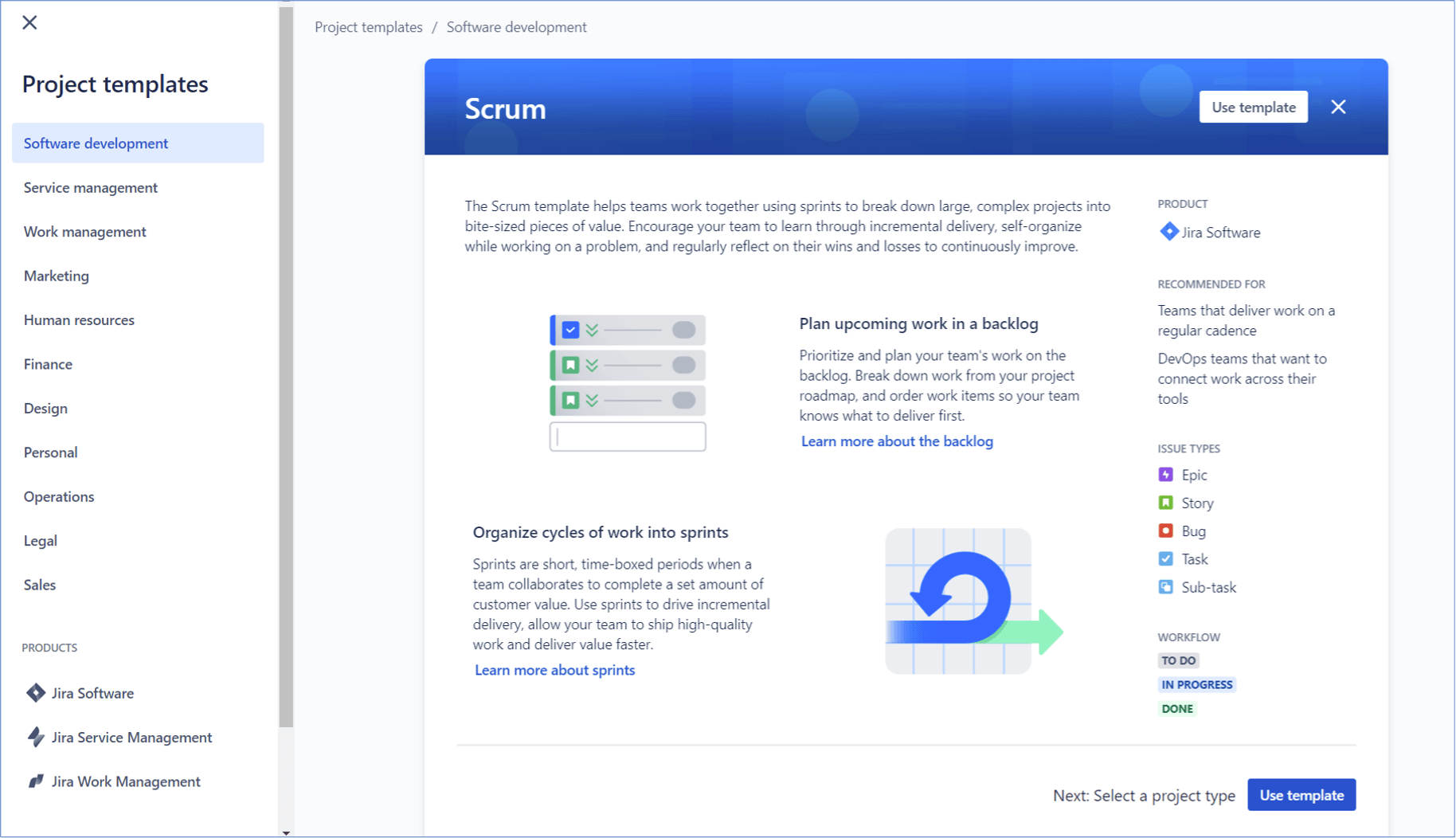
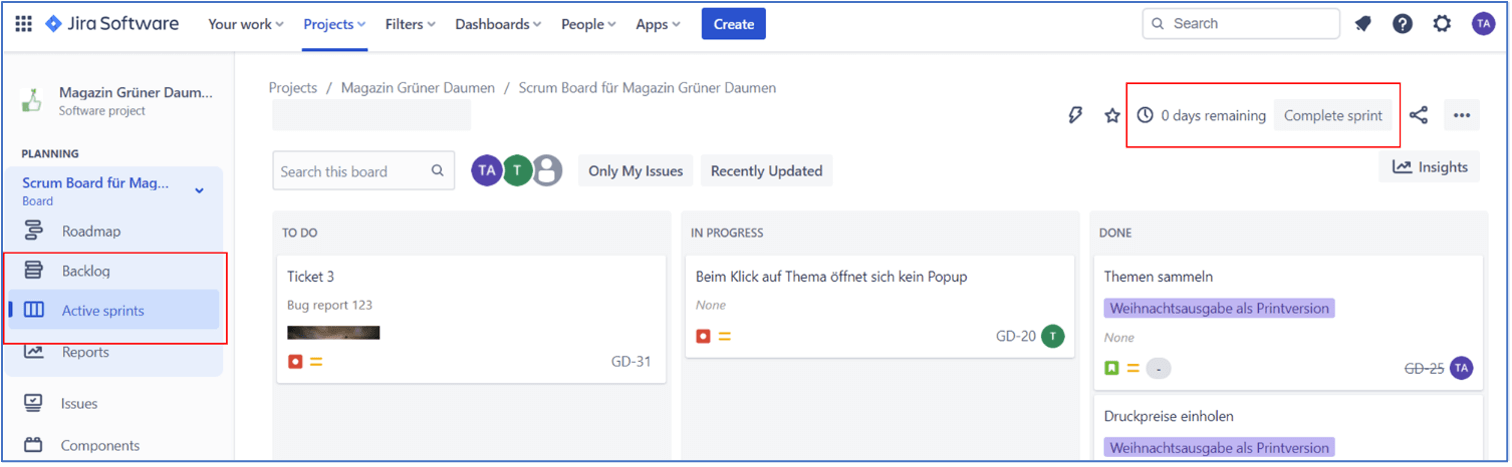
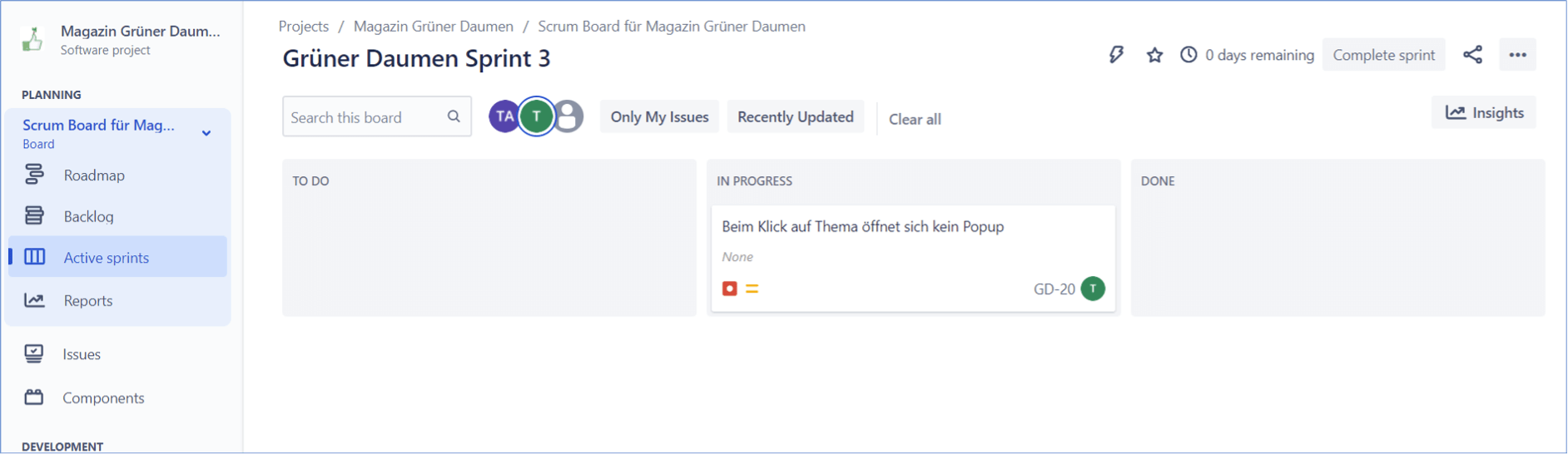
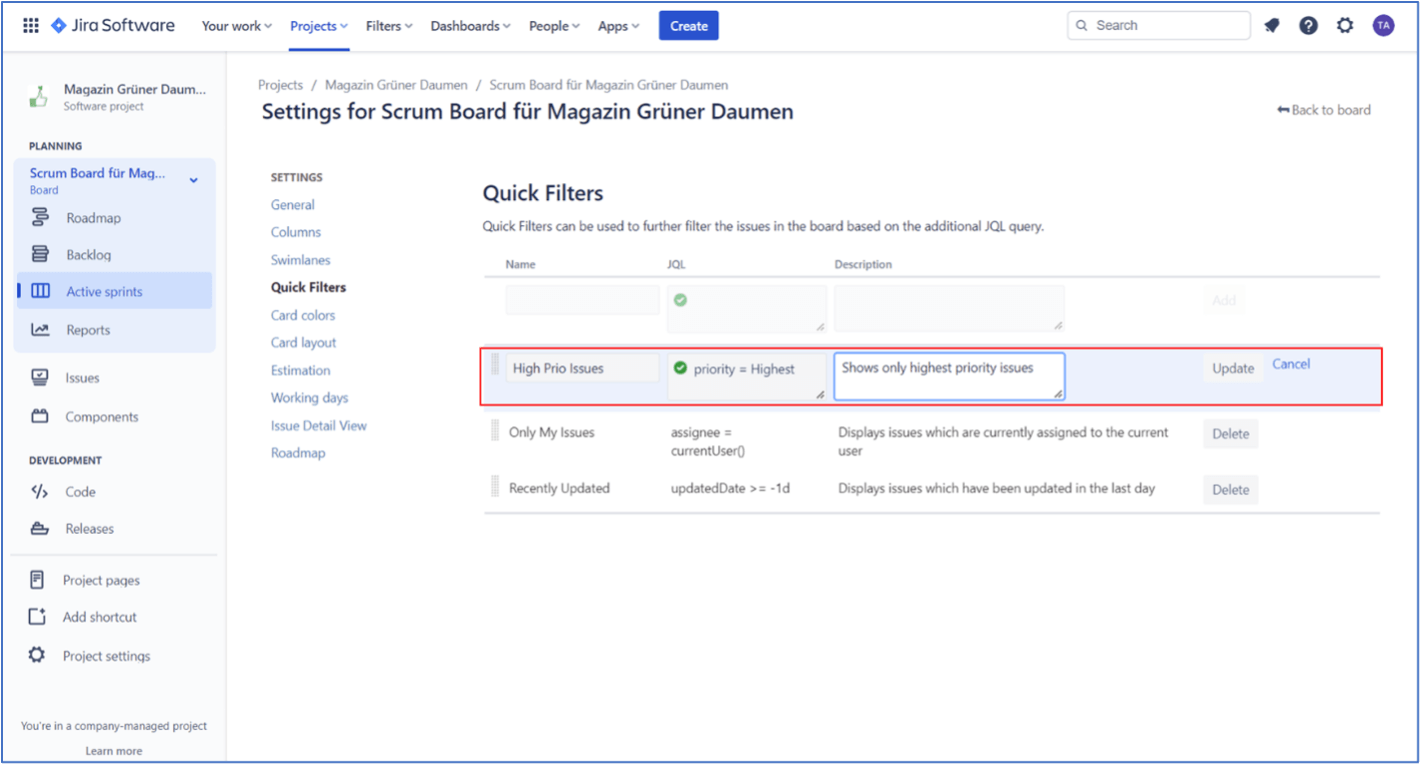
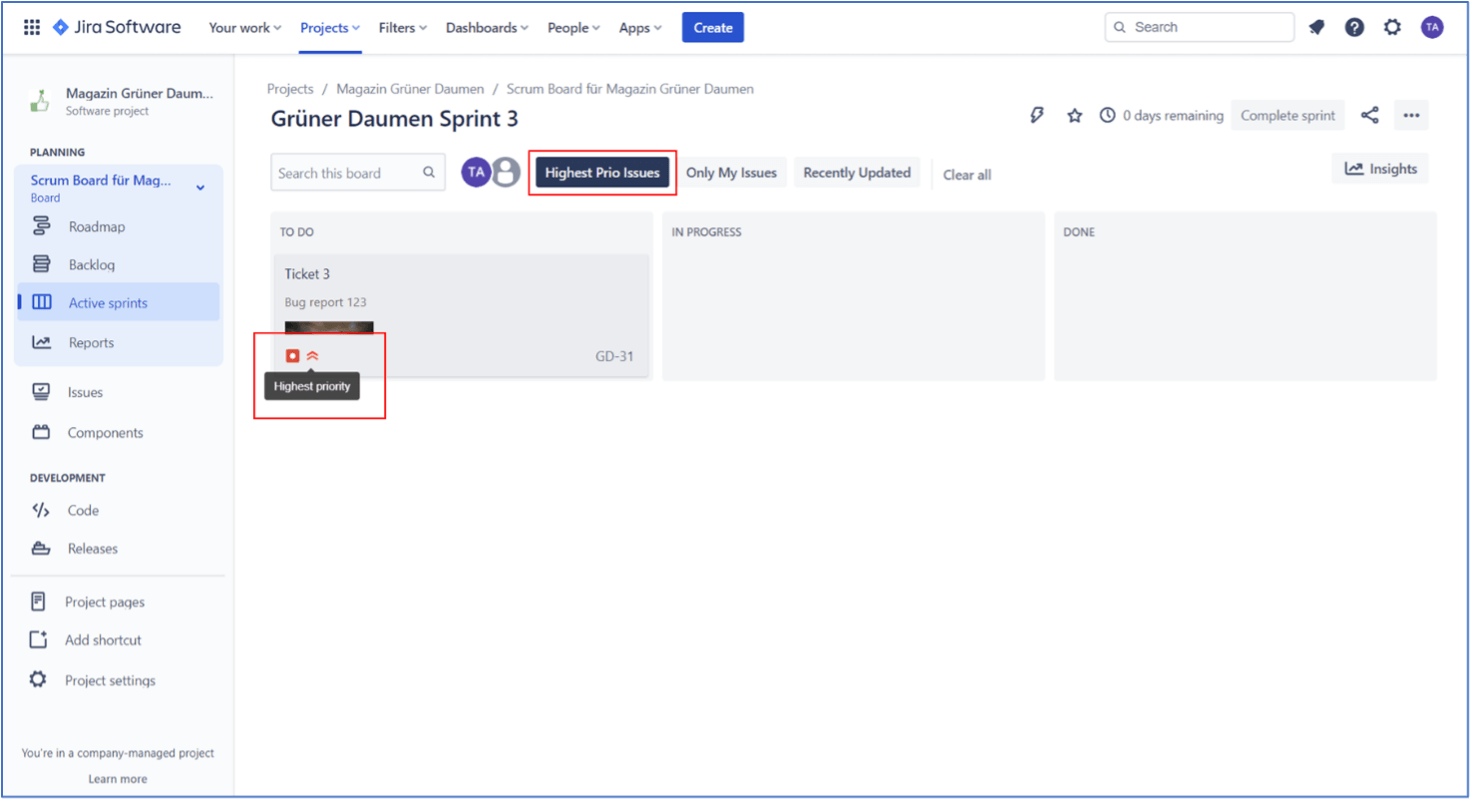
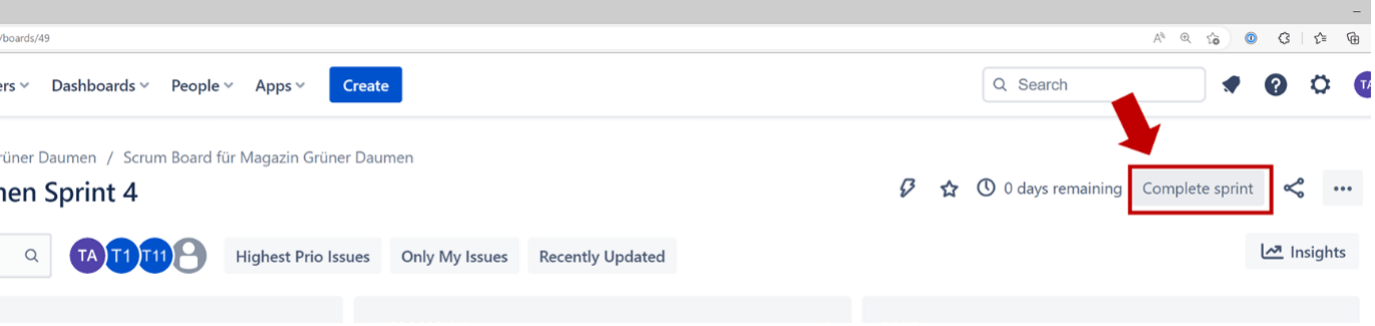
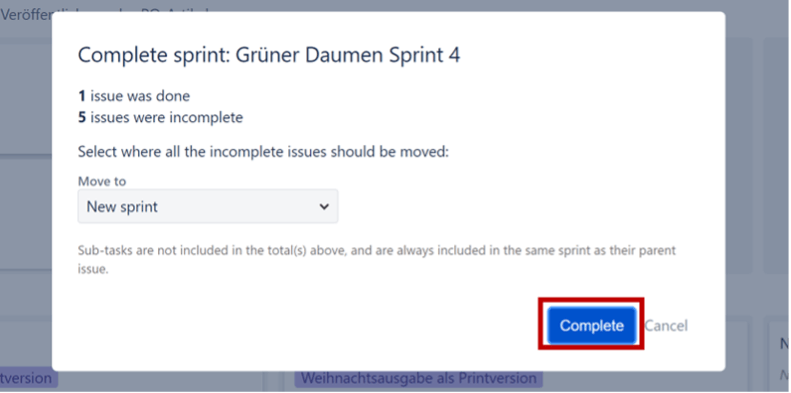
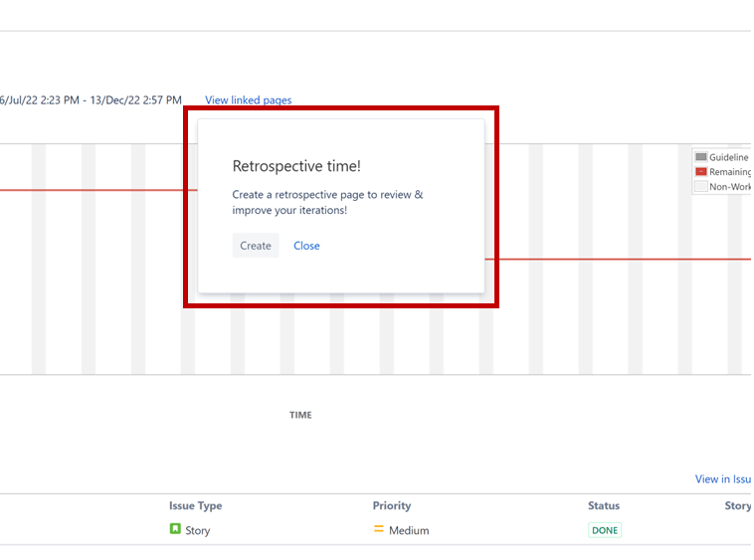
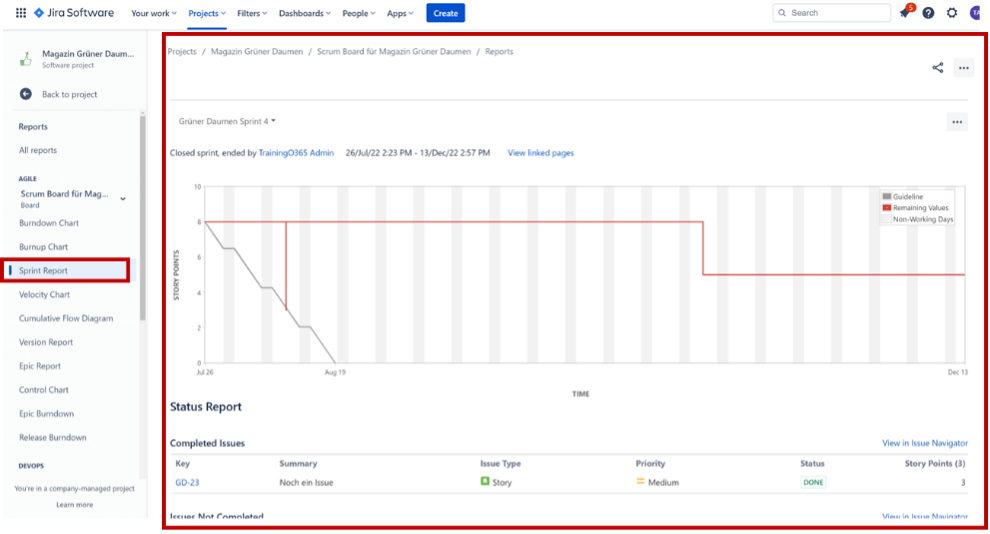
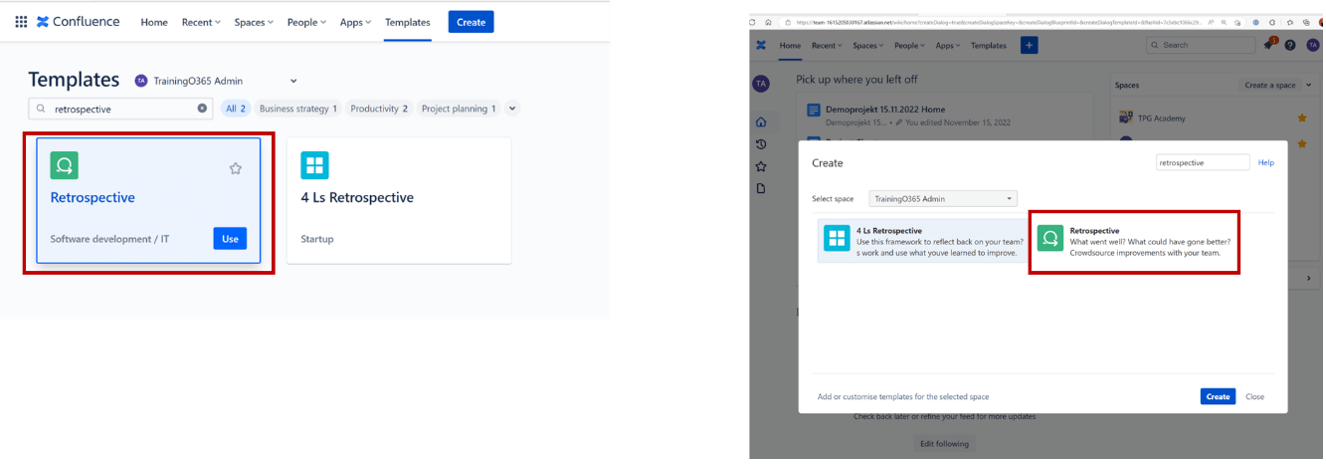
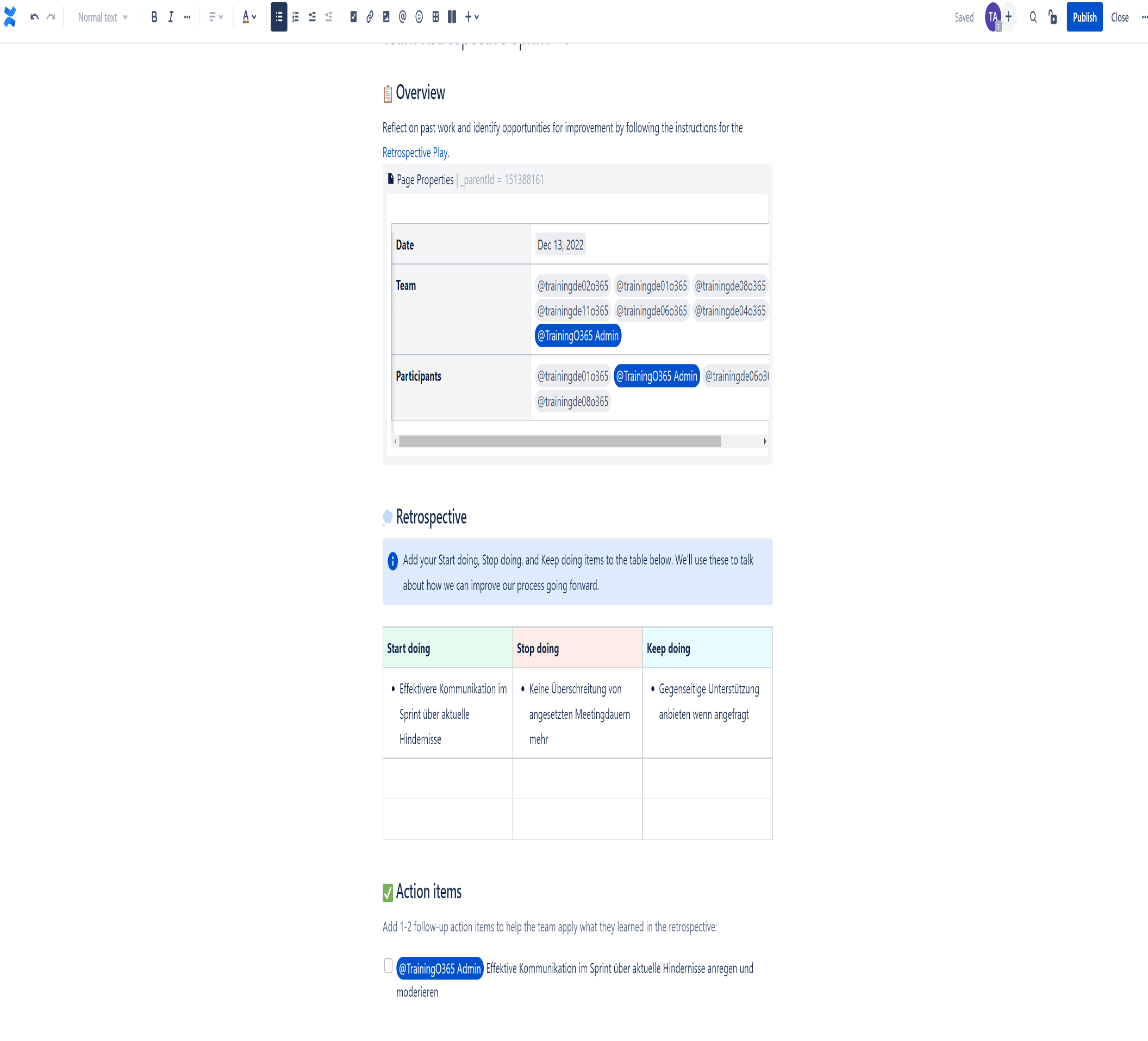
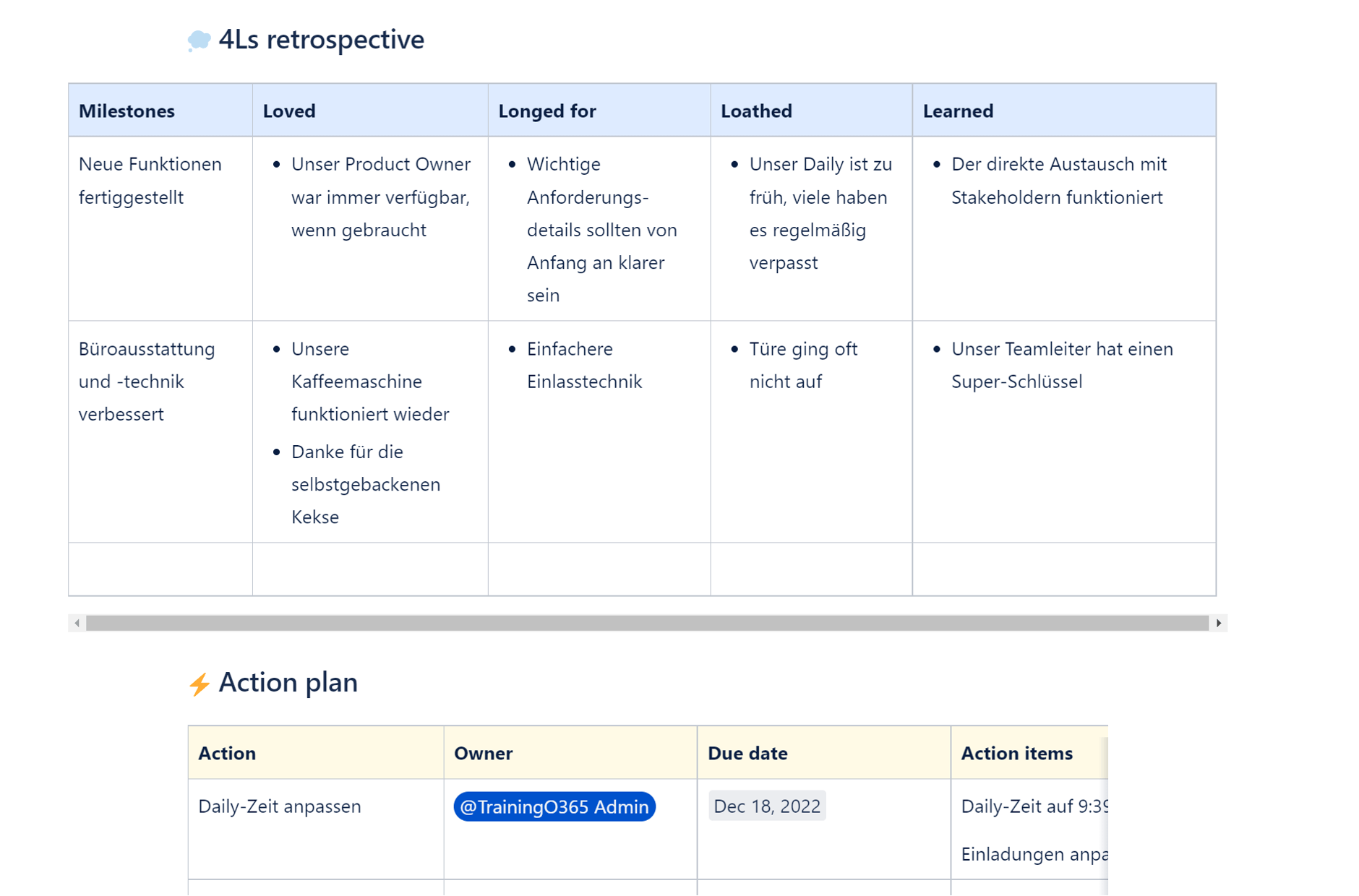
<img loading='lazy' style='display: none;' data-attachment-id-target='11834' src='https://www.theprojectgroup.com/blog/wp-content/uploads/2023/12/Picture-1-1.png'><img loading='lazy' style='display: none;' data-attachment-id-target='11833' src='https://www.theprojectgroup.com/blog/wp-content/uploads/2023/12/Picture-2-1.png'><img loading='lazy' style='display: none;' data-attachment-id-target='0' src=''><img loading='lazy' style='display: none;' data-attachment-id-target='11832' src='https://www.theprojectgroup.com/blog/wp-content/uploads/2023/12/Picture-3-1.png'><img loading='lazy' style='display: none;' data-attachment-id-target='11831' src='https://www.theprojectgroup.com/blog/wp-content/uploads/2023/12/Picture-4-1.png'><img loading='lazy' style='display: none;' data-attachment-id-target='11830' src='https://www.theprojectgroup.com/blog/wp-content/uploads/2023/12/Picture-5-1.png'><img loading='lazy' style='display: none;' data-attachment-id-target='0' src=''><img loading='lazy' style='display: none;' data-attachment-id-target='11829' src='https://www.theprojectgroup.com/blog/wp-content/uploads/2023/12/Picture-6-1.png'><img loading='lazy' style='display: none;' data-attachment-id-target='11828' src='https://www.theprojectgroup.com/blog/wp-content/uploads/2023/12/Picture-7-1.png'><img loading='lazy' style='display: none;' data-attachment-id-target='11827' src='https://www.theprojectgroup.com/blog/wp-content/uploads/2023/12/Picture-8-1.png'><img loading='lazy' style='display: none;' data-attachment-id-target='11826' src='https://www.theprojectgroup.com/blog/wp-content/uploads/2023/12/Picture-9-1.png'><img loading='lazy' style='display: none;' data-attachment-id-target='11825' src='https://www.theprojectgroup.com/blog/wp-content/uploads/2023/12/Picture-10-1.png'><img loading='lazy' style='display: none;' data-attachment-id-target='11824' src='https://www.theprojectgroup.com/blog/wp-content/uploads/2023/12/Picture-11-1.png'><img loading='lazy' style='display: none;' data-attachment-id-target='11823' src='https://www.theprojectgroup.com/blog/wp-content/uploads/2023/12/Picture-12.png'><img loading='lazy' style='display: none;' data-attachment-id-target='0' src=''><img loading='lazy' style='display: none;' data-attachment-id-target='6274' src='https://www.theprojectgroup.com/blog/wp-content/uploads/2020/04/Antje-058-Bearbeitet_quadrat_Web-e1598523083709.jpg'><img loading='lazy' style='display: none;' data-attachment-id-target='0' src=''>{"id":10277,"date":"2023-12-12T19:26:33","date_gmt":"2023-12-12T18:26:33","guid":{"rendered":"https:\/\/www.theprojectgroup.com\/blog\/?p=10277"},"modified":"2025-06-26T16:59:11","modified_gmt":"2025-06-26T14:59:11","slug":"scrum-master-jira","status":"publish","type":"post","link":"https:\/\/www.theprojectgroup.com\/blog\/scrum-master-jira\/","title":{"rendered":"3 Scrum Master Jira \/ Confluence Tipps, durch die Sie leichter mit den Tools arbeiten"},"content":{"rendered":"<p>Das webbasierte Atlassian Jira hat sich mittlerweile zum dominierenden Tool f\u00fcr Aufgabenmanagement, Projektmanagement und Fehlerverwaltung entwickelt. Besonders f\u00fcr Projekte, in denen die Methoden Scrum und Kanban zum Einsatz kommen, eignet sich Jira sehr gut.\u00a0In diesem Artikel finden Sie drei<strong> Scrum Master Jira \/ Confluence Tipps.<\/strong><\/p>\n<p>Lernen Sie, wie Sie diese Tools f\u00fcr eine bessere Begleitung Ihrer Prozesse sowie f\u00fcr die Team-Fortschrittsmessung nutzen k\u00f6nnen. Dieser Artikel ist Bestandteil unserer Blog-Reihe <a href=\"#Serie\">\u201eJira f\u00fcr Rollen im Projektmanagement\u201c<\/a>.<\/p>\n<p>Diese Kapitel warten auf Sie:<\/p>\n<ul>\n<li><a href=\"#Kapitel1\">Welche Aufgaben eines Scrum Masters k\u00f6nnen Jira und Confluence unterst\u00fctzen?<\/a><\/li>\n<li><a href=\"#Kapitel2\">Tipp 1: Quickfilter f\u00fcr das Sprintboard einsetzen<\/a><\/li>\n<li><a href=\"#Kapitel3\">Tipp 2: Retrospektive mit Sprint-Report verkn\u00fcpfen<\/a><\/li>\n<li><a href=\"#Kapitel4\">Tipp 3: Retrospektiven-Vorlage in Confluence und weitere Templates<\/a><\/li>\n<li><a href=\"#Kapitel5\">Fazit \u2013 Jira l\u00e4sst sich f\u00fcr Scrum Team Zwecke sinnvoll einsetzen<\/a><\/li>\n<\/ul>\n<p>Legen wir los mit zwei kurzen Definitionen.<\/p>\n<h2>Was ist Jira?<\/h2>\n<p><a href=\"https:\/\/www.atlassian.com\/de\/jira\" target=\"_blank\" rel=\"noopener\">Atlassian Jira<\/a> ist ein webbasiertes Tool f\u00fcr Aufgabenmanagement, Projektmanagement und Fehlerverwaltung. Es kommt haupts\u00e4chlich bei Teams in der Produkt- und Softwareentwicklung zum Einsatz. Teams, die im <a href=\"https:\/\/www.theprojectgroup.com\/blog\/agiles-projektmanagement-grundlagen\/\" target=\"_blank\" rel=\"noopener\">agilen Projektmanagement<\/a> arbeiten, werden mittels verschiedener Projekt- und Boardtypen (z.B. Kanban, Scrum, Projektmanagement u.v.m.) unterst\u00fctzt.<\/p>\n<h2>Was ist Confluence?<\/h2>\n<p><a href=\"https:\/\/www.atlassian.com\/software\/confluence\" target=\"_blank\" rel=\"noopener\">Atlassian Confluence<\/a> ist eine webbasierte Wiki-Software, die die interne Zusammenarbeit in Projektteams und im Unternehmen unterst\u00fctzt. Das Tool l\u00e4sst sich hervorragend mit Jira integrieren und bietet in dieser Kombination beste Voraussetzungen f\u00fcr agil arbeitende Teams.<\/p>\n<h2 id=\"Kapitel1\">Welche Aufgaben eines Scrum Masters k\u00f6nnen Jira und Confluence unterst\u00fctzen?<\/h2>\n<p>Jira ist vor allem f\u00fcr <strong>Aufgabenmanagement<\/strong> gedacht und bildet dabei die Realit\u00e4ten verschiedener Teams durch diverse Projekt- und Boardtypen gut ab.<\/p>\n<p>F\u00fcr Scrum Teams gibt es in Jira unter den Softwareprojekten den Vorlagentyp \u201eScrum\u201c.<\/p>\n<figure id=\"attachment_11834\" aria-describedby=\"caption-attachment-11834\" style=\"width: 702px\" class=\"wp-caption aligncenter\"><a href=\"https:\/\/www.theprojectgroup.com\/blog\/wp-content\/uploads\/2023\/12\/Picture-1-1.png\"><img data-attachment-id=\"11834\"loading=\"lazy\" decoding=\"async\" class=\"wp-image-11834 size-large\" src=\"https:\/\/www.theprojectgroup.com\/blog\/wp-content\/uploads\/2023\/12\/Picture-1-1-1024x589.png\" alt=\"Scrum-Softwareprojektvorlage in Jira Cloud\" width=\"702\" height=\"404\" srcset=\"https:\/\/www.theprojectgroup.com\/blog\/wp-content\/uploads\/2023\/12\/Picture-1-1-1024x589.png 1024w, https:\/\/www.theprojectgroup.com\/blog\/wp-content\/uploads\/2023\/12\/Picture-1-1-300x173.png 300w, https:\/\/www.theprojectgroup.com\/blog\/wp-content\/uploads\/2023\/12\/Picture-1-1-768x442.png 768w, https:\/\/www.theprojectgroup.com\/blog\/wp-content\/uploads\/2023\/12\/Picture-1-1-1536x884.png 1536w, https:\/\/www.theprojectgroup.com\/blog\/wp-content\/uploads\/2023\/12\/Picture-1-1.png 1828w\" sizes=\"(max-width: 702px) 100vw, 702px\" \/><\/a><figcaption id=\"caption-attachment-11834\" class=\"wp-caption-text\">Scrum-Softwareprojektvorlage in Jira Cloud<\/figcaption><\/figure>\n<p>Diesen Vorlagentyp zeichnet gegen\u00fcber beispielsweise Kanban Projekten aus, dass er eine Sprint-Funktionalit\u00e4t hat. Dies bedeutet, dass ein <strong>Sprintboard<\/strong> f\u00fcr Planung und Durchf\u00fchrung von Arbeit in getakteten Iterationen zur Verf\u00fcgung steht.<\/p>\n<figure id=\"attachment_11833\" aria-describedby=\"caption-attachment-11833\" style=\"width: 702px\" class=\"wp-caption aligncenter\"><a href=\"https:\/\/www.theprojectgroup.com\/blog\/wp-content\/uploads\/2023\/12\/Picture-2-1.png\"><img data-attachment-id=\"11833\"loading=\"lazy\" decoding=\"async\" class=\"wp-image-11833 size-large\" src=\"https:\/\/www.theprojectgroup.com\/blog\/wp-content\/uploads\/2023\/12\/Picture-2-1-1024x316.png\" alt=\"Scrum Master Jira \u2013 Sprint-Funktionalit\u00e4ten \" width=\"702\" height=\"217\" srcset=\"https:\/\/www.theprojectgroup.com\/blog\/wp-content\/uploads\/2023\/12\/Picture-2-1-1024x316.png 1024w, https:\/\/www.theprojectgroup.com\/blog\/wp-content\/uploads\/2023\/12\/Picture-2-1-300x93.png 300w, https:\/\/www.theprojectgroup.com\/blog\/wp-content\/uploads\/2023\/12\/Picture-2-1-768x237.png 768w, https:\/\/www.theprojectgroup.com\/blog\/wp-content\/uploads\/2023\/12\/Picture-2-1.png 1512w\" sizes=\"(max-width: 702px) 100vw, 702px\" \/><\/a><figcaption id=\"caption-attachment-11833\" class=\"wp-caption-text\">Sprint-Funktionalit\u00e4ten in Scrum-Projekten: Planung und Abarbeitung offener Themen pro Sprint<\/figcaption><\/figure>\n<p>In Scrum Teams k\u00fcmmern sich Scrum Master insbesondere darum, die Prozesse und die Zusammenarbeit des Teams bestm\u00f6glich zu unterst\u00fctzen. Sie helfen der Organisation dabei, Scrum besser zu verstehen und anzuwenden.<\/p>\n<p>Als Scrum Master k\u00f6nnen Sie die Arbeit Ihres Scrum Teams mit den speziellen Funktionalit\u00e4ten von Scrum Projekten in Jira und Confluence gut begleiten. Drei aus unserer Sicht sehr wichtige Tipps lesen Sie im folgenden Text.<\/p>\n<p>Fangen wir mit dem Sprintboard an.<\/p>\n\n    <p class=\"datamintsbanner\">\n        <a href=\"\" target=\"_blank\" class=\"datamintsbanner__link\" title=\"Motorworld Event (TPG Webinar)\" style=\"display: block;\">\n            <img data-attachment-id=\"0\"decoding=\"async\" src=\"\" class=\"datamintsbanner__image\" style=\"display: block; max-width: 100%\">\n        <\/a>\n    <\/p>\n    \n<h2 id=\"Kapitel2\">Tipp 1: Quickfilter f\u00fcr das Sprintboard einsetzen<\/h2>\n<p><strong>Quickfilter<\/strong> befinden sich direkt \u00fcber dem Board. Mit ihnen lassen sich die Issues filtern, die in Form von Karten auf dem Board angezeigt werden. Wenn beispielsweise ein Quickfilter f\u00fcr eine bestimmte zugewiesene Person (Assignee) aktiviert ist, sind auf dem Board nur diejenigen Issues zu sehen, welche gerade dieser Person zugewiesen sind.<\/p>\n<figure id=\"attachment_11832\" aria-describedby=\"caption-attachment-11832\" style=\"width: 702px\" class=\"wp-caption aligncenter\"><a href=\"https:\/\/www.theprojectgroup.com\/blog\/wp-content\/uploads\/2023\/12\/Picture-3-1.png\"><img data-attachment-id=\"11832\"loading=\"lazy\" decoding=\"async\" class=\"wp-image-11832 size-large\" src=\"https:\/\/www.theprojectgroup.com\/blog\/wp-content\/uploads\/2023\/12\/Picture-3-1-1024x297.png\" alt=\"Scrum Master Jira \u2013 Quickfilter\" width=\"702\" height=\"204\" srcset=\"https:\/\/www.theprojectgroup.com\/blog\/wp-content\/uploads\/2023\/12\/Picture-3-1-1024x297.png 1024w, https:\/\/www.theprojectgroup.com\/blog\/wp-content\/uploads\/2023\/12\/Picture-3-1-300x87.png 300w, https:\/\/www.theprojectgroup.com\/blog\/wp-content\/uploads\/2023\/12\/Picture-3-1-768x223.png 768w, https:\/\/www.theprojectgroup.com\/blog\/wp-content\/uploads\/2023\/12\/Picture-3-1-1536x445.png 1536w, https:\/\/www.theprojectgroup.com\/blog\/wp-content\/uploads\/2023\/12\/Picture-3-1.png 1884w\" sizes=\"(max-width: 702px) 100vw, 702px\" \/><\/a><figcaption id=\"caption-attachment-11832\" class=\"wp-caption-text\">Quickfilter f\u00fcr Assignees: Nur dem hier mit \u201eT\u201c bezeichneten Nutzer momentan zugewiesene Issues werden im Board angezeigt. Eine Mehrfachauswahl ist m\u00f6glich.<\/figcaption><\/figure>\n<p>Dies l\u00e4sst sich gut als Moderationshilfe einsetzen: Gerade bei neuen Scrum Teams ist es h\u00e4ufig noch ein Scrum Master, der zumindest unterst\u00fctzend durch das <strong>Daily Scrum Event<\/strong> f\u00fchrt. Das Daily Scrum dient als t\u00e4gliche Zusammenkunft zur \u00dcberpr\u00fcfung des Fortschritts im Hinblick auf das Sprintziel.<\/p>\n<p>Wenn das Team das Daily so gestaltet, dass jedes Teammitglied den anderen zu seinen aktuellen Themen etwas erz\u00e4hlt (etwa zu Arbeitsfortschritt, Hindernissen, Erfolgen), k\u00f6nnen Sie als Scrum Master auf einem geteilten Bildschirm deren aktuelle Themen schnell f\u00fcr alle transparent machen. Nutzen Sie dazu die jeweilige Aktivierung des Quickfilters f\u00fcr die betreffende Person.<\/p>\n<blockquote><p><strong>Unser Tipp: <\/strong>Springen Sie bei Ihren Daily Scrum Events auf diese Weise einmal reihum durch die Mitglieder Ihres Teams \u2013 und durch das Board mithilfe der Quickfilter, wie oben beschrieben.<\/p><\/blockquote>\n<p>Quickfilter f\u00fcr Assignees gibt es in Jira oft schon voreingestellt. Dar\u00fcber hinaus k\u00f6nnen Sie auch f\u00fcr viele andere Faktoren selbst weitere Filter einrichten \u2013 Board-Konfigurationsrechte vorausgesetzt.<\/p>\n<p>Quickfilter f\u00fcr Jira Boards basieren auf der so genannten \u201eJira Query Language\u201c. Alles, was sich in Jira filtern l\u00e4sst, k\u00f6nnen Sie auch als Boardfilter einsetzen, wie zum Beispiel verschiedene Priorit\u00e4tsstufen.<\/p>\n<figure id=\"attachment_11831\" aria-describedby=\"caption-attachment-11831\" style=\"width: 702px\" class=\"wp-caption aligncenter\"><a href=\"https:\/\/www.theprojectgroup.com\/blog\/wp-content\/uploads\/2023\/12\/Picture-4-1.png\"><img data-attachment-id=\"11831\"loading=\"lazy\" decoding=\"async\" class=\"wp-image-11831 size-large\" src=\"https:\/\/www.theprojectgroup.com\/blog\/wp-content\/uploads\/2023\/12\/Picture-4-1-1024x551.png\" alt=\"Scrum Master Jira \u2013 Quickfilter\" width=\"702\" height=\"378\" srcset=\"https:\/\/www.theprojectgroup.com\/blog\/wp-content\/uploads\/2023\/12\/Picture-4-1-1024x551.png 1024w, https:\/\/www.theprojectgroup.com\/blog\/wp-content\/uploads\/2023\/12\/Picture-4-1-300x161.png 300w, https:\/\/www.theprojectgroup.com\/blog\/wp-content\/uploads\/2023\/12\/Picture-4-1-768x413.png 768w, https:\/\/www.theprojectgroup.com\/blog\/wp-content\/uploads\/2023\/12\/Picture-4-1.png 1423w\" sizes=\"(max-width: 702px) 100vw, 702px\" \/><\/a><figcaption id=\"caption-attachment-11831\" class=\"wp-caption-text\">Ein Quickfilter, der alle h\u00f6chstpriorisierten Issues anzeigen l\u00e4sst\u2026<\/figcaption><\/figure>\n<figure id=\"attachment_11830\" aria-describedby=\"caption-attachment-11830\" style=\"width: 702px\" class=\"wp-caption aligncenter\"><a href=\"https:\/\/www.theprojectgroup.com\/blog\/wp-content\/uploads\/2023\/12\/Picture-5-1.png\"><img data-attachment-id=\"11830\"loading=\"lazy\" decoding=\"async\" class=\"wp-image-11830 size-large\" src=\"https:\/\/www.theprojectgroup.com\/blog\/wp-content\/uploads\/2023\/12\/Picture-5-1-1024x559.png\" alt=\"Scrum Master Jira \u2013 Quickfilter\" width=\"702\" height=\"383\" srcset=\"https:\/\/www.theprojectgroup.com\/blog\/wp-content\/uploads\/2023\/12\/Picture-5-1-1024x559.png 1024w, https:\/\/www.theprojectgroup.com\/blog\/wp-content\/uploads\/2023\/12\/Picture-5-1-300x164.png 300w, https:\/\/www.theprojectgroup.com\/blog\/wp-content\/uploads\/2023\/12\/Picture-5-1-768x419.png 768w, https:\/\/www.theprojectgroup.com\/blog\/wp-content\/uploads\/2023\/12\/Picture-5-1.png 1472w\" sizes=\"(max-width: 702px) 100vw, 702px\" \/><\/a><figcaption id=\"caption-attachment-11830\" class=\"wp-caption-text\">\u2026 sieht im Board dann zum Beispiel so aus.<\/figcaption><\/figure>\n<p>Auf diese Weise k\u00f6nnen Sie als Scrum Master sicherstellen, dass in den Team-Meetings und Scrum Events die Themen auf dem Board angezeigt werden, auf die sich das Team gerade konzentrieren m\u00f6chte.<\/p>\n\n    <p class=\"datamintsbanner\">\n        <a href=\"https:\/\/www.theprojectgroup.com\/de\/seminar-change-management\" target=\"_blank\" class=\"datamintsbanner__link\" title=\"Seminar Change Management \/ User Adoption im Projektumfeld\" style=\"display: block;\">\n            <img data-attachment-id=\"0\"decoding=\"async\" src=\"https:\/\/www.theprojectgroup.com\/blog\/wp-content\/uploads\/2024\/05\/Blog-Banner-Changemanagement-Seminar.jpg\" class=\"datamintsbanner__image\" style=\"display: block; max-width: 100%\">\n        <\/a>\n    <\/p>\n    \n<h2 id=\"Kapitel3\">Tipp 2: Retrospektive mit Sprint Report verkn\u00fcpfen<\/h2>\n<p>Zu Ihrem Aufgabenfeld als Scrum Master kann auch geh\u00f6ren, m\u00f6glichst produktive <a href=\"https:\/\/www.theprojectgroup.com\/blog\/retrospektive-methoden\/\" target=\"_blank\" rel=\"noopener\">Retrospektiven<\/a> zu gestalten. Zum Beispiel, indem Sie diese selbst moderieren. Oder indem Sie den anderen Scrum Teammitgliedern zeigen, wie sie selbst Retrospektiven abhalten k\u00f6nnen, die zu sinnvollen und nachhaltigen Verbesserungen von Prozess und Teamarbeit f\u00fchren.<\/p>\n<p>Die Arbeit von Scrum Teams wird in Jira durch Scrum-projektspezifische Auswertungen in Form von Reports unterst\u00fctzt. F\u00fcr Retrospektiven am Ende eines Sprints kann Ihnen der <strong>Sprint Report in Jira<\/strong> helfen, die Effektivit\u00e4t der erledigten Arbeit besser zu verstehen.<\/p>\n<p>Wenn aktive Sprints in Jira beendet werden, zeigt die Software automatisch einen Sprint Report an:<\/p>\n<figure id=\"attachment_11829\" aria-describedby=\"caption-attachment-11829\" style=\"width: 702px\" class=\"wp-caption aligncenter\"><a href=\"https:\/\/www.theprojectgroup.com\/blog\/wp-content\/uploads\/2023\/12\/Picture-6-1.png\"><img data-attachment-id=\"11829\"loading=\"lazy\" decoding=\"async\" class=\"wp-image-11829 size-large\" src=\"https:\/\/www.theprojectgroup.com\/blog\/wp-content\/uploads\/2023\/12\/Picture-6-1-1024x243.png\" alt=\"\" width=\"702\" height=\"167\" srcset=\"https:\/\/www.theprojectgroup.com\/blog\/wp-content\/uploads\/2023\/12\/Picture-6-1-1024x243.png 1024w, https:\/\/www.theprojectgroup.com\/blog\/wp-content\/uploads\/2023\/12\/Picture-6-1-300x71.png 300w, https:\/\/www.theprojectgroup.com\/blog\/wp-content\/uploads\/2023\/12\/Picture-6-1-768x182.png 768w, https:\/\/www.theprojectgroup.com\/blog\/wp-content\/uploads\/2023\/12\/Picture-6-1.png 1375w\" sizes=\"(max-width: 702px) 100vw, 702px\" \/><\/a><figcaption id=\"caption-attachment-11829\" class=\"wp-caption-text\">Schritt 1: Klick auf \u201eComplete Sprint\u201c in der aktiven-Sprintansicht in einem Scrum-Projekt.<\/figcaption><\/figure>\n<figure id=\"attachment_11828\" aria-describedby=\"caption-attachment-11828\" style=\"width: 791px\" class=\"wp-caption aligncenter\"><a href=\"https:\/\/www.theprojectgroup.com\/blog\/wp-content\/uploads\/2023\/12\/Picture-7-1.png\"><img data-attachment-id=\"11828\"loading=\"lazy\" decoding=\"async\" class=\"wp-image-11828 size-full\" src=\"https:\/\/www.theprojectgroup.com\/blog\/wp-content\/uploads\/2023\/12\/Picture-7-1.png\" alt=\"Scrum Master Jira \u2013 Best\u00e4tigung \" width=\"791\" height=\"393\" srcset=\"https:\/\/www.theprojectgroup.com\/blog\/wp-content\/uploads\/2023\/12\/Picture-7-1.png 791w, https:\/\/www.theprojectgroup.com\/blog\/wp-content\/uploads\/2023\/12\/Picture-7-1-300x150.png 300w, https:\/\/www.theprojectgroup.com\/blog\/wp-content\/uploads\/2023\/12\/Picture-7-1-768x382.png 768w, https:\/\/www.theprojectgroup.com\/blog\/wp-content\/uploads\/2023\/12\/Picture-7-1-350x175.png 350w, https:\/\/www.theprojectgroup.com\/blog\/wp-content\/uploads\/2023\/12\/Picture-7-1-164x82.png 164w\" sizes=\"(max-width: 791px) 100vw, 791px\" \/><\/a><figcaption id=\"caption-attachment-11828\" class=\"wp-caption-text\">Schritt 2: Best\u00e4tigung und Vorgabe an Jira, was mit gegebenenfalls noch nicht abgeschlossenen Themen im Sprint passieren soll (in einen neuen \/ n\u00e4chsten Sprint? Zur\u00fcck ins Backlog?)<\/figcaption><\/figure>\n<figure id=\"attachment_11827\" aria-describedby=\"caption-attachment-11827\" style=\"width: 500px\" class=\"wp-caption aligncenter\"><a href=\"https:\/\/www.theprojectgroup.com\/blog\/wp-content\/uploads\/2023\/12\/Picture-8-1.png\"><img data-attachment-id=\"11827\"loading=\"lazy\" decoding=\"async\" class=\"wp-image-11827\" src=\"https:\/\/www.theprojectgroup.com\/blog\/wp-content\/uploads\/2023\/12\/Picture-8-1.png\" alt=\"Scrum Master Jira \u2013 Retrospektive\" width=\"500\" height=\"371\" srcset=\"https:\/\/www.theprojectgroup.com\/blog\/wp-content\/uploads\/2023\/12\/Picture-8-1.png 754w, https:\/\/www.theprojectgroup.com\/blog\/wp-content\/uploads\/2023\/12\/Picture-8-1-300x223.png 300w\" sizes=\"(max-width: 500px) 100vw, 500px\" \/><\/a><figcaption id=\"caption-attachment-11827\" class=\"wp-caption-text\">Schritt 3: Jira schl\u00e4gt an diesem Punkt vor, eine Retrospektiven-Seite im Schwester-Tool Confluence anzulegen. Dies ist Inhalt des n\u00e4chsten Tipps in diesem Artikel.<\/figcaption><\/figure>\n<figure id=\"attachment_11826\" aria-describedby=\"caption-attachment-11826\" style=\"width: 990px\" class=\"wp-caption aligncenter\"><a href=\"https:\/\/www.theprojectgroup.com\/blog\/wp-content\/uploads\/2023\/12\/Picture-9-1.png\"><img data-attachment-id=\"11826\"loading=\"lazy\" decoding=\"async\" class=\"wp-image-11826 size-full\" src=\"https:\/\/www.theprojectgroup.com\/blog\/wp-content\/uploads\/2023\/12\/Picture-9-1.png\" alt=\"Scrum Master Jira \u2013 Sprint Report\" width=\"990\" height=\"534\" srcset=\"https:\/\/www.theprojectgroup.com\/blog\/wp-content\/uploads\/2023\/12\/Picture-9-1.png 990w, https:\/\/www.theprojectgroup.com\/blog\/wp-content\/uploads\/2023\/12\/Picture-9-1-300x162.png 300w, https:\/\/www.theprojectgroup.com\/blog\/wp-content\/uploads\/2023\/12\/Picture-9-1-768x414.png 768w\" sizes=\"(max-width: 990px) 100vw, 990px\" \/><\/a><figcaption id=\"caption-attachment-11826\" class=\"wp-caption-text\">Schritt 4: Ansicht des Sprint-Reports in Jira, basierend auf den Fortschrittsdaten. Diese Ansicht besteht aus einem Sprint-Burndown-Diagramm und aus einer Liste fertiggestellter sowie nicht fertiggestellter Themen darunter.<\/figcaption><\/figure>\n<h2 id=\"Kapitel4\">Tipp 3: Retrospektiven-Vorlage in Confluence und weitere Templates<\/h2>\n<p>Damit Teams ihre Retrospektiven moderativ begleiten und ihre Erkenntnisse notieren k\u00f6nnen, gibt es einige verschiedene <strong>Vorlagen in Confluence<\/strong>. Wenn Sie eine neue Seite in Confluence mit der entsprechenden Vorlage anlegen m\u00f6chten, k\u00f6nnen Sie beim Beenden eines Sprints dem Link aus Schritt 3 im vorherigen Tipp folgen \u2013 oder einfach in Confluence auf <em>Vorlagen<\/em> (engl. <em>Templates<\/em>) klicken.<\/p>\n<p>In einigen Confluence Versionen gelangen Sie zu den Vorlagen \u00fcber den <em>Erstellen<\/em>-Button (engl. <em>Create<\/em>). W\u00e4hlen Sie hier die Vorlagen mit dem Namen \u201e<strong>Retrospective<\/strong>\u201c.<\/p>\n<figure id=\"attachment_11825\" aria-describedby=\"caption-attachment-11825\" style=\"width: 600px\" class=\"wp-caption aligncenter\"><a href=\"https:\/\/www.theprojectgroup.com\/blog\/wp-content\/uploads\/2023\/12\/Picture-10-1.png\"><img data-attachment-id=\"11825\"loading=\"lazy\" decoding=\"async\" class=\"wp-image-11825\" src=\"https:\/\/www.theprojectgroup.com\/blog\/wp-content\/uploads\/2023\/12\/Picture-10-1-1024x358.png\" alt=\"Scrum Master Jira \u2013 Vorlagen-\u00dcbersicht\" width=\"600\" height=\"210\" srcset=\"https:\/\/www.theprojectgroup.com\/blog\/wp-content\/uploads\/2023\/12\/Picture-10-1-1024x358.png 1024w, https:\/\/www.theprojectgroup.com\/blog\/wp-content\/uploads\/2023\/12\/Picture-10-1-300x105.png 300w, https:\/\/www.theprojectgroup.com\/blog\/wp-content\/uploads\/2023\/12\/Picture-10-1-768x269.png 768w, https:\/\/www.theprojectgroup.com\/blog\/wp-content\/uploads\/2023\/12\/Picture-10-1.png 1326w\" sizes=\"(max-width: 600px) 100vw, 600px\" \/><\/a><figcaption id=\"caption-attachment-11825\" class=\"wp-caption-text\">Schritt 1: Ansicht der Vorlagen-\u00dcbersicht in Confluence mit Suche nach Vorlagennamen. \u201eRetrospective\u201c und Auswahl dieser Vorlage<\/figcaption><\/figure>\n<figure id=\"attachment_11824\" aria-describedby=\"caption-attachment-11824\" style=\"width: 500px\" class=\"wp-caption aligncenter\"><a href=\"https:\/\/www.theprojectgroup.com\/blog\/wp-content\/uploads\/2023\/12\/Picture-11-1.png\"><img data-attachment-id=\"11824\"loading=\"lazy\" decoding=\"async\" class=\"wp-image-11824\" src=\"https:\/\/www.theprojectgroup.com\/blog\/wp-content\/uploads\/2023\/12\/Picture-11-1-1024x929.png\" alt=\"Bearbeitungsansicht der Retrospektiven-Seite in Confluence\" width=\"500\" height=\"454\" srcset=\"https:\/\/www.theprojectgroup.com\/blog\/wp-content\/uploads\/2023\/12\/Picture-11-1-1024x929.png 1024w, https:\/\/www.theprojectgroup.com\/blog\/wp-content\/uploads\/2023\/12\/Picture-11-1-300x272.png 300w, https:\/\/www.theprojectgroup.com\/blog\/wp-content\/uploads\/2023\/12\/Picture-11-1-768x697.png 768w, https:\/\/www.theprojectgroup.com\/blog\/wp-content\/uploads\/2023\/12\/Picture-11-1-1536x1393.png 1536w, https:\/\/www.theprojectgroup.com\/blog\/wp-content\/uploads\/2023\/12\/Picture-11-1-2048x1858.png 2048w\" sizes=\"(max-width: 500px) 100vw, 500px\" \/><\/a><figcaption id=\"caption-attachment-11824\" class=\"wp-caption-text\">Schritt 2: Bearbeitungsansicht der Retrospektiven-Seite in Confluence<\/figcaption><\/figure>\n<p>Neben Metadaten wie Seitentitel, Datum und Teilnehmende der Retrospektive k\u00f6nnen Sie bei der Bearbeitung von Retrospektiven-Seiten in Confluence auf Basis dieser Vorlage eingeben, was die Teilnehmerinnen und Teilnehmer im nun gerade zu Ende gehenden Sprint beobachtet haben und welche Verbesserungsvorschl\u00e4ge sie f\u00fcr den n\u00e4chsten Sprint h\u00e4tten.<\/p>\n<p>Au\u00dferdem lassen sich Action Items zur konkreten Umsetzung dieser Verbesserungen festhalten und zuweisen. Diese werden dann allerdings in Confluence und nicht in Jira getrackt.<\/p>\n<p>Alternativ k\u00f6nnen Sie auch Backlog-Eintr\u00e4ge in Jira f\u00fcr die Umsetzung erstellen.<\/p>\n<p>Eine weitere Retrospektivenvorlage, die Confluence bietet, ist die <strong>\u201e4Ls\u201c-Retrospektive<\/strong>: Sie unterscheidet sich von der vorherigen Vorlage vor allem durch das eingesetzte Diskussionsformat. Statt \u201eStart Doing\u201c, \u201eStop Doing\u201c und \u201eKeep Doing\u201c gibt es hier vier Kategorien:<\/p>\n<ol>\n<li>\u201eLoved\u201c (dt. \u201egeliebt\u201c): Was fanden die Teammitglieder in diesem Sprint am allerbesten?<\/li>\n<li>\u201eLonged For\u201c (dt. \u201edanach gesehnt\u201c): Was h\u00e4tten sie sich zudem gew\u00fcnscht?<\/li>\n<li>\u201eLoathed\u201c (dt. \u201everachtet\u201c): Was fanden sie ganz furchtbar?<\/li>\n<li>\u201eLearned\u201c (dt. \u201egelernt\u201c): Was haben sie in diesem Sprint dazugelernt?<\/li>\n<\/ol>\n<p>Au\u00dferdem k\u00f6nnen sie gemeinsam Meilensteine festhalten, deren Erreichung sie besonders wichtig finden, und die 4 Ls nach diesen gruppieren.<\/p>\n<figure id=\"attachment_11823\" aria-describedby=\"caption-attachment-11823\" style=\"width: 702px\" class=\"wp-caption alignleft\"><a href=\"https:\/\/www.theprojectgroup.com\/blog\/wp-content\/uploads\/2023\/12\/Picture-12.png\"><img data-attachment-id=\"11823\"loading=\"lazy\" decoding=\"async\" class=\"wp-image-11823 size-large\" src=\"https:\/\/www.theprojectgroup.com\/blog\/wp-content\/uploads\/2023\/12\/Picture-12-1024x675.png\" alt=\"4Ls-Retrospektivenvorlage in Confluence\" width=\"702\" height=\"463\" srcset=\"https:\/\/www.theprojectgroup.com\/blog\/wp-content\/uploads\/2023\/12\/Picture-12-1024x675.png 1024w, https:\/\/www.theprojectgroup.com\/blog\/wp-content\/uploads\/2023\/12\/Picture-12-300x198.png 300w, https:\/\/www.theprojectgroup.com\/blog\/wp-content\/uploads\/2023\/12\/Picture-12-768x507.png 768w, https:\/\/www.theprojectgroup.com\/blog\/wp-content\/uploads\/2023\/12\/Picture-12-1536x1013.png 1536w, https:\/\/www.theprojectgroup.com\/blog\/wp-content\/uploads\/2023\/12\/Picture-12.png 1880w\" sizes=\"(max-width: 702px) 100vw, 702px\" \/><\/a><figcaption id=\"caption-attachment-11823\" class=\"wp-caption-text\">4Ls-Retrospektivenvorlage in Confluence<\/figcaption><\/figure>\n<h2 id=\"Kapitel5\">Fazit \u2013 Jira l\u00e4sst sich f\u00fcr Scrum Team Zwecke sinnvoll einsetzen<\/h2>\n<p>Jira und Confluence lassen sich f\u00fcr die Zwecke eines Scrum Teams dann wirklich sinnvoll einsetzen, wenn Sie als Scrum Master wissen, was Ihnen diese Tools bieten.<\/p>\n<p>In den oben vorgestellten drei Tipps haben Sie erfahren, wie Sie Ihr Scrum Team effektiver begleiten mit den richtigen Filtern im Sprint-Board Ihres Teams, Sprint Reports f\u00fcr eine gemeinsame Analyse des Sprintverlaufs und Retrospektiven-Vorlagen in Confluence zum Moderieren und Festhalten Ihrer Diskussionen und beschlossenen Verbesserungen.<\/p>\n<p>Damit k\u00f6nnen Sie auf Dauer nachhaltigere positive Ver\u00e4nderungen in Ihrem agilen Projektumfeld bewirken.<\/p>\n<h2 id=\"Serie\">Die Blog-Reihe \u201eJira f\u00fcr Rollen im Projektmanagement\u201c<\/h2>\n<p>Dieser Artikel mit Scrum Master Jira \/ Confluence Tipps ist Teil einer Reihe, in der wir die M\u00f6glichkeiten der Tools f\u00fcr verschiedene Rollen beschreiben. Hier die \u00dcbersicht:<\/p>\n<ul>\n<li>Teil 1: <a href=\"https:\/\/www.theprojectgroup.com\/blog\/jira-projektmanagement\/\" target=\"_blank\" rel=\"noopener\">Jira f\u00fcr das PMO<\/a><\/li>\n<li>Teil 2: <a href=\"https:\/\/www.theprojectgroup.com\/blog\/scrum-master-jira\/\" target=\"_blank\" rel=\"noopener\">Jira f\u00fcr Scrum Master<\/a> (dieser Artikel)<\/li>\n<li>Teil 3: <a href=\"https:\/\/www.theprojectgroup.com\/blog\/product-owner-jira\/\" target=\"_blank\" rel=\"noopener\">Jira f\u00fcr Product Owner<\/a><\/li>\n<li>Teil 4: <a href=\"https:\/\/www.theprojectgroup.com\/blog\/developer-jira\/\" target=\"_blank\" rel=\"noopener\">Jira f\u00fcr Developer<\/a><\/li>\n<li>Teil 5:<a href=\"https:\/\/www.theprojectgroup.com\/blog\/jira-tipps\/\" target=\"_blank\" rel=\"noopener\"> Jira Tipps zu Filtern, Dashboard und Berichten<\/a><\/li>\n<\/ul>\n\n    <p class=\"datamintsbanner\">\n        <a href=\"https:\/\/bit.ly\/3IWzlQw\" target=\"_blank\" class=\"datamintsbanner__link\" title=\"TPG ProjectPowerPack Microsoft 365 Projektmanagement\" style=\"display: block;\">\n            <img data-attachment-id=\"0\"decoding=\"async\" src=\"https:\/\/www.theprojectgroup.com\/blog\/wp-content\/uploads\/2025\/04\/PPP_Blog_Banner_3_1300px-AS_tiny.jpg\" class=\"datamintsbanner__image\" style=\"display: block; max-width: 100%\">\n        <\/a>\n    <\/p>\n    \n<blockquote><p><strong>Unsere Tipps zum Schluss: <\/strong>Lernen Sie das individuell anpassbare \u201cThe PPM Paradise\u201d kennen \u2013 <span dir=\"ltr\" role=\"presentation\">die optimale Umgebung f\u00fcr ein unternehmensweites Projekt-, Programm-, Portfolio- und Ressourcenmanagement (PPM). Laden Sie sich jetzt <\/span><a href=\"https:\/\/www.theprojectgroup.com\/data\/Downloads_eBooks\/TPG_PPM_Paradise_eBook_-_TPG_TheProjectGroup.pdf\" target=\"_blank\" rel=\"noopener\"><span dir=\"ltr\" role=\"presentation\">hier das eBook dazu herunter<\/span><\/a><span dir=\"ltr\" role=\"presentation\"> (nur klicken, ohne Formular).<\/span><\/p>\n<p><span dir=\"ltr\" role=\"presentation\">Und abonnieren Sie unseren <\/span><a href=\"https:\/\/www.theprojectgroup.com\/de\/projektmanagement-newsletter\" target=\"_blank\" rel=\"noopener\"><span dir=\"ltr\" role=\"presentation\">Projektmanagement Newsletter<\/span><\/a> mit mehr MS Project Tipps, praxisstarken Artikeln, Webinaren, Podcasts, eBooks etc. f\u00fcr einen h\u00f6heren Reifengrad-Level Ihres Projektmanagements!<\/p><\/blockquote>\n<p>Sie wollen das Gelernte vertiefen, weitere wichtige Tipps erfahren und Ihre Fragen stellen? Dann sind Sie genau richtig bei der TPG <a href=\"https:\/\/www.theprojectgroup.com\/de\/jira-schulung\" target=\"_blank\" rel=\"noopener\"> Jira Schulung (f\u00fcr Einsteiger, Fortgeschrittene und Experts)<\/a>.<\/p>\n<p><strong>Haben Sie noch Fragen? Dann hinterlassen Sie einen Kommentar, auf den wir in K\u00fcrze antworten werden \u2013 garantiert.<\/strong><\/p>\n<span style='display:none;'>FALSE<\/span><hr \/>\n<blockquote>\n<p style=\"text-align: left;\"><strong class=\"alignnone\"><img data-attachment-id=\"6274\"loading=\"lazy\" decoding=\"async\" class=\"wp-image-6274 size-thumbnail alignleft\" src=\"https:\/\/www.theprojectgroup.com\/blog\/wp-content\/uploads\/2020\/04\/Antje-058-Bearbeitet_quadrat_Web-150x150.jpg\" alt=\"\" width=\"150\" height=\"150\" \/>\u00dcber die Autorin:<br \/>\nAntje Lehmann-Benz, PMP, PMI-ACP, PSM<br \/>\n<\/strong><\/p>\n<p style=\"text-align: left;\">Antje Lehmann-Benz, PMP, ist Trainerin f\u00fcr Projektmanagement mit einem besonderen Schwerpunkt auf agilen Themen und Scrum Seminaren. Au\u00dferdem hat sie Erfahrung in Software-Trainings (JIRA, Confluence) und -Beratung. Neben der Vermittlung von Frameworks und theoretischen Inhalten hat sie Erfahrung in der Anwendung von Agile Games und praktischen \u00dcbungen zur Vertiefung der gelernten Inhalte.<\/p>\n<p style=\"text-align: right;\">Mehr \u00fcber Antje Lehmann-Benz auf <a href=\"https:\/\/www.linkedin.com\/in\/antje-lehmann-benz\/?locale=de_DE\" target=\"_blank\" rel=\"noopener\">Linkedin<\/a>.<\/p>\n<\/blockquote>\n\n    <p class=\"datamintsbanner\">\n        <a href=\"https:\/\/bit.ly\/3udKM2C\" target=\"_blank\" class=\"datamintsbanner__link\" title=\"Job TPG Bewerbung Wirsuchendich TPG TheProjectGroup Consultant Microsoft PPM Jobs\" style=\"display: block;\">\n            <img data-attachment-id=\"0\"decoding=\"async\" src=\"https:\/\/www.theprojectgroup.com\/blog\/wp-content\/uploads\/2022\/10\/Jobs-3.jpg\" class=\"datamintsbanner__image\" style=\"display: block; max-width: 100%\">\n        <\/a>\n    <\/p>\n    \n","protected":false},"excerpt":{"rendered":"<p>Das webbasierte Atlassian Jira hat sich mittlerweile zum dominierenden Tool f\u00fcr Aufgabenmanagement, Projektmanagement und Fehlerverwaltung entwickelt. Besonders f\u00fcr Projekte, in denen die Methoden Scrum und Kanban zum Einsatz kommen, eignet sich Jira sehr gut.\u00a0In diesem Artikel finden Sie drei Scrum Master Jira \/ Confluence Tipps. Lernen Sie, wie Sie diese Tools f\u00fcr eine bessere Begleitung<\/p>\n<div class=\"read-more\"><a href=\"https:\/\/www.theprojectgroup.com\/blog\/scrum-master-jira\/\" title=\"Weiterlesen\">Weiterlesen<\/a><\/div>\n","protected":false},"author":22,"featured_media":10294,"comment_status":"open","ping_status":"open","sticky":false,"template":"","format":"standard","meta":{"footnotes":""},"categories":[127],"tags":[],"_links":{"self":[{"href":"https:\/\/www.theprojectgroup.com\/blog\/wp-json\/wp\/v2\/posts\/10277"}],"collection":[{"href":"https:\/\/www.theprojectgroup.com\/blog\/wp-json\/wp\/v2\/posts"}],"about":[{"href":"https:\/\/www.theprojectgroup.com\/blog\/wp-json\/wp\/v2\/types\/post"}],"author":[{"embeddable":true,"href":"https:\/\/www.theprojectgroup.com\/blog\/wp-json\/wp\/v2\/users\/22"}],"replies":[{"embeddable":true,"href":"https:\/\/www.theprojectgroup.com\/blog\/wp-json\/wp\/v2\/comments?post=10277"}],"version-history":[{"count":40,"href":"https:\/\/www.theprojectgroup.com\/blog\/wp-json\/wp\/v2\/posts\/10277\/revisions"}],"predecessor-version":[{"id":13466,"href":"https:\/\/www.theprojectgroup.com\/blog\/wp-json\/wp\/v2\/posts\/10277\/revisions\/13466"}],"wp:featuredmedia":[{"embeddable":true,"href":"https:\/\/www.theprojectgroup.com\/blog\/wp-json\/wp\/v2\/media\/10294"}],"wp:attachment":[{"href":"https:\/\/www.theprojectgroup.com\/blog\/wp-json\/wp\/v2\/media?parent=10277"}],"wp:term":[{"taxonomy":"category","embeddable":true,"href":"https:\/\/www.theprojectgroup.com\/blog\/wp-json\/wp\/v2\/categories?post=10277"},{"taxonomy":"post_tag","embeddable":true,"href":"https:\/\/www.theprojectgroup.com\/blog\/wp-json\/wp\/v2\/tags?post=10277"}],"curies":[{"name":"wp","href":"https:\/\/api.w.org\/{rel}","templated":true}]}}